

December 2012 – Volume 16, Number 3
| Title | Hot Potatoes Version 6.3 |
| Authors | Stewart Arneil and Martin Holmes Half-Baked Software Inc. / University of Victoria Humanities Computing and Media Centre |
| Contact Information | http://hotpot.uvic.ca http://hotpotatoes.net |
| Type of product | Program for creating exercises and tests |
| Platform | Windows XP/Vista/7, Mac, Linux |
| Minimum hardware requirement |
Computer with Internet access (for uploading web pages) |
| Price | Software: freeware Hosting space on http://hotpotatoes.net: 10Mb, 50 pages: £49 30Mb, 200 pages: £99 (annual subscription) |
Introduction
Hot Potatoes, developed by the research and development team at the University of Victoria Humanities Computing and Media Centre, is an exercise-creating program which can be used by webmasters, teachers and even students (Erben, Ban, & Castaneda, 2009) to make a variety of interactive exercises. These exercises can then be exported as HTML files and launched on any website.
The earliest version of the program dates back to late 1990s, and since then, multiple newer versions have been developed. The program is highly user-friendly, and one need not be a web programmer or know HTML code to be able to work with it. All that is required of the program user is to write questions and answers, or to import data such as texts or images. The program also has the ability to change the provided data into interactive exercises and export them as web pages. Therefore, since Hot Potatoes does not require much techno-literacy on the part of users, this program can be very useful for language teachers in creating different types of interactive exercises including multiple-choice and short-answer questions, jumbled-sentence items, crossword puzzles, and matching/ordering or gap-fill exercises.
Bearing in mind the wide variety of exercises that one can create with the latest version of Hot Potatoes, this software can be used to create language learning activities suitable for learners with varying levels of language proficiency. For example, at the beginner level, questions can be accompanied by pictures, while advanced level questions could be connected to complex reading passages.
Another beneficial attribute of the newest version of Hot Potatoes is its support of Unicode. This means that one can create exercises in almost any language desired, even in languages with alphabetic systems other than Roman alphabet (e.g. Cyrillic, Persian, etc.). The target language needs only to first be defined as one of the input languages of the computer keyboard.
In this review we will take a closer look at particular features of the latest version of Hot Potatoes, and see how it can be applied for language learning purposes.
The Program
The Hot Potatoes program consists of five modules for creating different types of interactive exercises (see Fig. 1): JCloze, JMatch, JQuiz, JCross, and JMix. Also, as can be seen in Figure 1, there is the Masher module that, as the name would suggest, is used to make a unit that is a mix of different exercises made from other parts; this unit can then be used as the index (homepage) of all the exercises.
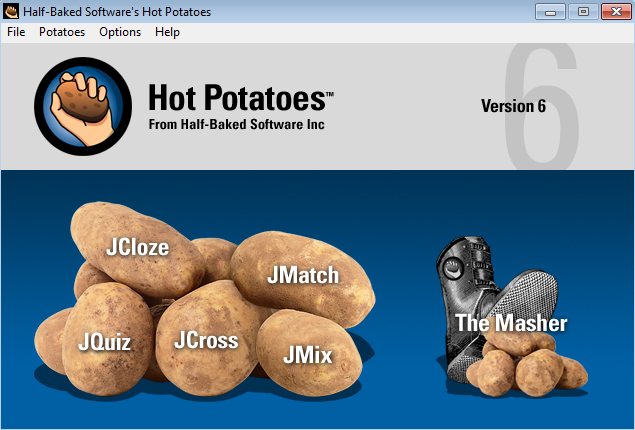
Figure 1. Hot Potatoes main page
JCloze is used to make gap-fill exercises, in which learners are required to type the correct missing word in the blank space provided. The type of exercise created here can be either a cloze passage, or several items in separated sentences and numerically ordered. Figure 2 shows an example of a gap-fill exercise in JCloze window. As can be seen, in this sample exercise the text is a set of separate items, and not a cloze passage.
After inserting the text in an editing window, the gaps must be indicated, which is done by selecting the word and then pressing the “Gap” button. In the window that appears, the correct answer is shown by default along with other alternative correct answers (if any). This alternative correct answer feature is very useful in cases in which more than one correct answer is possible, such as in the case of words with two possible spellings. An optional clue can also be provided to help learners guess the required word. In the sample exercise shown in Figure 2, the red underlined words are the words selected to be removed. After inserting all the gaps in this way and choosing a title for the exercise, it is ready to be exported as a web page. After learners fill in the blanks, they press the “Check” button to mark the answers. In the web page created, a “Hint” button can also be included, showing learners one letter of the missing word.
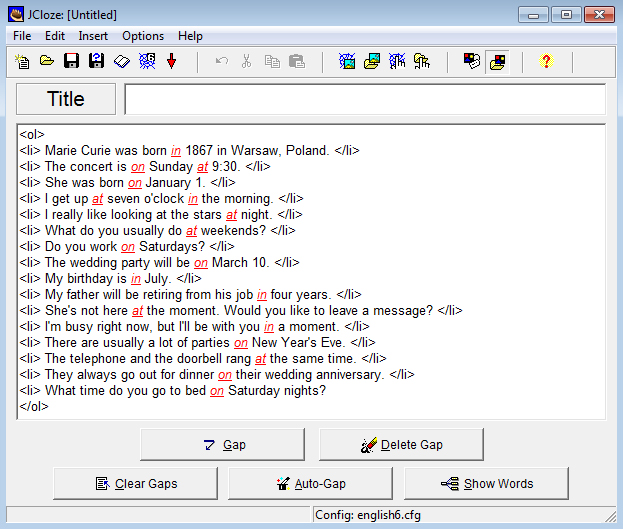
Figure 2. JCloze window
In JCloze, like other modules of the program, reading texts or images can be inserted to meet the purposes of a certain activity. Figure 3 shows an example of a web page created in JCloze and accompanied by pictures.
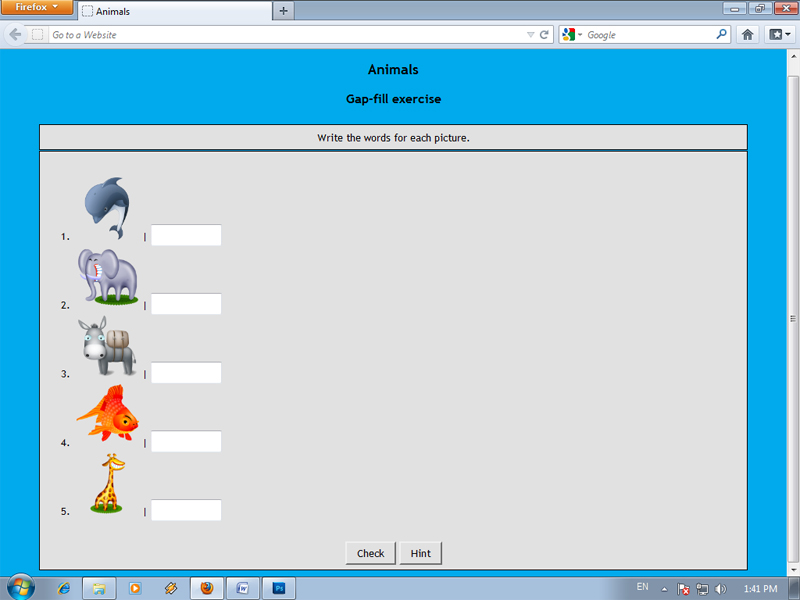
Figure 3. JCloze sample exercise
In the “Options” bar, there are settings common to all the modules of the program. In the “Configure Output” window subtitles and instructions for how to complete exercises can be defined. This is where the display settings of the output file can be set. Users can choose fonts and colours, buttons to be included in the web page, and feedback the learners receive when answering an item correctly or incorrectly. Users can also choose to include a timer or a virtual keyboard for non-roman characters. Users also have the option to submit the results to an email address via CGI and FormMail.pl located in the CGI folder of the target server.
The next module, JMatch, is used to create matching exercises, and either words (text) or images can be matched. Figure 4 shows a sample window of JMatch. As with any matching exercise, the items are listed in two columns, one of which includes ordered items and the other one jumbled items. When creating matching exercises, the matching pairs should be listed side by side on the same line in the editing window, but in the published web page the items on the right column will be randomly ordered. One or more of the matching pairs can be fixed to give an example to learners. After inserting matching items in the left and right columns, the exercise is ready to be exported as a web page in one of the three different formats (a feature unique to JMatch): standard format, drag/drop format, and flashcard format. In all these three formats the content of the exercise are the same while their graphical representation is different.
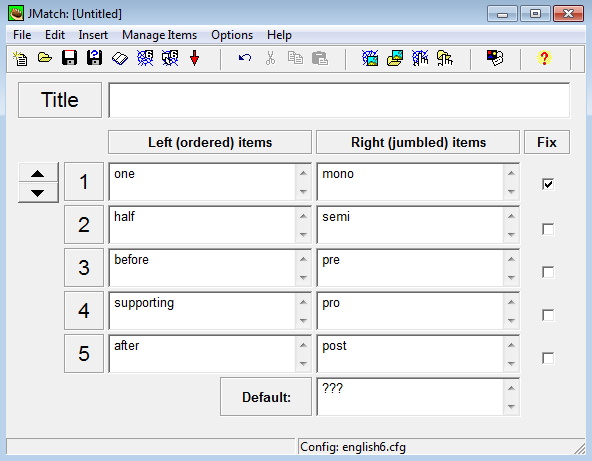
Figure 4. JMatch window
The next part of the program, JQuiz, is used to create multiple-choice or short-answer exercises. On the top right-hand side of the window, there is an option to choose formats such as multiple-choice, short-answer, multi-select, or hybrid (which is a mix of the other options). Also, in the advanced mode of this window, users can assign percentages of correctness for each answer. Figure 5 shows a sample exercise in JQuiz.
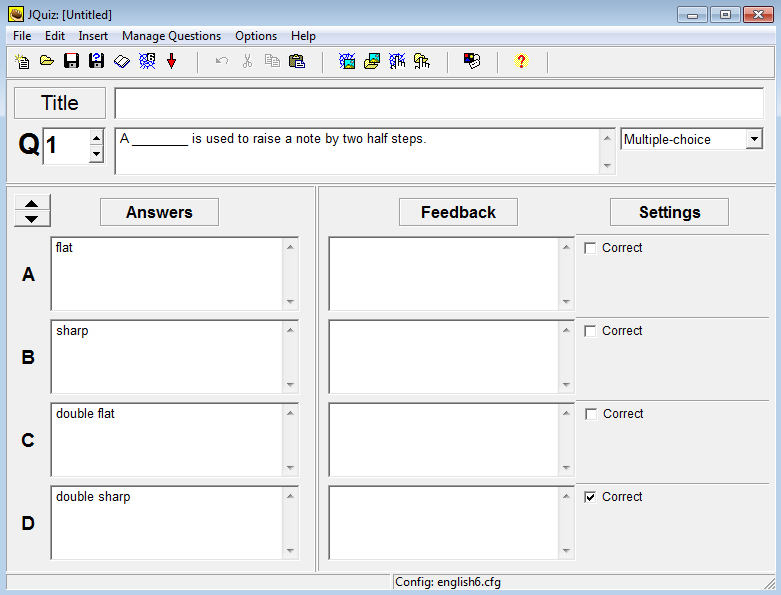
Figure 5. JQuiz window
In JQuiz, the question stems are indicated at the top of the page, with the letter “Q” marking the stem and followed by the number of question. The number of choices is four by default, marked A, B, C, and D, but this default number of options may be changed. Only when a choice space is filled with an item is that choice activated and included among the answers. The correct answer is checked as correct on the right-hand side of the window in front of each item. An interesting feature of JQuiz is that for every single answer, whether correct or incorrect, specific feedback can be provided to the learner. This feedback, for example, can be an explanation of why that answer is incorrect, and what is wrong with it, as well as more clarifications for the correct answers.
JCross is used to create crossword puzzles. Making a crossword puzzle in JCross is not difficult and does not require much creativity, because of a function called Automatic Grid-Maker in the Manage Grid bar. All the exercise creator must do is choose a grid size, insert the target words on the left-side editing window, each on separate lines, and then press the “Make the grid” button. Once the grid is formed, the puzzle creator must add definitions (or clues) for each word with the “Add Clues” button, and then export the web page.
The last module of the Hot Potatoes program is called JMix, which is used to create jumbled-sentence exercises. Figure 6 shows a sample window of a JMix exercise builder. As can be seen in the figure, the main sentence is written on the left window, each word in a separate line. Just as in the creation of a JCloze activity, alternative sentences that can be accepted as correct can be placed in the right-hand side column (see the example sentence shown in the Figure 6). This feature is very useful in creating sentence-making language activities in which there can be more than one correct answer to the question due to possible variations in the word order of a sentence. JMix provides two formats for the web pages exported: standard format and drag/drop format. Again, the content is the same but its representation will be different.
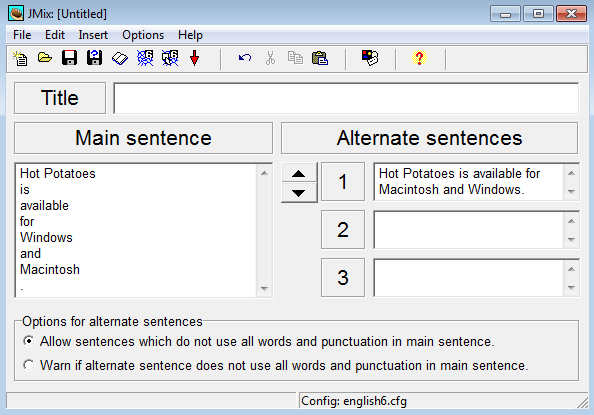
Figure 6. JMix window
Finally, the last part of the Hot Potatoes program is the Masher. When exercises are exported as web pages, they can be uploaded and linked to any existing website by simple web programming software. Another way is to use Masher to build a whole website through Hot Potatoes, including an index page which serves as the homepage for other sub-pages. To clarify, Masher is not a module for creating exercises itself, but is used to mix related exercises around a topic made up of other parts, so that the parts can be linked together in a single index page. The resulting index page and its subpages can then be uploaded to Hotpotatoes.net or any other hosting space online.
Figure 7 shows a sample window of the Hot Potatoes Masher. As seen in the figure, files already made in different modules of the program can be added or deleted. Once the settings and the order of files have been arranged, the whole unit will be created in the provided output address by pressing the “Build unit” button. Note that the appearance settings, such as fonts, colours, etc., used in Masher will affect all files included in the index page, regardless of previously chosen settings.
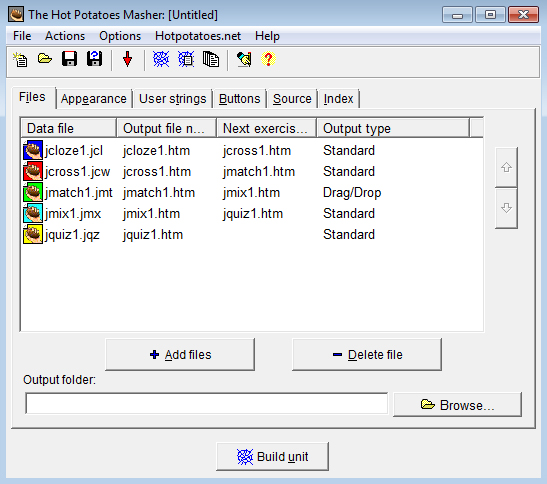
Figure 7. The Masher window
Evaluation
All in all, Hot Potatoes, with its variety of straightforward and descriptive features, is a handy and useful freeware program for webmasters, teachers, and everyone interested in making interactive exercises for different purposes. What makes this software different from other similar programs is that it is user-friendly and easy to work with. That holds true even for first-time users, as one only needs to install the program and insert content to easily publish tests or activities. It is a suitable choice for language learning instructors who want to make interactive web-based activities, but do not want to spend a lot of time learning complex HTML codes or other web languages.
Conclusion
In summary, Hot Potatoes is a great freeware program for language teachers to create or upload exercises on their personal websites, class group sites, or on the password-protected Hotpotatoes.net. Creating exercises for learners gives them space to repeatedly practise the target language. Students may also engage in the process of creating the exercises themselves, then sharing their work on a class group site for others to access. Previous studies point to the need for learners to be provided with opportunities for language input, making language salient, and focusing on form (Chapelle, 2001; Ellis, 2005). Having students create exercises may allow them to both learn the concepts and practise their language skills through the creation of the exercise (Erben, Ban, & Castaneda, 2009).
References
Chapelle, C. A. (2001). Computer applications in second language acquisition. Cambridge: Cambridge University Press.
Ellis, R. (2005). Instructed second language acquisition: A literature review. Report to the Ministry of Education, New Zealand. Retrieved January 18, 2007, from www.educationcounts.edcentre.govt.nz/publications/downloads/instructed-second-language.pdf
Erben, T., Ban, R., & Castaneda, M. (2009). Teaching English language learners through technology. New York: Routledge.
About the Reviewer
Amir Ghorbanpour is an English instructor and web designer at Payame Noor University of Tehran. He holds an MA in TEFL and his research interests include educational technology, computer assisted language learning/teaching, and second language acquisition.
<amirgh1984 yahoo.com>
| © Copyright rests with authors. Please cite TESL-EJ appropriately. |