

November 2014 – Volume 18, Number 3
| Title | SoftChalk Create 8.03 |
| Authors | Sue Polyson Evans, Robert Godwin-Jones, & Peter Huneke |
| Contact Information | http://softchalk.com/contact |
| Type of product | E-Content Authoring Software |
| Platforms | OS: Windows 7/8, VISTA, Macintosh OS X 10.6.3 or higher Browsers: IE 9+, Firefox, Safari 1.2+, Chrome (with some limitations) |
| Supplementary software | SoftChalk Cloud: http://softchalk.com/products/cloud SoftChalk Share: http://softchalk.com/products/share |
| Price | Pricing details: http://softchalk.com/buy-now |
Product Description
SoftChalk Create (also called SoftChalk) is an e-content authoring tool that offers non-programmers a chance to easily develop and create e-content with different features using a simple and user-friendly interface. Content created via SoftChalk can include different types of data, like images, PDF documents, audio files, and YouTube videos. One can also incorporate different types of interactive activities and question formats into the program. As can be seen in Figure 1, the final product is produced in the form of a webpage that is accessible using any almost any modern device, platform, or browser, with minor limitations using Google Chrome.
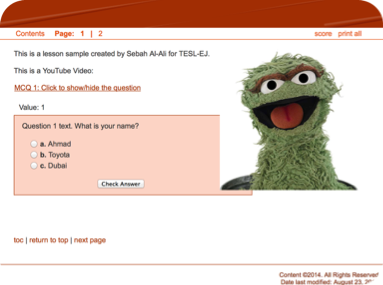
Figure 1. An example of a final product created with SoftChalk
As there are many e-content authoring tools offered in the market, it is important to outline what sets SoftChalk apart from other options.
Interface
As can be seen in Figure 1, SoftChalk’s interface is very similar to that of most word processors like Microsoft Word. Adding text is done in a manner similar to any word processor. Adding questions or other activities is self-explanatory with easy to understand options. In some activities, the program offers a how-to menu to show an example of how an activity will be displayed in the final product, and offers a link for extra support (see Figure 2).
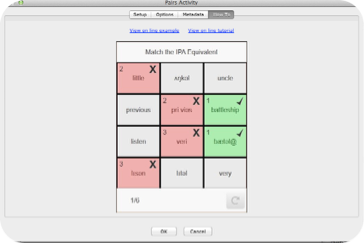
Figure 2. Support is easily accessible in most activities
Activities
What is unique about SoftChalk are the various kinds of interactive activities that can be integrated into lessons (see Figure 3). There are quiz poppers, which offer an e-version of basic question formats: true/false, multiple choice, short answer, matching, and ordering. SoftChalk also offers a variety of interactive activities that take the electronic capabilities of the activities to another level, including pairing activities, sorting, labeling, word search, jigsaw puzzles, drag and drop, timeline, and other features. These activities utilize touch features, if available. When tested out with beginner to elementary-level second language learners, the activities were perceived as easy to understand, although a few students who preferred working from a paper textbook needed help with some types of activities.
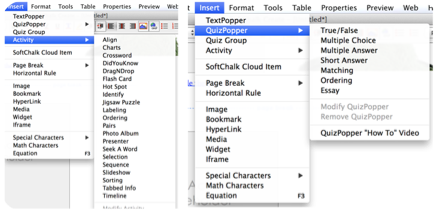
Figure 3. SoftChalk offers traditional questions and a variety of interactive activities
Questions (quiz poppers) can be added in sets or individually, as well as assigned points, which are tracked throughout the set. As can be seen in Figure 4, teachers can also add customize the feedback for each question to help give students hints or explain the correct answer. However, feedback needs to be manually entered for each and every question.
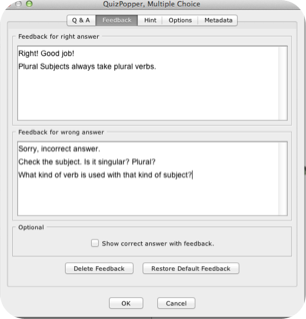
Figure 4. Customized feedback can be added for individual questions
If integrated into a Learning Management System (LMS) like Blackboard, reports will be generated via SCORM or ScoreCenter and will include great detail about learners’ performance, as displayed in Figure 5. On the other hand, if reports are designated to be sent by email, they are brief and include only basic feedback on learners’ performance (see Figure 6). Names are manually entered by students in that case, and the email to which reports are sent should be pre-configured before publishing the content.
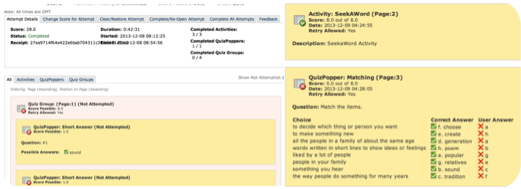
Figure 5. An example of detailed reports delivered in Blackboard using ScoreCenter
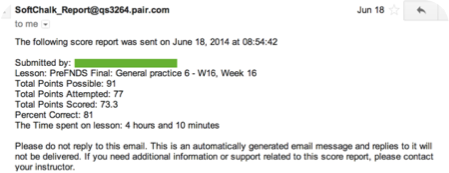
Figure 6. An example of brief reports sent via email by the script
Final Product
Content generated by SoftChalk can be displayed in a single page or on multiple pages. An option is provided to create a table of contents listing all available pages, although pages are, by default, linked to each other using “previous” and “next” links at the bottom of each page. Final products are output in the form of a folder that contains a number of files (webpages, audios, pictures, etc.) and folders. Webpages are designed in a responsive manner; that is, the design responds well by adapting to different devices and/or screen widths (see Figure 7).
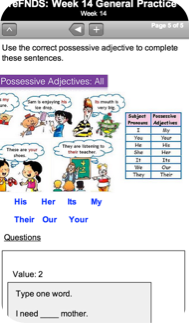
Figure 7. Example of content presented in a device-sensitive (table) layout
SoftChalk in ESL Classrooms
SoftChalk is not designed for language teachers or learners specifically, but rather is a general program that can be utilized for any purpose. However, with SoftChalk’s support for audio and video, almost all language skills can be successfully practiced using SoftChalk, except for speaking skills. Reading passages can be included as texts or images, and comprehension questions can be added on the same page either below the text or beside the reading text. SoftChalk’s feedback features and the option to try questions again motivates students to keep looking for correct answers and identify possible mistakes in their strategies for locating the answers. Grammar skills can be practiced using various kinds of interactive activities that give students a variety of tasks and an added element of fun (see Figures 8 and 9). When piloted with beginner to elementary-level second language learner students, the interactive activities were received positively and students reported being encouraged to continue trying the activities until they received the best score possible on a task.
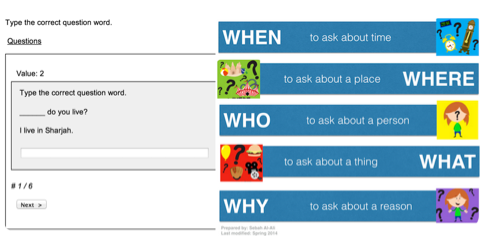
Figure 8. Traditional activities covering grammar skills
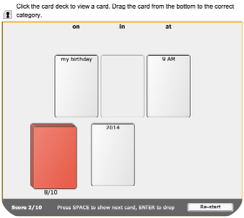
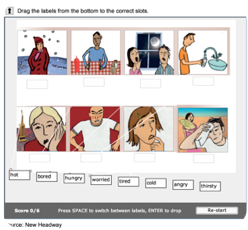
Figure 9. A variety of activities that allow students to learn in different ways
Listening skills are one of the most suitable skills to be covered using this software. Students have the capacity to repeat an audio recording as many times as needed in order to understand the content (see Figure 10). Teachers can also limit the students and the content (see Figure 10), audio files, limiting students’ options to only replaying an audio from the start rather than rewinding it a few seconds, for example.
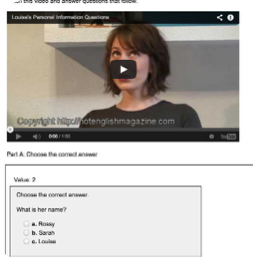
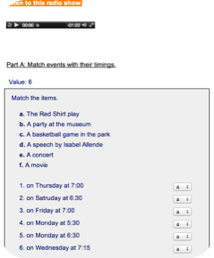
Figure 10. An example of an activity targeting listening skills
Limitations
Despite the plethora of valuable features offered by SoftChalk, the software does have a few limitations that need to be considered. One limitation is that questions or activities cannot be copied; instead, a potential instructor must repeat the exact same steps over and over again even if she/he only needs to change the question stem, which makes the process of creating sets of activities time consuming. For example, when preparing a set of activities for a 30-minute class, a teacher could easily spend more than an hour adding activities and questions.
Another limitation is that, unless using SoftChalk Cloud, content created by SoftChalk Create can only be shared with students if uploaded to a website or shared via a supported Learning Management System like Blackboard. Content cannot be shared via email without a direct link to the content.
Yet another drawback is that when an activity containing much audio or video data is loaded, the page could crash, necessitating a reloading of the page. This is an issue when completing scored activities. Reloading a page for any possible reason will result in losing all previously earned points; therefore, learners must do the same activities again if they need to submit their results. Some technologically savvy students testing out SoftChalk found ways around this by taking screenshots of each activity with the given score, just in case the page crashed. When the page did crash, they emailed the instructor their screenshots as a proof of documentation of their results. However, such a process is not always feasible and results in an additional burden for instructors in calculating scores.
Finally, although it could be considered an advantage by some, the layout and content display are completely controlled by the software; this could make repeated use of SoftChalk activities with the same layout look boring, possibly resulting in a loss of appeal to users. Users may only change the colors and backgrounds that are used in a pre-defined layout using a feature called StyleBuilder (see Figure 11).
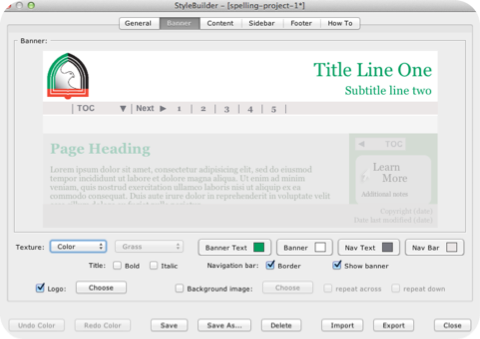
Figure 11. An example of available options that may be restyled with the default layout
Conclusion
Using SoftChalk to create in-class materials can be time consuming and tedious; however, the softwared tability to offer students’ individualized learning environments is a unique and fascinating feature. Piloting SoftChalk with students gave me a chance to cater to learners of various proficiency levels in one class. More advanced learners do not need to wait for less advanced learners to finish an activity to move on; instead, every student moves at his/her own pace, allowing learners to focus their energy and spend time practicing what they really need to improve. Students find these activities useful, because they can keep track of their own progress and see themselves getting better at certain skills over time. Given that unlimited attempts at activities are allowed, students can do the tasks as many times as they want and use as much time as they need to practice their language skills. Finally, SoftChalk might not be the ultimate language learning program, but it surely offers much help for teachers who want their students to “practice, practice, practice” language skills until they are mastered.
About the Reviewer
Sebah Al-Ali <sebah.alali gmail.com> is an English faculty member at Sharjah Higher Colleges of Technology in the United Arab Emirates. She has published a few articles and presented at numerous conferences sharing her instructional technology experience. She is mainly interested in how technology can be utilized to to facilitate active learning, develop interactive curriculum, and train teachers.
|
© Copyright rests with authors. Please cite TESL-EJ appropriately.
Editor’s Note: The HTML version contains no page numbers. Please use the PDF version of this article for citations. |