

September 2007 — Volume 11, Number 2
On the Internet
Text-to-Speech Applications Used in EFL Contexts to Enhance Pronunciation
Dafne González
Universidad Simón Bolívar, Caracas, Venezuela
Introduction
Helping EFL students with their pronunciation is a difficult task faced by most teachers in EFL contexts. Too many students in the classroom, few teaching hours a week and lack of language input are just a few of all the obstacles encountered by EFL teachers.
Increased access to the Internet and to the free Web 2.0 tools available on the Web provides teachers with many alternatives to help them face these problems. Teachers can now create all kinds of resources to provide varied input and have them easily accessible for their students. Readings, videos, Power Point presentations, podcasts, and images, can all be made available at any time on the Internet, and some can even be downloaded for offline access. Furthermore, there are many sites where teachers can find ready-made materials to teach and have students practice their listening, reading, writing and speaking skills, including grammar and vocabulary exercises. However, helping a large number of students with their pronunciation when there is not enough time to monitor each student during class time remains a problem. Having students record and send the recordings to the teacher is a good idea, but it is time consuming for the teacher, and it will not provide immediate feedback to the students. Furthermore, students will tend to rely only on the teacher, which is not ideal if we want to promote autonomous learners who do not need to be rushing to their teachers to check the pronunciation of each word they want to utter. Is there a way to solve this problem?
Text-to-speech (TTS) applications found on the Internet can be incorporated to our lessons to help students listen to any written text to check its pronunciation and intonation. In this article we will describe some text-to-speech applications freely available on the Web and how they can be used in EFL courses.
|
Text |
 |

Speech |
What are Text-to-speech applications?
TTS applications are sound synthesis (computer generated simulation of human speech) tools that convert written text to sound. Originally, these applications were created for blind people. An intelligible text-to-speech program allows people with visual impairments or reading disabilities to listen to written works on a home computer. Many computer operating systems have included speech synthesizers since the early 1980s. Nowadays, they are offered for commercial use, to promote commercial Web sites; for example, Site Pal <http://www.sitepal.com>.
For more information, see the Wikipedia articles on:
-
Visual Impairment < http://en.wikipedia.org/wiki/Visual_impairment/>
-
Reading disability <http://en.wikipedia.org/wiki/Reading_disability/>
-
Speech synthesis < http://en.wikipedia.org/wiki/Text-to-speech/>
There is a great variety of TTS applications on the Web, to be used for free or by paying a fee. Some can be used online, for example:
-
Site Pal <http://www.sitepal.com>
-
Bluegrind, <http://www.bluegrind.com>
-
Cepstral, <http://www.cepstral.com>
and others have to be downloaded to the computer, for example:
-
ReadPlease, <http://www.readplease.com/#listen>
-
TextAloud MP3, <http://www.nextuptech.com/TextAloud/download.html>
- Cantare, <http://www.ccdmd.qc.ca/en/cantare/>
TTS tools were not created for ELT, but they can be of great benefit for our students. I will describe the features, advantages and disadvantages, of some TTS applications I have used with my students.
Some examples of text-to-speech applications
AT&T Lab <http://public.research.att.com/~ttsweb/tts/demo.php>
This is a demo of the Wizzard Software offered by AT&T, free to use for non-commercial purposes.
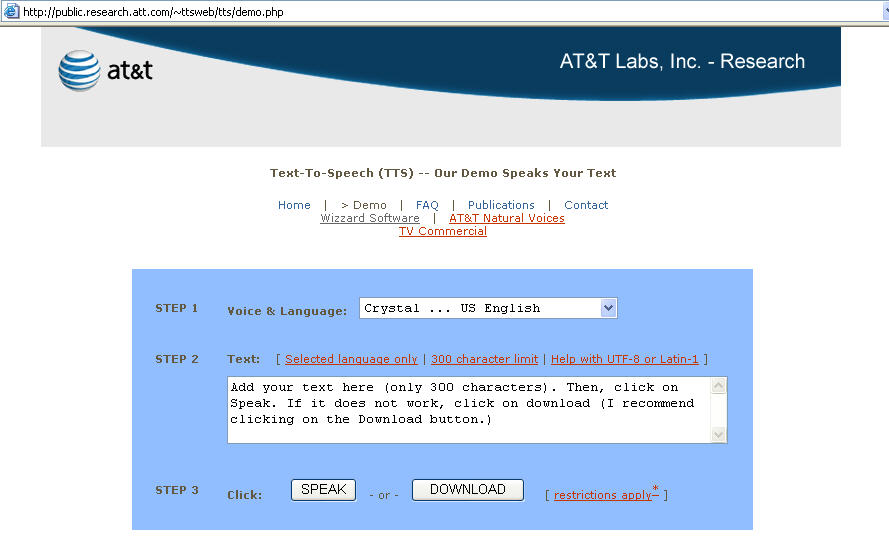
When you click SPEAK you have the opportunity to play or save your file,
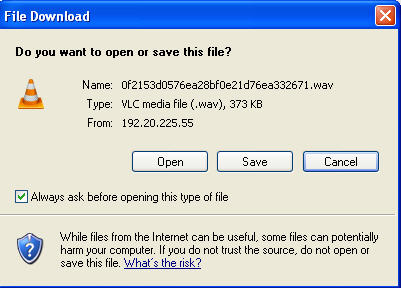
and if you click DOWNLOAD you see a message like this one:
|
Your audio can be found at /tts/speech/0f2153d0576ea28bf0e21d76ea332671.wav To download, right-click the link above. In most browsers this will show a menu. Select "Save Link Target As…" to save the audio clip. Note: This link is good for about 5 minutes, after which the audio file will be deleted to conserve disk space.
|
Click here to hear the Wizzard’s synthesized voice recording:
|
Features
|
Advantages
|
Disadvantages
|
|
American and British accents |
Web-based
|
Only allows a 300-character text (but students can record longer texts in 300-character chunks) |
|
Selection of male and female voices |
Immediate feedback |
|
|
Downloading available |
Students can save the recording for further listening |
|
|
FAQ page available |
|
|
Cepstral <http://www.cepstral.com/demos/>
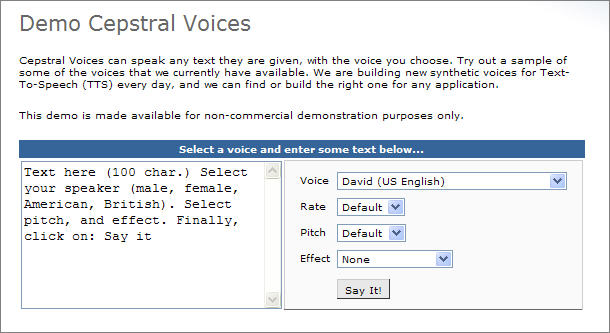
This is a paid service, but the demo page can be used for free. With the paid service you are able to add new voices to the application.
|
Features
|
Advantages
|
Disadvantages
|
|
American and British accents |
Web-based
|
Demo can only reproduce 100 characters at a time |
|
Selection of male and female voices |
Immediate feedback |
Sound cannot be saved |
This is a good application to use with loose words and short sentences.
Site-Pal <http://www.sitepal.com>
SitePal is an application for businessand as such is a paid service, but students can use the free demo to listen to their written texts..

This tool appeals to students because they can select avatars, the way they look and a background.
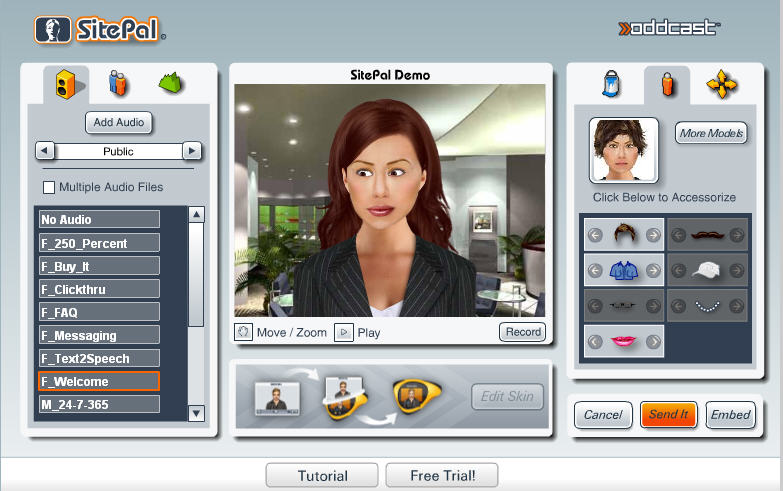
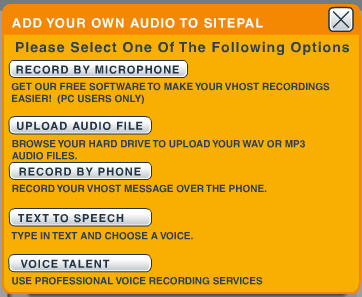
After clicking on the Add Audio tab, select the Text to Speech button
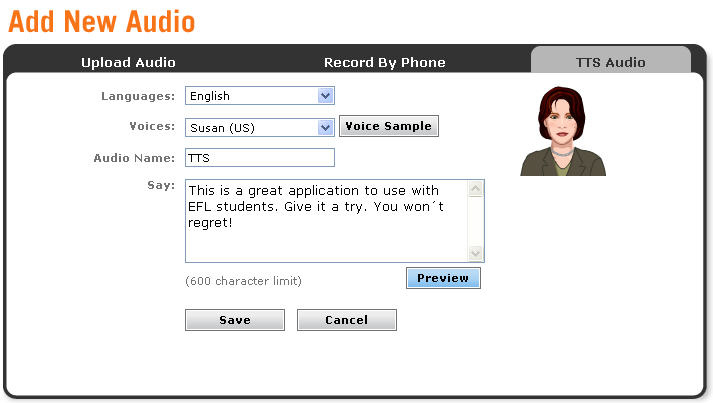
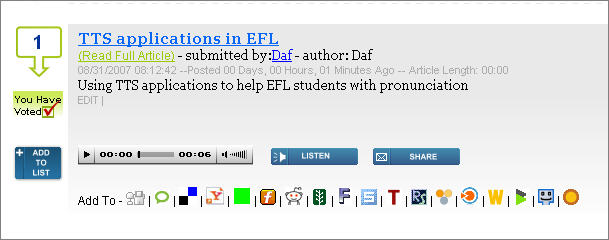
Once you have written your message (600 characters), click the Save button, and you will be prompted to send it by e-mail, and you will be sent a URL where you will be able to listen to your message (click on the image below).

|
Features
|
Advantages
|
Disadvantages
|
|
American and British accents |
Web-based
|
Only allows a 600-character text |
|
Selection of male and female voices |
Immediate feedback |
Recording only remains available for a couple of weeks |
|
Selection of animated characters |
Recording can be added to Web page, wiki or blog |
|
|
URL to go back to recorded message |
|
|
Bluegrind <http://www.bluegrind.com>
This application was especially created for the visually impaired.

| Features |
Advantages
|
Disadvantages |
|
Allows recording a whole web page just by adding the URL to the page, |
Web-based |
Only a male voice is available |
| Allows recording of your own text | Immediate feedback | Recordings made are not kept on the user personal space |
| Downloading available |
Recordings can be saved for further listening |
Long articles may take a while to be ready for listening |
| Free registration | No text-limit | |
| Search capability | Recording is kept on the web accessible through a URL | |
| Generates code to embed text and recording to Web page, blog or wiki | ||
|
Possibility to add recording to different social bookmarks (Del.icio.us, Yahoo, Technorati, Digg, among many others). |
This albummmm is powered by BubbleShare –
Add to my blog
Direct link to Bubbleshare "Bluegrind, Text to Speech" – http://www.bubbleshare.com/album/223665/overview
How to use text-to-speech applications in EFL contexts
These TTS applications may be used for different purposes in an EFL class. These are three of the ways I have used them with my English for Architecture and Urban Planning students:
- To practice the pronunciation of vocabulary they have failed to pronounce. After listening to students conversations, oral presentations, or recordings, I given them a list of the words they have mispronounced. Then, they select the TTS application of their choice, write the words and listen to their pronunciation. Finally, they record them and post the recordings to their blogs or wikis where I can check their work.
- To listen to written articles from the web. Most of the articles my students read are on the Web, and I have found they retain more the new vocabulary if they listen to the texts while they are reading them. Bluegrind has been of great help for this. Students copy the URL of the site, and they can read and listen to the article at the same time. Furthermore, they can save the recording to post it on their wiki for further listening at home from the computer or by saving them to their MP3 players.
- To practice the pronunciation of texts written by them before recording. Every week, my students have to record a text written by them related to class content. They are asked to write their text, proof-read it, and then use any of the TTS applications we use in class to check pronunciation and intonation before they proceed to record it and post it for correction.
Conclusion
TTS applications can rendermany benefits to EFL students while making teachers job easier. I have found that my students have improved their pronunciation since I started using them in my classes, not to mention that they have become more autonomous. They know where to go when they have problems pronouncing a new word, to prepare for oral presentations or to record projects to be posted online.
You might be able to listen to this article by clicking on the image, or using this direct link: <http://www.bluegrind.com/full_article.html?article_id=68387>
Editor’s note:
Both the author and the editor are aware that the Bluegrind website went down September 2, 2007, at the moment of going to press with this article. However we have decided to leave in the references to Bluegrind anyway. For one thing, it could be a temporary problem and the site could return. But the wider consideration is that sites come and go on the Internet, and any site referenced in this column could disappear without notice. In the case of coverage here of Bluegrind, the author has documented the site’s look and feel to such an extent that its functionality can be appreciated, and so the editor feels that readers will benefit from the description of this example of a TTS website, whether it continues to function or not.
| © Copyright rests with authors. Please cite TESL-EJ appropriately.
Editor’s Note: The HTML version contains no page numbers. Please use the PDF version of this article for citations. |