* * * On the Internet * * *
September 2011–Volume 15, Number 2
Web-based Learning:
Moving from Learning Islands to Learning Environments
Sean Dowling
Sharjah Higher Colleges of Technology, United Arab Emirates
<sdowling hct.ac.ae>
Abstract
Web-based learning, the use of Web-based resources for learning, is becoming more common in educational institutions. However, many Web-based courses do little more than reaffirm traditional teaching approaches of presentation and assessment, resulting in closed learning environments. Current trends in education stress the need for learning that encourages critical thinking and problem solving, collaboration and communication, global awareness and information literacy. Therefore, we need to make Web-based learning more open. Integrating Web 2.0 tools and technology into the learning process is one way to do this. This integration needs to be done carefully, using the new tools to enhance traditional methods of instruction, moving Web-based learning from learning islands to learning environments.
Keywords: Web-based learning, Web 1.0, Web 2.0
Introduction
Web-based learning, either fully online or blended with traditional face-to-face learning, has often taken place in “islands” (Ehlers, 2009, citing Kerres, 2006) or “walled gardens” (Downes, 2007). In these courses, content is delivered using Web portals such as learning management systems or websites. Using such portals, educators can interact with learners and vice versa, but there are few, if any, opportunities for learners to interact with each other or the wider world. However, due to the emergence of Web 2.0 technologies, Web-based courses can now be designed that give learners opportunities not only to consume, but also to produce content that can be shared across the World Wide Web, thereby moving from Web-based learning islands to Web-based learning environments (Ehlers, 2009).
Fortunately, there are a growing number of educators starting to design and deliver online courses built around Web 2.0 technologies. This may be a result of simply wanting to experiment with Web 2.0 tools that they or their students are using outside the classroom. More importantly, it may also be a result of recognizing that learning using Web 2.0 tools encourages critical thinking and problem solving, collaboration and communication, global awareness and information literacy, the so-called “21-st century skills” (Buchem & Hamelmann, 2011, p. 4; Rotherham & Willingham, 2010, p. 17; Dohn, 2009). Unfortunately, despite the efforts of these early innovators and the general enthusiasm towards using Web 2.0 tools in education, their use is still the exception rather than the norm (Bertolo, 2008; Bower et al., 2010; Conole, 2010; Gousetti, 2010). In addition, even when Web 2.0 tools are used, they tend to be added on to courses rather than being integrated; a situation resulting in limited learning improvements (Lim et al., 2010).
So why has adoption of Web 2.0 tools in education been somewhat slow? First, there is the problem of “digital dissonance” (Clarke et al., 2009, p. 57): despite using Web 2.0 tools in their daily lives, both educators and students still haven’t seen the potential of using the tools for learning. Secondly, using Web 2.0 tools for learning is not compatible with current curricula that emphasize knowledge consumption and reproduction of this knowledge in assessments. Finally, even if educators have the opportunity to use Web 2.0 tools for learning, as the learning focuses not just on the product but also the process, assessment presents more challenges (Ehlers, 2009; Gray et al., 2010). But the above problems are not intractable. One way to address the problems is for educators to look at how Web 2.0 tools are integrated in existing online courses.
In this paper, one such course, web2english, an online English course that uses both Web 1.0- and Web 2.0-based learning, is featured. First, the paper defines Web 1.0- and Web 2.0-based learning and outlines the differences between the two types of learning. Then, the importance of combining both types of learning in online courses within an instructional design framework is discussed. Next, the need to assess Web 2.0-based learning correctly is outlined. Finally, there is a detailed discussion on how web2english has been designed in relation to the above issues.
Web 1.0- and Web 2.0-based learning
In this paper, the term Web 1.0 refers to early stages of the World Wide Web when it was read-only, or mainly non-participatory. Content was added by a few to be accessed, passively, by many (Dohn, 2009; Brown, 2010). Applying this concept to Web 1.0-based learning, content is designed and delivered by educators, either via websites, blogs, learning management systems or simply by email, to be accessed by learners. The benefits of Web 1.0-based learning over traditional paper-based learning are limited; one benefit is convenience of electronic distribution (Arvan, 2009), another is computer-graded assessments and a third is access to a wide range of Web-based resources (Lim et al., 2010). On the other hand, it may be that Web 1.0-based learning does little more than reaffirm traditional teaching approaches of presentation and assessment (Dowling, 2011).The underpinning pedagogy is transmissive (from expert to novice) and learners are mainly using lower-order thinking processes such as remembering, understanding and applying (Anderson & Krathwohl, 2001). Unfortunately, a lot of online courses follow this model.
Web 2.0 (O’Reilly, 2005) refers to a newer version of the Web where it has developed into a read-write, or participatory, entity. New tools have given all Web users the opportunity to not only consume content but also to produce and share it. In relation to Web 2.0-based learning, knowledge production isn’t restricted to educators. Learners, either individually or in groups, can also construct and publish knowledge by using a range of tools such as blogs, microblogs, podcasts, wikis, social bookmarking, shared document/image/video spaces, mindmapping and digital storytelling (Bower et al., 2010; Oliver, 2010). The underpinning pedagogy is co-constructivist and higher thinking processes such as analyzing, evaluating and creating (Anderson & Krathwohl, 2001) are emphasized.
Combining Web 1.0- and Web 2.0-based learning in Web-based courses
It might appear from the above that Web 2.0-based learning is superior. However, there is a need for both types of learning from a scaffolding perspective. According to Walqui (2005, p. 163), scaffolding is the process by which “the learner is assisted by others to be able to achieve more than he or she would be able to achieve alone”. While the Web provides vast amounts of learning material, finding appropriate material can be problematic for learners, particularly those in the early stages of the learning cycle. These early-stage learners need expert guidance to acquire the basic skills or knowledge needed for higher-level learning to take place (Magliaro et al., 2005; Rotherham & Willingham, 2010). This guidance involves educators doing three things for their learners:
- Creating or recommending appropriate webpages, blog entries or other online material
- Developing appropriate online assessments
- Tracking and supporting learner activity
Up to this stage, learning is being transmitted from the teacher to the learner and involves the consumption of Web-based materials; therefore, it can be classified as Web 1.0-based learning. However, once learners have acquired the basic skills set, they can start applying their new skills and knowledge in activities that require higher-level skills such as analyzing, evaluating and creating. These activities may involve publishing to blogs, podcasts or wikis and analyzing and evaluating Web-based resources. Learners are contributing to the Web; hence, the learning can be classified as Web 2.0-based.
It’s important to note that learning doesn’t necessarily have to move linearly from Web 1.0-based to Web 2.0-based; they can be intertwined. Using Gagne’s (1985) nine events of instruction as a framework (see table 1), events 1 and 2, gaining attention and informing users of objectives, can be done via a blog or website. These events are examples of transmissive, or Web 1.0-based, learning. For event 3, where the recall of prior learning is stimulated, Web 2.0-based learning, using tools such as Twitter or Facebook, could be used to create a space for learners to share their prior learning about a topic, co-constructing a larger knowledge resource in the process. The next stages of the instruction cycle, content presentation, practice, feedback and assessment are transmissive, Web 1.0-based learning. In the final stage in the instruction cycle, enhancing retention and transferring to further learning, Web 2.0 tools could be used by learners to co-construct and share new knowledge.
Table 1. Intertwining of Web-based learning using Gagne’s nine events of instruction
| Instructional Event | Type of learning | Learning tool | |
| 1 | gain attention | transmissive, Web 1.0 | blog, website |
| 2 | inform learners of objectives | transmissive, Web 1.0 | blog, website |
| 3 | stimulate recall of prior learning | co-constructivist, Web 2.0 | social networking tool, blog |
| 4 | present the content | transmissive, Web 1.0 | blog, website |
| 5 | provide learning guidance | transmissive, Web 1.0 | blog, website |
| 6 | elicit performance (practice) | transmissive, Web 1.0 | blog, website |
| 7 | provide feedback | transmissive, Web 1.0 | blog, website |
| 8 | assess performance | transmissive, Web 1.0 | blog, website |
| 9 | enhance retention and transfer to the further learning | co-constructivist, Web 2.0 | social networking tool, blog, podcast, wiki, shared document space |
Web-based learning assessment
So far this article has outlined how Web-based learning might be a mix of Web 1.0- and Web 2.0-based learning. Web 1.0-based learning can be assessed in traditional ways, for example comprehension quizzes and reproduction of model texts. However, Web 2.0-based learning “raises significant challenges for assessment, posing a barrier to further adoption” (Gray et al., 2010, p. 206) for educators. One of these challenges is that Web 2.0-learning is not only about the final product, but also about the process and social interactions that lead up to it (Ehlers, 2009). Another challenge is privacy, both at an institutional level and private level. Institutions may not be comfortable with assessments being open to public viewing. Similarly, Light (2011) writes that some learners may be very reluctant to publish to a public viewing space, particularly before it has gone through a drafting process and been vetted by the teacher.
However, these challenges are not insurmountable. Rubrics can be designed to grade the process and social interactions of Web 2.0-based learning. In addition, learning management systems traditionally used by educational institutions are starting to add Web 2.0-type tools, so Web 2.0-based assessments can be kept within the learning island. Finally, by using Web 1.0-based formative assessment and constructive feedback, educators can help “perfect” learners’ texts before they are opened up for public viewing, thereby decreasing the chance of learners’ work being ridiculed by peers. This approach also has the benefit of making Web 2.0-based learning easier to assess. The “private” text could be marked for content (Web 1.0-based assessment). Once it goes “public”, the text could be graded using criteria such as layout, inclusion of multimedia, and correct referencing and hyperlinking.
In the remainder of the paper, I will discuss how an online English course, web2english, has been designed using a combination of Web 1.0- and Web 2.0-based learning and assessment, creating a learning environment (rather than a learning island) in the process.
Discussion
The Course Overview
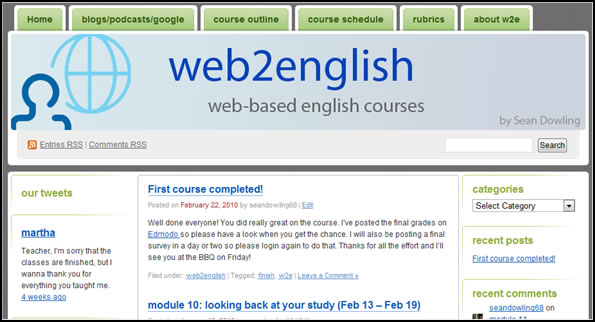
Figure 1. web2english course home page
Having a background in TEFL (Teaching English as a Foreign Language), I had been thinking about creating a fully online English course for a number of years but the apparent difficulty and expense of doing this had deterred me. The main problem was how to manage the learning without resorting to an expensive LMS solution or hosting an open-source LMS on a server. However, with the rapid expansion of new, user-friendly Web applications, it became evident that there were tools now available to develop pedagogically-sound online courses easily and very cost effectively. I decided to develop a twelve-week course, with two main objectives: 1) to enable students’ English and computer skills to improve, and 2) to show that new Web technologies could be used to successfully deliver and manage an online course, creating an interactive learning environment in the process. The course, web2english, was divided into eleven modules: an orientation module and ten learning modules. The orientation module was done in face-to-face mode to ensure that students could master the tools needed for successful participation in the course. Five hours of instruction over one week was allocated for this module. The remaining modules were done in online mode (with a weekly face-to-face study morning for students with no teacher present), with the expectation that students complete between seven and ten hours of study per module. Figure 2 shows the course schedule.
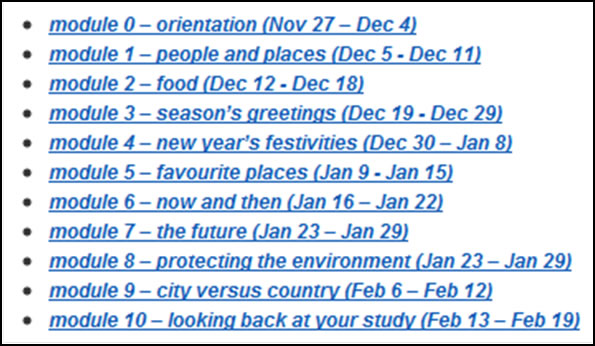
Figure 2. web2english course schedule
The Students
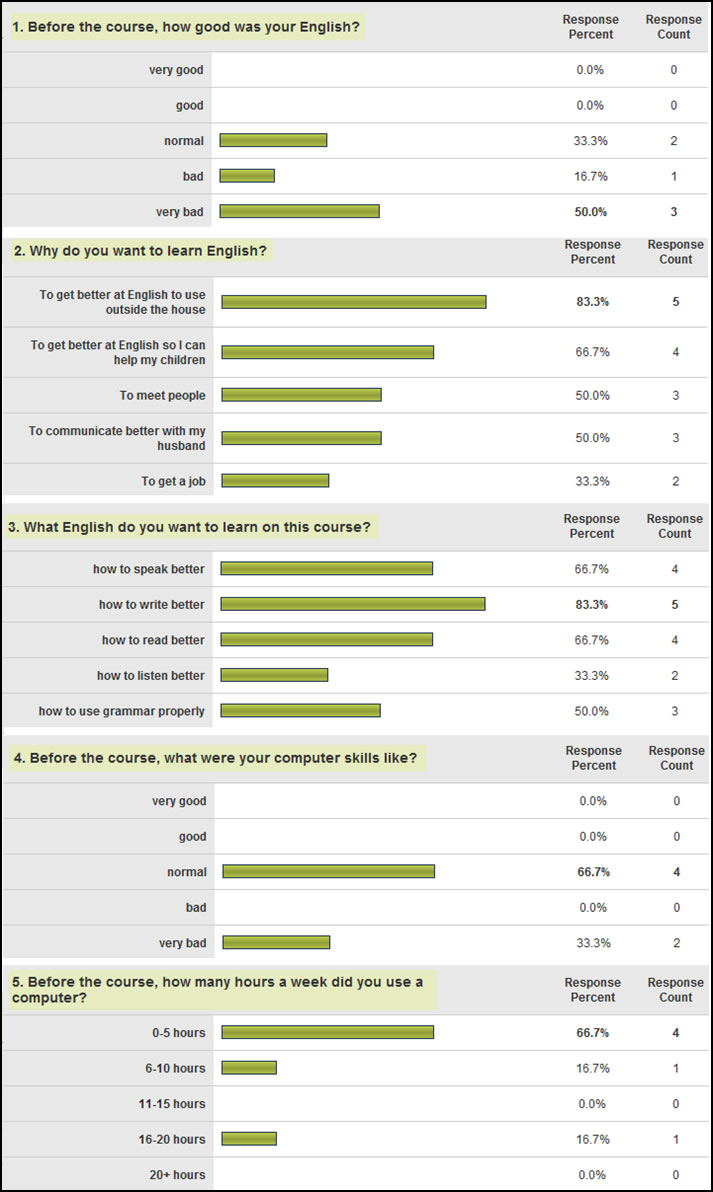
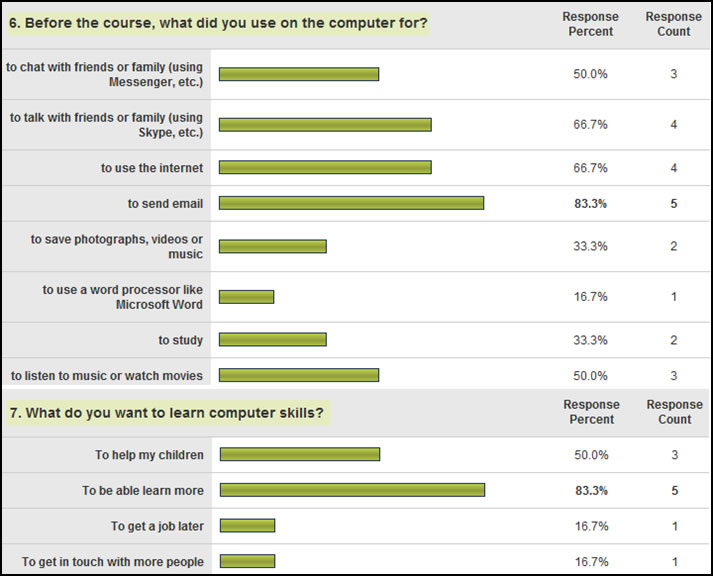
Even though I work in an institute of higher education, it proved difficult to develop a fully online, Web-based course with my students. The main reason was that my students were part of a large course that followed a set curriculum and most online learning activities were expected to be delivered through our learning management system. Consequently, I decided to develop the course using a non-traditional group of students. Six volunteers were recruited from the family of faculty members and friends. These volunteers were housewives, ranging in age from thirty-five to fifty, from Korea (2), Japan, Thailand, China and Columbia. They were definitely not “digital natives” (Prensky, 2001, p. 1). When asked about their computer skills, four felt that their skills were normal, while two felt that they were very bad (in fact, two had not even used Microsoft Word). Their computer usage was low: four used it for less than five hours per week, one between five and ten hours and one between sixteen and twenty hours. They used computers predominantly for internet-related activities such as chatting and talking to family and friends, browsing and sending email, but some activities included watching videos, listening to music and uploading pictures and videos from cameras. When asked why they wanted to acquire more computer skills, it was interesting that five responded that they wanted to be able to learn more. This perhaps indicates that students realize that advances in technology now give them more opportunities for lifelong, informal learning. (See Appendix A for full results of the Pre-course survey on skills and expectations.)
Combining Web 1.0- and Web 2.0-based learning and assessment in web2english
Table 2. web2english design framework (using Gagne’s [1985] nine events of instruction)
| Instructional Event | Type of learning | Learning tool | |
| 1 | gain attention | transmissive, Web 1.0 | web2english blog |
| 2 | inform learners of objectives | transmissive, Web 1.0 | web2english blog – main page and course outline page |
| 3 | stimulate recall of prior learning | co-constructivist, Web 2.0 | Edmodo social learning platform |
| 4 | present the content | transmissive, Web 1.0 | web2english blog, Edmodo, elllo.org and British Council websites |
| 5 | provide learning guidance | transmissive, Web 1.0 | Edmodo |
| 6 | elicit performance (practice) | transmissive, Web 1.0 | Classmarker and Edmodo |
| 7 | provide feedback | transmissive, Web 1.0 | Classmarker and Edmodo |
| 8 | assess performance | transmissive, Web 1.0 | Edmodo |
| 9 | enhance retention and transfer to the further learning | co-constructivist, Web 2.0 | Blogger, Twitter, MyPodcasts, Google Docs |
The Web now offers a wide range of easy-to-use tools that can be utilized as part of the teaching and learning process. However, this ability to quickly produce Web content can result in key stages of the instructional design process being omitted, leading to a mixed-bag of online materials with limited educational value (Dowling, 2011; Lim et al., 2010; Sharma & Barrett, 2007). Therefore, Web-based learning should be built around proven instructional design frameworks. In the case of web2english, this framework was Gagne’s (1985) nine events of instruction (see table 2 above).
Event 1 – gain attention: web2english was built around a WordPress blog (see figure 3). This blog acted as the portal from where students could access all course materials. The main page of the blog contained a list of posts, with the current learning module on top. By making this post “sticky” (i.e. pinning it to the top), the current learning module could be highlighted, thereby gaining the attention of students. Page tabs at the top of the blog also acted as attention getters as they could direct students to course outline, course schedule and, very importantly, assessment rubrics.
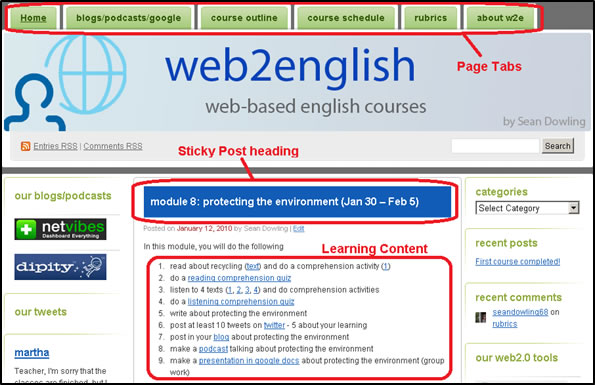
Figure 3. web2english course schedule
Event 2 – inform learners of objectives: Learners were informed of course objectives on the course outline page (see figure 4). In addition, the required learning activities for each module were accessible from the main page (see figure 3 above) and from the course outline page (see figure 5). Finally, the rubrics for each type of learning activity were displayed on the rubrics page (see figure 6).
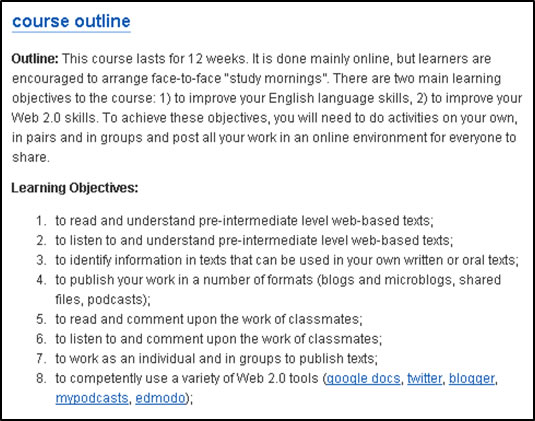
Figure 4. Course outline
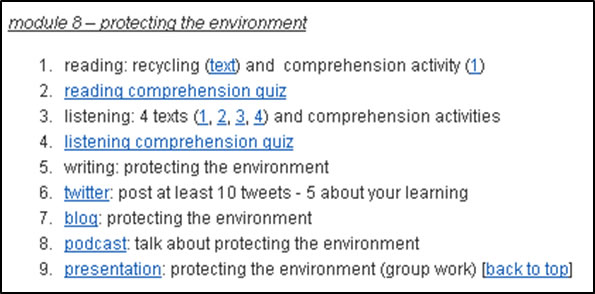
Figure 5. Learning activities within a module
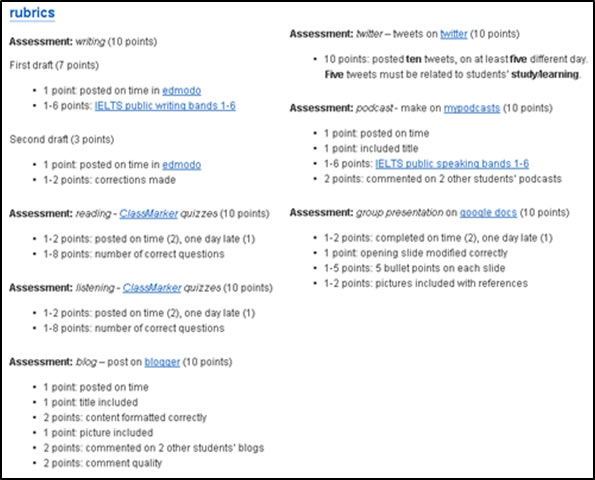
Figure 6. Assessment rubrics
Event 3 – stimulate recall of prior learning: Until now, learning has been transmissive, or Web 1.0-based, with all content being generated by the teacher; there has been no learner input. However, to stimulate recall of prior learning, and to give the learners an opportunity to interact with each other, a more constructivist, or Web 2.0-based, activity was needed. This could perhaps have been done via the blog, but it would have been difficult to provide enough detail and interaction for each learning module. Therefore, the social learning platform, Edmodo, was used to develop this type of activity.
Edmodo allowed a learning space to be provided for the teacher and students to interact with each other and with the course content, giving students an opportunity to contribute to their learning in the process. For example, warm-up activities that stimulated recall of prior learning, such as polls and open-ended questions, were added before the main content was presented (see figures 7 and 8). These polls and questions were created by the teacher, but students were encouraged to add comments. These learner-generated comments would add to the learning resource and give students more learning opportunities.
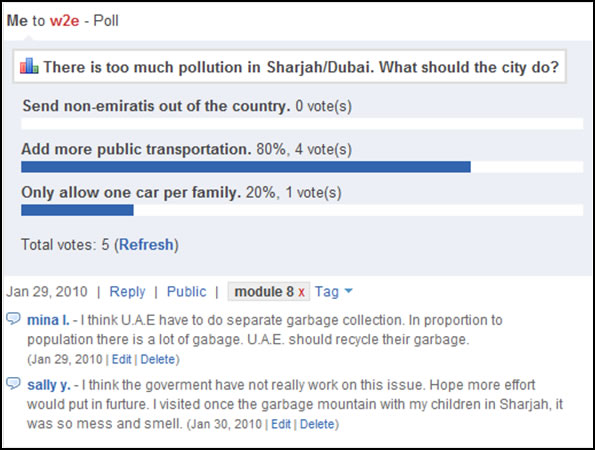
Figure 7. A poll
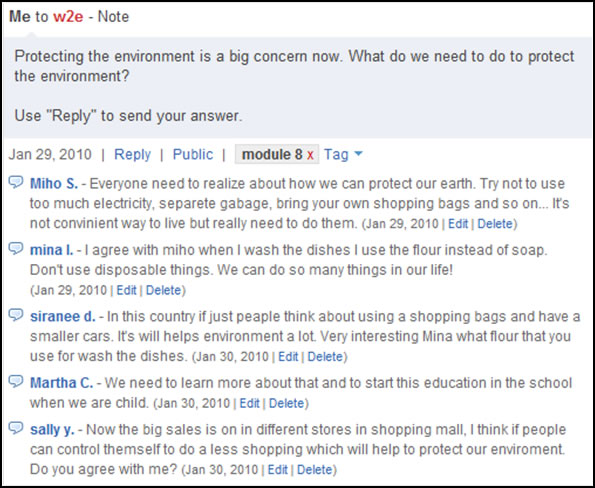
Figure 8. An open-ended question
Event 4 – present the content: The first-stage learning content was Web 1.0-based. Content was initially presented on the portal. However, to add detail, learning modules were broken down into individual activities on Edmodo. The content consisted of readings from the British Council’s Learn English website, listenings from the http://elllo.org website (see figure 9) and some grammar input necessary to complete a writing activity (see figure 10). To complete the activities successfully, students only needed to apply lower-level thinking skills such as remembering, understanding and applying. They needed to remember the key grammar inputs, understand the reading and listening texts and grammar and then apply their new knowledge in a writing activity.
Event 5 – provide learner guidance: Learner guidance came in three distinct formats. First, as searching the Web for appropriate material is a difficult task, Web-based content was selected for students that would match their learning level. Second, the interactive space provided by Edmodo was used for asking for help. When having difficulties, students could send notes directly to the class or teacher. A notification immediately appeared on my computer via my email account. Provided I was using my computer at the time, I could provide the student with almost instant feedback. Figure 11 shows a good example of how a note has been used by a student to help someone and contribute to the learning environment in the process. Finally, learner guidance, in the form of grammar notes and modeling (figure 10), was provided to students before they started the writing activities.
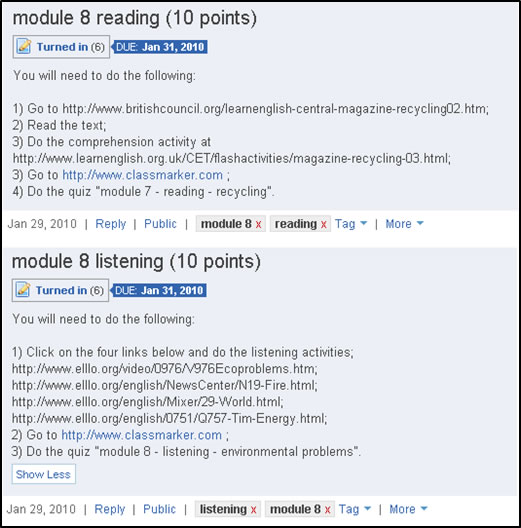
Figure 9. Reading and listening activities
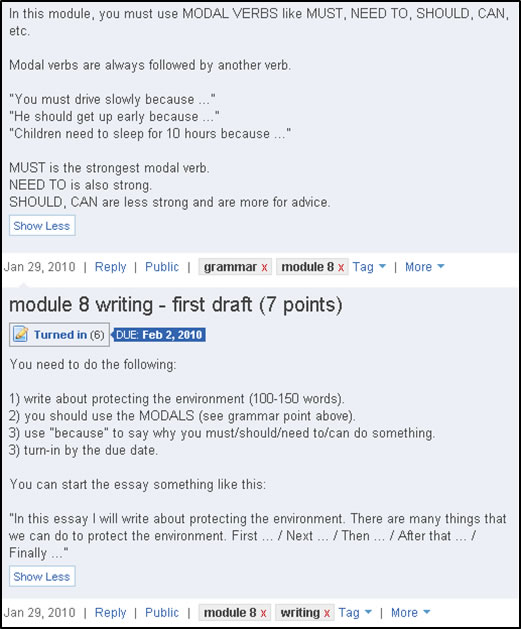
Figure 10. Extra grammar support and writing activity
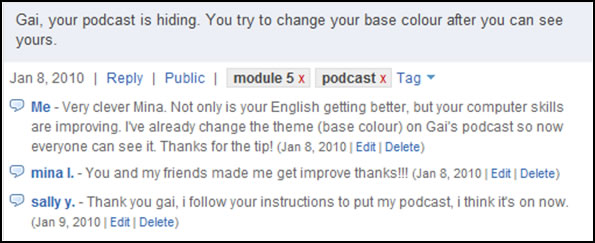
Figure 11. Students and teacher fixing a problem
Event 6 – elicit performance (practice): Performance was elicited in three ways. First, students listened to a number of listening quizzes on elllo.org before they attempted a final, graded quiz. Second, students produced a piece of writing (see figure 11 above) related to the reading and listening texts that they had completed earlier. Finally, they had to produce an audio recording (podcast) of their written texts.
Event 7 – provide feedback: For the Web 1.0-based learning in the course, feedback was provided in a number of ways. The first was to use listening quizzes on elllo.org which provided automatic feedback. The second was to use Classmarker, a Web-based tool, to create simple comprehension quizzes for the reading and final listening activity. The listening quiz consisted of multiple choice questions, so feedback was instant. The reading quizzes were open-ended, so needed to be manually marked. This enabled more detailed feedback to be provided to students. Feedback was also given to students after they completed the first draft of the writing activities.
Event 8 – assess performance: In the early-stages, or Web 1.0-based stage, of the learning cycle, there were two types of assessment: 1) reading and listening comprehension quizzes delivered via Classmarker, and 2) first and second drafts of the writing activity.
It’s important to note that up to now, most of the learning, feedback and assessment has followed traditional transmissive teaching methods. Even though the learning has been Web-based, it has been Web 1.0-based and the learning environment wasn’t very open. There has been some learning content created by students, but most of the learning content has been created or selected by the teacher. Similarly, there has been some communication between students, but most of the communication is top-down, from teacher to students. In order to open up the learning environment and provide additional learning opportunities, it was necessary to give students the opportunity to co-construct and publish content to a wider audience. Event 9 of the instruction cycle was used to do this.
Event 9 – enhance retention and transfer to the further learning: Up to now, students had used grammar and model texts to produce their own written texts. The learning guidance, feedback provided by the teacher and the drafting process had helped students “perfect” these texts. They were now ready to be published for peer review and become additional learning resources in the process. Several studies have shown the effectiveness of peer review for enhancing student learning (Rieber, 2006; Liang & Tsai, 2010). Knowing that texts will be reviewed by peers motivates students to produce better texts in a timely fashion. In addition, peer-produced texts have similar content; in the case of web2english texts, grammar and vocabulary. Therefore, reviewing peer texts enhances retention of key knowledge.
The first Web 2.0 publication tool used by students was their blog. The blogging activity was not about producing a grammatically correct piece of text (this had already been done in the previous writing activity) but was about using the features of a blog correctly. Students were expected to correctly format the text and insert pictures in the blog. In addition, social interaction was an important criteria; students received marks for the quantity and quality of their comments about their peers’ blog postings. Figures 12 and 13 show the assessment rubrics for the blogging activity and an example of a blog posting and comments.
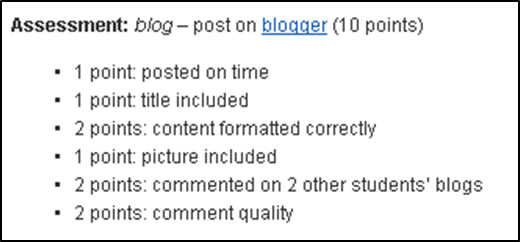
Figure 12. Blog post assessment rubrics

Figure 13: Blog post and comments
The next Web 2.0-based learning activity, making a podcast, followed a similar process to the blog posting. Students made an audio recording of their written text, posted it to their podcast and then made comments on those of their peers. However, there was a significant change in the assessment procedure. Instead of awarding points for the formatting of the podcast, points were awarded for the quality of narration of the podcast. Students’ reading, listening and writing skills had all been assessed in previous activities. But the other traditional language skill, speaking, had not been assessed. Adding the above text narration activity enabled, albeit superficially, students’ speaking skills to be assessed. Figures 14 and 15 show the assessment rubrics for the podcast activity and an example of a podcast and comments.
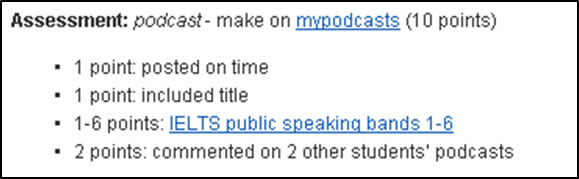
Figure 14. Podcast assessment rubrics
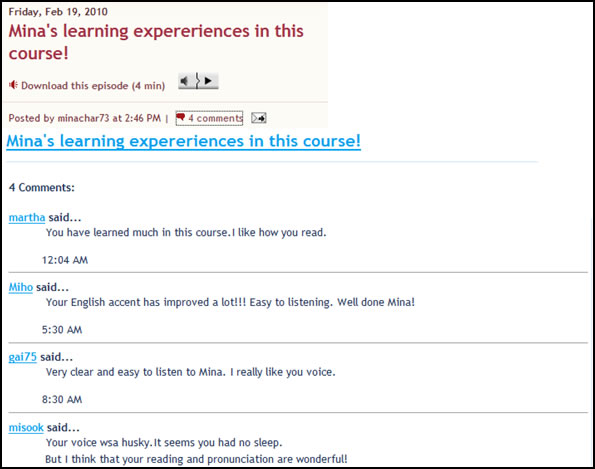
Figure 15. Podcast and comments
While the blogging and podcasting allowed students to produce and share learning materials, these materials were being produced individually (although the comments and replies to comments are good examples of co-constructing knowledge). The final learning activity involved using Google Docs. Google Docs allows students, who are in different locations, to work on a shared document (e.g,. spreadsheet, presentation, form). In web2english, students used Google Docs to co-construct presentations. These presentations consisted of individual pages with data, in bullet points, from their earlier written texts. Images, with correct referencing, were also added to the pages. Figures 16 and 17 show the assessment rubrics and an example of pages from a presentation.
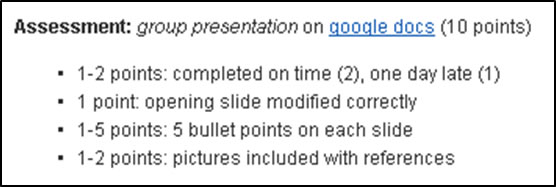
Figure 16. Presentation assessment rubrics
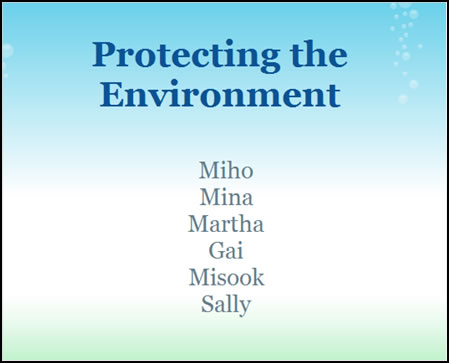

Figure 17. Presentation contents page and page from presentation
One of the perceived problems with online courses is the lack of interaction between participants. web2english attempted to address this problem in a number of ways. Spaces for student interaction were provided by using Edmodo in the early stages of learning and by blogs, podcasts and Google Docs in the latter stages. While these tools gave students opportunities for interaction, these learning interactions were not on a daily basis. To give students more opportunities for daily interaction, one other Web 2.0 tool, Twitter, was used.
Twitter is an example of a microblog. Whereas blogs and podcasts can give a picture of a person’s life or learning over time, microblogging is more concerned with what a person is doing at one particular moment in time, such as going to a concert, having a coffee with friends or attending a lecture, and the need to get this information out to an audience in real-time (Kanter, 2008). To assist with this quick publishing, microblogs encourage the sending of very short texts; for example, Twitter restricts posts to a maximum of 140 characters. Twitter was used in web2english for this immediacy. A Twitter community was set up at the start of the course, consisting of seven members (six students and the teacher). In each module, students were expected to produce ten tweets (posts), on five different days. Half the tweets were general; the other half were reflections on their learning (see figure 19). Assessment was based on quantity rather than quality (see figure 18), in the hope that students would produce more tweets. Students could view each other’s tweets via Twitter or from the web2english blog and respond, or retweet, to each other’s tweets. During the 12-week course, students produced 572 tweets, an average of 48 per week, or 8 per student per week.

Figure 18. Twitter assessment rubrics
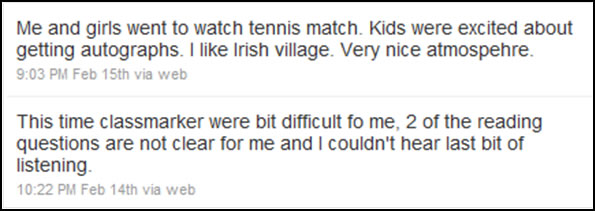
Figure 19. Two tweets in Twitter
Even though the above Web 2.0-based learning was very student-centred, it should be noted that each activity was formally assessed by the teacher. Despite views that Web 2.0-based assessment is problematic (Ehlers, 2009; Gray et al., 2010), the above assessments show that this doesn’t have to be the case; provided Web 2.0-based assessment focuses on Web 2.0-based learning skills, assessment of Web 2.0-learning should be relatively straightforward. In web2english, during the Web 1.0-based stage of learning, the content, grammar and vocabulary of the texts were assessed. Therefore, during the Web 2.0-based stage of learning, the teacher was able to focus assessment on key Web 2.0 learning skills such as blending of multimedia, social interaction and co-construction of knowledge.
Conclusion
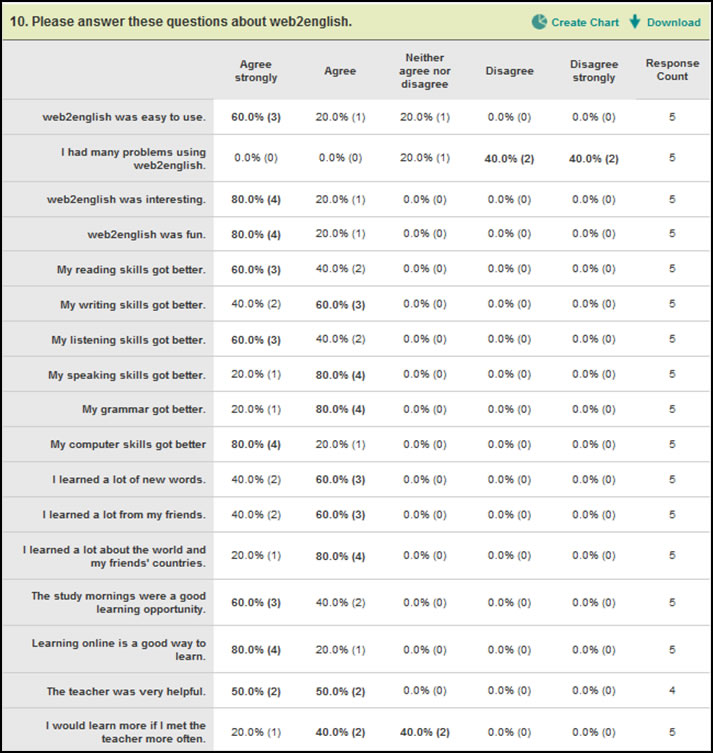
One of the goals of the web2english course was to show that new Web technologies could be used to successfully deliver and manage an online course, creating an interactive learning environment in the process. On completion of the course, it was clear that this goal had been achieved. The post-course survey indicated a high degree of student satisfaction with the course; students found it easy to use, thought that it was interesting and fun, felt that both their English and computing skills had improved and believed that learning online was a good way to learn (see Appendix B for full details). In addition, by allowing students to co-construct a variety of learning resources, it allowed their learning to be more open, creating a learning environment rather than a traditional learning island.
web2english also demonstrated how Web-based courses might be designed to overcome the problem of the slow uptake of Web 2.0 tools in education. It showed how to integrate the Web 2.0 tools used by educators and students in their daily lives, for example blogs, microblogs and social networking platforms, into the learning process. Moreover, it demonstrated that the curriculum change needed for successful integration on Web 2.0 technologies doesn’t need to be radical; good Web-based courses should include a combination of Web 1.0-based learning, where teachers use traditional pedagogies to instruct their students and scaffold their learning using Web-based resources, and Web 2.0-based learning, where teachers guide their students to co-construct and publish learning resources. Finally, web2english shows that assessing the process and social interactions of Web 2.0-based learning is not overly problematic, provided that the assessment focuses on the key Web 2.0 skills and not traditional Web 1.0-based learning skills.
Even though web2english appeared to be successful, there are some issues that need to be addressed. As the learners were not enrolled in a particular educational institution, it allowed for flexibility in course design. This may not be the case in a more formal learning environment where curriculum and assessment tools are more rigid. In addition, the course was limited to only six students. In traditional learning environments, where cost is an issue, classes will be larger. Managing the social interaction of large classes may become problematic. However, despite these potential problem areas, it’s clear that Web-based courses that carefully integrate Web 2.0-based learning have the potential to open up learning islands into learning environments, giving students opportunities to develop 21st century skills in the process.
About the Author
Sean Dowling [http://www.seandowling68.wordpress.com] is the eLearning and Educational Technology Coordinator at the Sharjah Higher Colleges of Technology in the United Arab Emirates. He has also spent a number of years teaching English as a foreign language. Currently, his areas of specialization are open eLearning management systems, development of multimedia literacies and teacher development.
| © Copyright rests with authors. Please cite TESL-EJ appropriately. Editor’s Note: The HTML version contains no page numbers. Please use the PDF version of this article for citations. |
References
Anderson, L., & Krathwohl, R. (2001). A Taxonomy for learning, teaching, and assessing: A revision of Bloom’s taxonomy of educational objectives. New York, NY: Longman.
Arvan, L. (2009). Dis-integrating the LMS. EDUCAUSE Quarterly Magazine 32, 2. Retrieved September 16, 2011 from http://www.educause.edu/EDUCAUSE+Quarterly/EDUCAUSEQuarterlyMagazineVolum/DisIntegratingtheLMS/174588.
Bertolo, E. (2008). Web 2.0: Unlearned lessons from previous virtual learning environments. Bioscience Education e-Journal 11. Retrieved September 16, 2011, from http://www.bioscience.heacademy.ac.uk/journal/vol11/beej-11-7.aspx.
Bower, M., Hedberg, J.G., & Kuswara, A. (2010). A framework for Web 2.0 learning design. Educational Media International 47, 3, September 2010, pp. 177-198.
Brown, S. (2010). From VLEs to learning webs: The implications of Web 2.0 for learning and teaching. Interactive Learning Environments 18, 1, 1-10.
Buchem, I., & Hamelmann, H. (2011). Developing 21st century skills: Web 2.0 in higher education – a case study. eLearning Papers 24, 1-4. Retrieved May 10, 2011, from http://www.elearningeuropa.info/files/media/media25535.pdf.
Clarke, W., Logan, K., Luckin, R., Mee, A., & Oliver, M. (2009). Beyond Web 2.0: Mapping the technology landscapes of young learners. Journal of Computer Assisted Learning 25, 56-69.
Conole, G. (2010). Facilitating new forms of discourse for learning and teaching: Harnessing the power of Web 2.0 practices. Open Learning 25, 2, June 2010, 141-151.
Dohn, N.B. (2009). Web 2.0-mediated competence: Implicit educational demands on learners. Electronic Journal of e-Learning 7, 2, 111-118.
Dowling, S. (2011). Digital learning spaces: An alternative to traditional learning management systems? Proceedings of the 4th Annual Conference on e-Learning Excellence in the Middle East, Dubai. Retrieved September 9, 2011, from http://seandowling68.files.wordpress.com/2010/12/digital_learning_spaces_sdowling.pdf.
Downes, S. (2007). E-Learning 2.0: In development. Retrieved April 12, 2011, from http://www.slideshare.net/Downes/elearning-20-in-development.
Ehlers, U-D., (2009). Web 2.0 – E-Learning 2.0 – Quality 2.0? Quality for new learning cultures. Quality Assurance in Education, 17, 3, 296-314.
Gagne, R. (1985). The conditions of learning (4th ed.). New York, NY: Holt, Rinehart & Winston.
Gousetti, A., (2010). Web 2.0 and education: Not just another case of hype, hope and disappointment? Learning, Media and Technology 35, 3, 351-356.
Gray, K., Thompson, C., Sheard, J., Clerehan, R., & Hamilton, M. (2010). Students as Web 2.0 authors: Implications for assessment design and conduct. Australasian Journal of Educational Technology 26, 1, 105-122.
Kanter, B. (2008). Mobilizing generation 2.0: A practical guide to using Web 2.0. San Francisco, CA: Jossey-Bass.
Kerres, M. (2006). Potenziale von Web 2.0 nutzen. In Hohenstein, A., and Wilbers, K. (Eds.) Handbuch E-Learning, München: DWD.
Liang, J-C., & Tsai, C-C. (2010). Learning through science writing via online peer assessment in a college biology course. The Internet and Higher Education 13, 4, December 2010, 242-247.
Light, D. (2011). Do Web 2.0 right. Learning and Leading with Technology. February, 2011. 10-15.
Lim, W-Y., So H-J. & Tan S-C. (2010). eLearning 2.0 and new literacies: Are social practices lagging behind? Interactive Learning Environments 18, 3, September 2010, 203-218.
Magliaro, S., Lockee, B., & Burton, J. (2005). Direct instruction revisited: A key model for instructional technology. Educational Technology Research & Development, 53, 4, 41-55.
Oliver, K. (2010). Integrating Web 2.0 across the curriculum. Tech Trends 54, 2, 50-60.
O’Reilly, T. (2005). What is Web 2.0? Design patterns and business models for the next generation of software. O’Reilly: Spreading the knowledge of innovators. Retrieved September 16, 2011 from http://oreilly.com/web2/archive/what-is-web-20.html.
Prensky, M. (2001). Digital Natives, Digital Immigrants. On the Horizon. 9, 5, pp. 1-6. Retrieved September 16, 2011 from http://www.marcprensky.com/writing/Prensky%20-%20Digital%20Natives,%20Digital%20Immigrants%20-%20Part1.pdf.
Rieber, L. J. (2006). Using peer review to improve student writing in business courses. Journal of Education for Business 81, 6, 322-326.
Rotherham, A., & Willingham, D. (2010). “21st-century skills” – Not new but a worthy challenge. American Educator, Retrieved April 11, 2011 from http://www.aft.org/pdfs/americaneducator/spring2010/RotherhamWillingham.pdf.
Sharma, P. & Barrett, B. (2007). Blended Learning – Using technology in and beyond the language classroom. Oxford, UK: Macmillan Education.
Walqui, A. (2006). Scaffolding instruction for English language learners: A conceptual framework, The International Journal of Bilingual Education and Bilingualism 9, 2, 159-180.
Appendix A: Pre-course survey on skills and expectations
(Administered during the pre-course orientation period.)