

September 1996 — Volume 2, Number 2
TOEFL Mentor
Encomium Publications
3639 Wilshire Avenue
Cincinnati, OH 45208
Telephone: (513) 871-4377
E-mail info@encomium.com
Web: http://www.encomium.com
U.S. $96.00 each
System requirements (Macintosh):
Macintosh IIci or better
System 7.0 or higher
4MB Ram
multimedia CD-ROM drive
13″ color monitor
external speaker optimal
network or single user
System requirements (IBM):
Microsoft Windows 3.1
4MB Ram
486/66 with 8 MB RAM optimal
VGA color monitor (256 colors is recommended)
Sound Blaster board
multimedia CD-ROM drive
mouse
Overview
Study material on CD-ROM holds great promise since more information can fit on one disk than could fit in an entire book. TOEFL Mentor contains over 90mb of listening material and 10mb of textual material–far more material than could be practically provided through any other (current) medium.
“This program will improve your knowledge of English grammar. It will also sharpen your reading and listening comprehension” claims TOEFL Mentor on the opening screen. But with CALL software, there is always one nagging question: What can the software do that can’t done just as well with a book, pencil and paper? A good CALL program should allow the user to work more efficiently and to accomplish tasks and obtain information that would be difficult or impossible to do in a more traditional mode.
Looking specifically at TOEFL preparatory materials, what could an ideal program do? It should be more than a set of practice tests. It should teach as well as test, and it should do this more efficiently than could be done by a book. It should, to some extent, teach the students better test-taking skills as well as teach relevant content. It goes without saying that the materials presented should be accurate and representative of the type of material found on an actual TOEFL examination, and that it should be free of mechanical flaws.
The comments below are based on my relatively thorough examination of a pre-release edition of the Macintosh version using a 100mhz PowerMac 7500 along with the experience of 18 students of intermediate level who used the material on slower 60mhz PowerMac 6100s. The students, who were doing software evaluations as part of my seminar on “English through Computers,” each filled in an evaluation form similar to the one in Appendix 1.
General Structure of the Program
The program has been designed using the Hypercard/Supercard engine. The individual parts can thus be opened independently with Hypercard if desired. For each of the three TOEFL sections there is a practice section and two complete tests. The program recommends that students start by taking one of the tests, then do the practice material, and finish by taking the second test to note their progress.
The first menu presents the following choices
     Listening                 Practice       Test

     Structure                 Practice       Test

     Reading                   Practice       Test

     Test of Written English   Description & Strategies

     About TOEFL     How to use this program    Test Strategy
Clicking on one of the first three items brings up the respective submenu:
     Listening

       Part A                  Description    Practice

       Part B                  Description    Practice

       Part C                  Description    Practice

    Structure & Written Expression   Description    Practice

    Reading                  Description    Practice
For the Listening section, each of the “Description” sections presents a thorough explanation of the different item types normally encountered on a TOEFL exam with a sample item that may be played and practiced. Each of the “Practice” selections leads to a long set of practice items. When “Play Dialog” is clicked a QuickTime control panel pops up which permits the student to replay the dialog in part or en toto as many times as required. Once the correct answer has been selected, a box explains why the other choices were wrong (Figure 1).
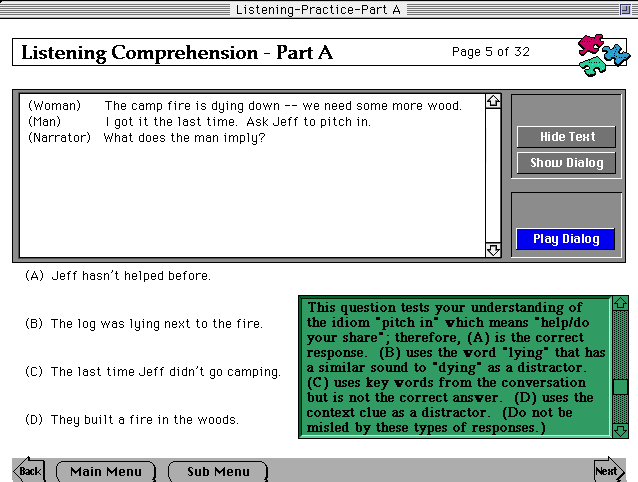
[Note: To see a larger, clearer version of this screen shot, depress the mouse over the graphic and select “View this image”.]
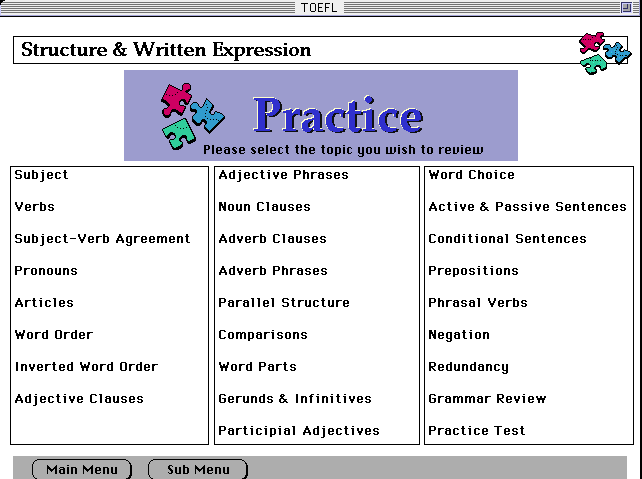
Choosing the Structure & Written Expression practice section reveals a menu with a plethora of choices for studying various structures and TOEFL item types (Figure 2). Each selection has a brief ‘theory’ section followed by numerous pages (screens) of practice material including a 50-item practice test.
The Reading Comprehension section starts with 22 screens of analysis of item types and practical hints for ferreting out wrong distractors. It includes an extensive list of common prefixes and suffixes intended to help students extend their vocabulary.
While the program has a wealth of material, unfortunately, it is marred by a number of flaws which will be pointed out below as we go through the relevant sections of the Evaluation Sheet in Appendix 1 point by point.
Availablity of help
There is no help on navigation techniques but help on additional study material relevant to the point at hand is sometimes available via a button at the bottom of the screen.Content
- Are there clear educational goals?
Yes: To improve TOEFL scores
- Is the information accurate?
Some of the items are not well-constructed. This is a problem with all TOEFL prep materials since large-scale testing of items is usually impractical; however, my subjective impression is that these items were not tested on a sample population at all. To give a clear example of a poor item,
Prejudices,________ essays written by H.C.Mencken, a well-known critic, protests the
shallowness of social and cultural aspects of American life.(A) a collection of
(B) it is a collection of
(C) being a collection of
(D) that is a collection ofChoice (A) triggers the ‘Correct!’
window which contains an explanation, part of which explains that “An adjective clause (which/that is a collection of essays) would be correct also.” Surprisingly, “that is a collection of essays” is choice (D) which is flagged as an error! [Encomium informs me that this particular problem has been fixed in the current release. -TR]Furthermore, the item is factually wrong since Mencken’s middle initial was “L” not “C”.
Click here for actual screen image.
This item, practicing “Word Order”, would seem to be testing vocabulary instead.
    The survival rate for ________ is one out of every ten.
    (A) a tube test baby

    (B) a baby test tube

    (C) a test tube baby

    (D) test tube a baby
Click here for actual screen image - Is the information accurate?
- The explanation “the sequence should be Quantifier + Modifier + Noun” does not help since there are three items with that sequence, only one of which is correct. Furthermore, two reviewers of this article independently suggested that the plural, “test tube babies” would be more logical than any of the choices presented.
Click here for another problematic grammar item.
In the first Listening Comprehension test, I encountered this item which would seem to have two possible correct answers.
(Man) What’s wrong with Sue? She doesn’t seem to be herself
these days.
(Woman) I’d hate to be in her shoes — getting a job and moving at
the same time must be difficult.
(Narrator) What does the woman mean?(A) She doesn’t think there’s anything wrong with Sue.
(B) These days are hard for Sue.
(C) She doesn’t want to be in the same situation.
(D) She dislikes wearing Sue’s shoes.
The “correct” answer for this item is “C” but to me, the implication of the sentence is “B”. If this item had been field-tested, surely this problem would have been noticed.
Click here to see actual item.
Record of progress
- Is the current working level always reported?
- There is a report of test results after each section of the tests is taken.
- Can progress be checked at any time?
- No. When taking the test there is no report on whether items have been answered correctly or not, nor is there a report of the current percent correct.
- Is a progress report maintained from session to session?
- The test report can be saved to disk as a text file but there is no way to read the data back into the program. If a student does only one or two of the test sections, quits, and then returns, a total TOEFL score cannot be calculated. All three parts must be done at one sitting.
Presentation
- Is the program designed for easy navigation and control?
- The structure is straight-forward since the students can only progress in a linear fashion inside any one exercise set. Each page is clearly labeled in the following manner: “Page 5 of 15”. TOEFL Mentor, however, does not allow students to easily navigate to other parts of the current section being studied since the only options are “Back” “Next” and “Menu.”
For the listening items, the student must press ‘play’ in order for the item to load and then play. This is true even for the timed tests. When the allotted 12 seconds is up, the program automatically proceeds to the next item but then waits for the student to press “Play.” It would have been more realistic to have the item play automatically, and perhaps provide a “Pause” button for the student to use if needed.
Also, there is no way to go back if “next” is accidentally hit one time too many. This can be a problem since students CAN hit “next” if they want to proceed to the next question before the 12 second limit is up. If the key is hit just as the time limit arrives, the program will go ahead two items instead of one. A warning could be built in to ask if the user really intended to skip the question, or the next button could have been relabelled ‘skip question’ until the item had been answered.
The listening items are rather cumbersome due to excessive dependence on the mouse. In order to hear an item, the user first has to press the ‘next’ button in the lower right corner and then, when the next item appears, press the “Play” button in the right middle of the screen. Even though Hypercard normally allows the keyboard arrow keys to control card changes, this feature seems to have been disabled in TOEFL Mentor. (Command+2 still works for moving to the previous card, but this would not be obvious to the normal user.)
While the Hypercard menu bar has been hidden, some of the key combinations do appear to work after a fashion. Command + P will print the current card; however, there is no way to control the size since the Page Setup menu item is not available. A single card thus prints out wastefully on two sheets of paper.
For the structure and reading tests, the students must proceed linearly through the items even though it is important when taking timed tests to learn to skip difficult items and to come back to them later.
In the Reading Comprehension section, even though the questions for each passage generally proceed in order from beginning to end, each new item resets the reading passage to the top, forcing the test-taker to scroll down again to the relevant section. It would have been much better if the passage was scrolled to the line being questioned each time.
When taking the tests, the user is allowed to return to previous items by laboriously clicking “back” but once the last item has been answered and “next” clicked, the score is reported and further revision is prohibited. It would have been better to have students click a “Done” button to confirm their intentions.
- Is the interface intuitive?
- Yes, to the extent that functions exist, their operation is obvious without explicit explanation.
- Can the learner go back to earlier steps easily?
- No, only the practice sections allow the student to go back, and even then through an arduous page by page manner.
- Can the learner control the order of presentation?
- Yes. TM suggests that the students take one of the two complete tests, then do the practice items, and finally take the second complete test to note their improvement. Inside the practice items the student is free to select any section to practice.
- Can the learner control how long to spend at each step?
- Yes, except for the tests themselves, which are timed, as they should be.
- The items are self-paced except for the tests, as mentioned above.
- Is the material easy to read?
- Many people would prefer a printed booklet to the screen since reading items are presented in a scrolling window which utilizes only the upper portion of the screen — even when the lower portion is not being used for presenting an item.
- Are the graphics useful?
- Graphics are used lightly to ‘garnish’ the pages in a professional manner.
- Is the layout well-designed?
- It is a shame that the full area of the computer screen isn’t used. Roughly, the upper third of the TM window shows 7 lines of the target text, while the lower part contains the question and the multiple choice answers. Here, clearly, a low-tech textbook outshines the computer since the whole text can be seen at a glance. Students complained about having to scroll through the text. Further, even though the students were using 17″ monitors, the presentation stays at the “least common denominator” size of 13 inches.
- Is the sound clear?
- Yes, the sounds themselves have been recorded clearly but the beginning of each sound-bite often came out clipped when played. I tried the disk on three different models of Power Macintoshes, all with internal CD-ROM drives, with no difference in the result. Once the sound bite had been read into memory, repetitions were clear. Unfortunately, for the two listening tests, repetitions are not allowed. The students found this problem frustrating.
- Is the rate of speaking appropriate?
- Yes.
- Are sound effects use appropriately?
- Yes. There is no annoying sound when an item is wrong and only a light ‘ting’ when a correct item is selected.
- Is the program easy to install?
- The program can be run directly from the CD-ROM. Placing the sound bites on the machines’ hard disk makes the sounds load more quickly, but this step requires 96MB of space.
- Does the program load quickly?
- The program does seem slightly sluggish. Part of this can be attributed to the CD-ROM and part to the general sluggishness of hypercard stacks.
- Does the program work as expected, without bugs?
- Unfortunately the answer to this is NO! The greatest annoyance was clicking on the “Sub Menu” button and then being greeted with a blank page! This seems to happen anytime one is a few pages deep into a section. The only cure seems to be to quit and restart TM.
- Does the program take up excessive disk space?
- It probably isn’t practical to transfer the contents to a hard disk, unless you have 110MB of disk space to spare!
- Does the program offer enough value for money?
- The material provides yet one more way to study for the TOEFL. Individual students might find the product too expensive for private use. For institutions, however, TOEFL Mentor could provide numerous hours of useful study material despite the flaws in the current version.
- Could the goals be achieved more easily without a computer?
- With the exception of the ability to listen to items repeatedly at the push of the mouse button, I don’t think there is anything in the current version of the program that could not be done as well with more traditional materials. The listening feature, however, is superior to the non-tech alternative of using a text with a cassette tape since it is much easier to find and repeat specific passages. With the addition of some other features suggested in the ‘wish list’ below and elsewhere in this article, a product could be made that is superior to traditional texts, even for the Structure and Reading sections.
- clicking on an unknown vocabulary item produced a definition.
- clicking a button would highlight the location of the correct answer within long reading exercises, rather than locations having to be specified by line number.
- a record of errors were kept so that students could return to items that they had got wrong the first time through.
- the material was available in the major languages of ESL/EFL student populations: Spanish, Japanese, Arabic, etc. Study materials like this often require the student to understand explanations which are syntactically more complex than the concept being explained. Use of the native language would allow them to study the material more effectively, particularly since they probably are not familiar with English grammar terms. Lexical glosses in the native language would also be welcomed by most students.
Navigation
Pacing
Graphical Presentation
Audio
Technical considerations
Value
Wish List
It would be nice if…
Summary
While the program is still somewhat “buggy” and lacks many of the programming niceties that could make this a top notch program, even in its present form it can provide students with considerable practice at test-taking techniques while providing a thorough review of the standard item types and grammatical patterns that appear on TOEFL exams. I would recommend, however, that students do not spend time puzzling out the feedback on their answers since the explanations are often unsatisfying.
I would hope that this review and other user reports will stimulate Encomium to develop a revised version of TOEFL Mentor with enhanced functions and more accurate items and explanations.
Please see Appendix 2 for the publisher’s comments to this review.
Reviewed by
Thomas N. Robb
Kyoto Sangyo University
Kyoto, Japan
<trobb@cc.kyoto-su.ac.jp>
|
© Copyright rests with authors. Please cite TESL-EJ appropriately. Editor’s Note: Dashed numbers in square brackets indicate the end of each page in the paginated ASCII version of this article, which is the definitive edition. Please use these page numbers when citing this work. |