

May 2022 – Volume 26, Number 1
| Title | Mentimeter |
| Website | https://www.mentimeter.com |
| Contact Information | hello mentimeter.com mentimeter.com |
| Type of Product | Interactive presentation platform |
| Platform | iOS, Android, PC/MAC, and Windows |
| Hardware Requirements | Smart-device and access to Internet connection |
| Registration | Required |
| Price | The Free plan is totally free. The Basic plan costs 9.99 dollar per month, and the Pro plan costs 24.99 dollar per month. The Enterprise version is customized. |
Stimulating learners’ engagement in a large class is one of the most important issues for language educators (Lamb, 2017). The present review aims to offer a review of Mentimeter for creating interactive presentations in large language classrooms. Driven by the continuous development of mobile technologies, language educators and teachers apply ‘Bring Your Own Device’ (BYOD) approach in using technology in classes. BYOD allows teachers and students to use their personally owned device and invite them to actively participate in various forms of in-class activities (Stowell, 2015). Mentimeter is an engaging and interactive Learner Response System (LRS). It allows real-time interaction between language educators and learners via mobile devices. At present, Mentimeter has over 200 million users, and 90,000 customers across more than 220 countries and territories (Mentimeter, 2021), and the application of this tool in language education deserves a deep and critical review.
LRS in Language Learning
In traditional language teaching, educators are speakers, and students are listeners. This type of approach implants an inefficient style of one-way communication. ‘Show-of-hand’ is the most common approach in a large traditional lesson that teachers use to assess students’ understanding of knowledge (Cline, 2006). This approach offers opportunities for a small number of active and confident students to participate in class activities, and students tend to follow and imitate each other. The process is relatively slow, which takes considerable time for the teacher to calculate and identify students’ responses (Abrahamson, 2006).
LRS predominantly intends to collect learners’ responses together with feedback in the digital era. Teachers publish the pre-set questions and students use mobile devices to respond. Existing studies show that LRS can motivate students to engage in class activities and become increasingly focused (e.g., Simpson & Oliver, 2007). During discussions, students are much more willing to actively participate in discussing their misconceptions and confusions with their educators and peers (Draper & Brown, 2004). LRS can help teachers give formative assessments by providing students with various types of questions in class, together with improved instructions based upon their responses as well (Elliott, 2003). Students become more interactive, and their exam performance would also be accordingly improved (El-Rady, 2006).
Nonetheless, teachers along with students may encounter a number of challenges when using LRS. Allen and Tanner (2005) argue that teachers may experience difficulties in spending time in learning and setting up LRS due to time constraints and work pressure. Pedagogically, integrating current course resources together with curriculum into LRS is not a simple task for teachers (Draper & Brown, 2004). That is, implementing LRS in language education still deserves further attention and practice.
Main features of an LRS – Mentimeter
Mentimeter enables language teachers to enrich their presentations by adding various types of interactive questions. Popular question types include multiple-choice, word cloud, open-ended questions, scale questions, ranking questions and Q&A board. These questions can flexibly be used to collect quick responses from learners and analyze their understanding of a particular issue. Students can be motivated by varieties of visualizations (e.g., graphs in the multiple-choice question, speech bubbles in the open-ended question.) and generate further interest in learning.
No matter whether being used in warm-up activities, teaching, or reviewing, language educators can always discover a way to make their presentations engaging and inclusive. For instance, a multiple-choice question could be designed for a classroom warm-up when a session aims to introduce Massive Open Online Courses (MOOCs) in foreign language education. As Figure 1 shows, the multiple-choice question asks students how many MOOCs they have taken before.
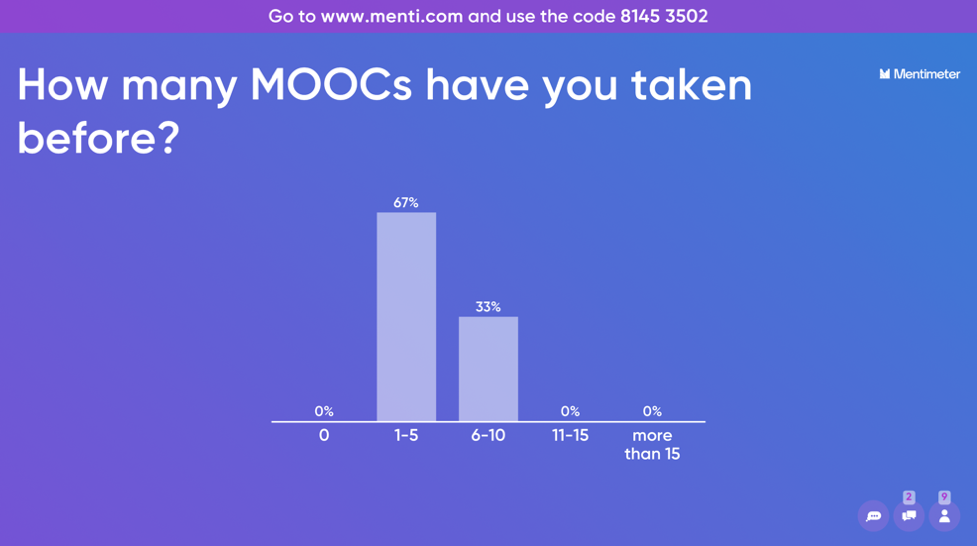
Figure 1. An example of a multiple-choice question for warm-up
Teachers can also design open-ended questions to assist students in familiarizing themselves with the new knowledge when introducing and reviewing as well. As Figure 2 shows, the open-ended question, “What are the differences between MOOCs and online educational videos?” help students ”catch the balls” that get dropped.
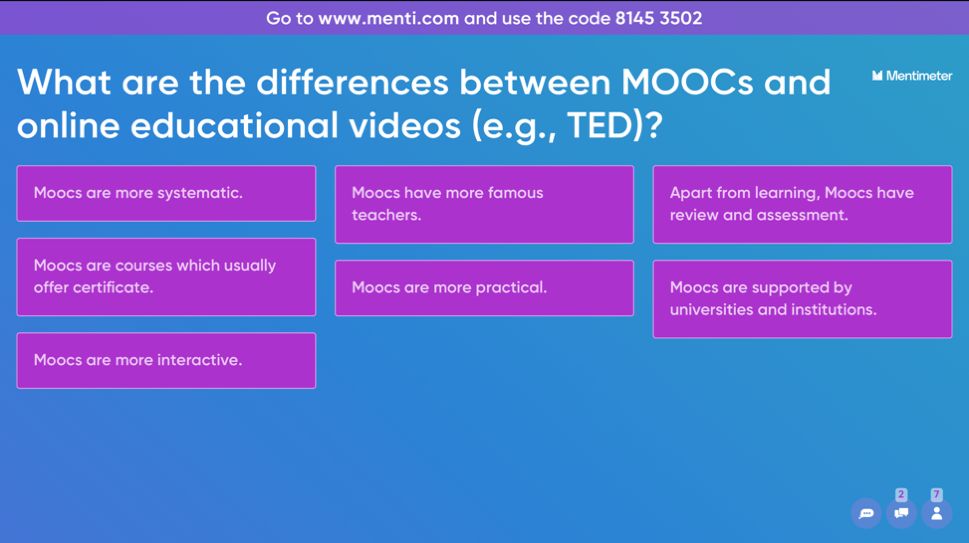
Figure 2. An example of an open-ended question for knowledge retention
Regarding discussion, Mentimeter offers interactive and engaging approaches to stimulate teacher-student and student-student interactions. For example, a word cloud question can promptly collect responses from their students and aid educators in highlighting the most common answers for the audience. As Figure 3 illustrates, teachers set a question, “What are the features of MOOCs?” so as to gather the students’ ideas. Apart from that, the ranking question gives educators the power to design interactive polls to encourage class engagement. For instance, students are asked to rank the benefits of MOOCs in language teaching and learning from their own perspectives, as shown in Figure 4. Furthermore, a scale question is an effective way to collect students’ voices that promotes class interaction as well. Figure 5 reports students’ attitudes toward the usefulness of MOOCs in their language learning.
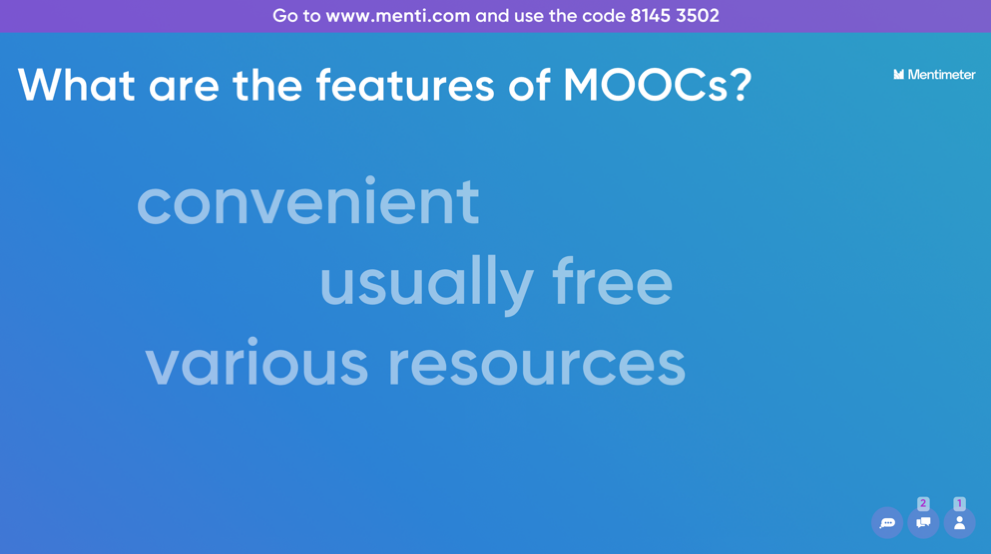
Figure 3. An example of a word cloud question for discussion
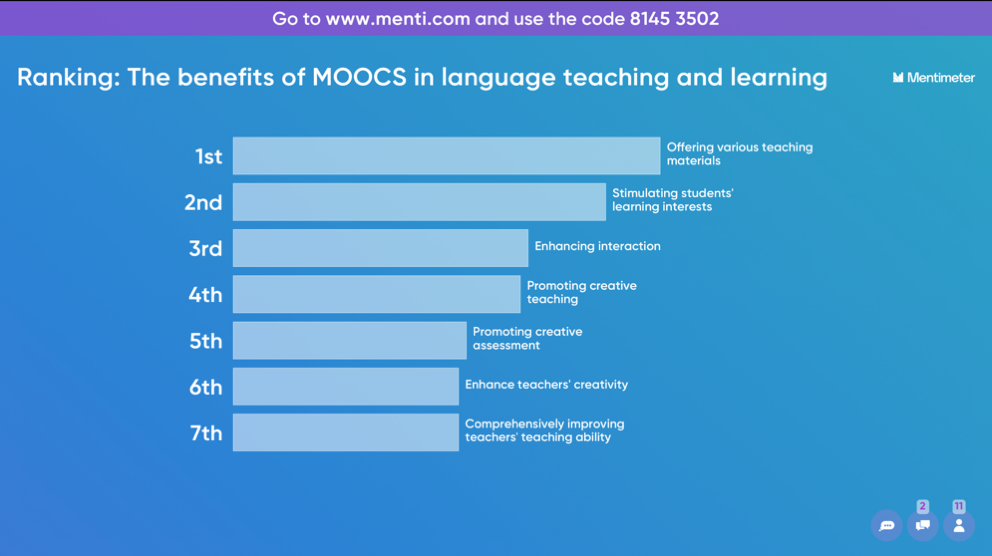
Figure 4. An example of a ranking question for discussion
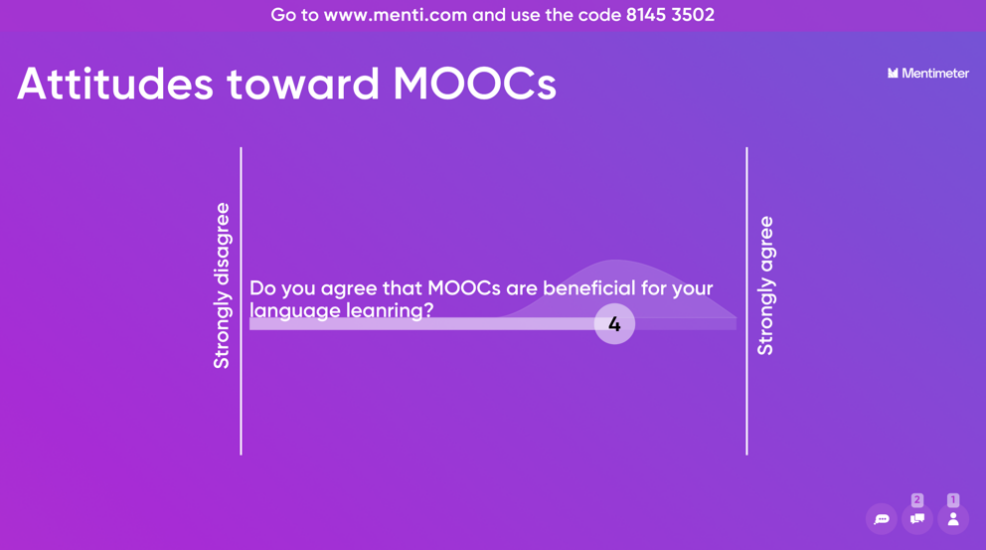
Figure 5. An example of a scale question for discussion
Additionally, it is worth mentioning that the Q&A board could be added at the end of the slides, which is a convenient way to collect the learners’ feedback, comments, and leftover questions both directly and anonymously (Figure 6). Most importantly, Mentimeter allows the audience to ask questions throughout the presentation as well. “Like”, “Question mark”, “Thumbs up”, and “Thumbs down” options can also be added to each slide for more engaging and interacting opportunities.
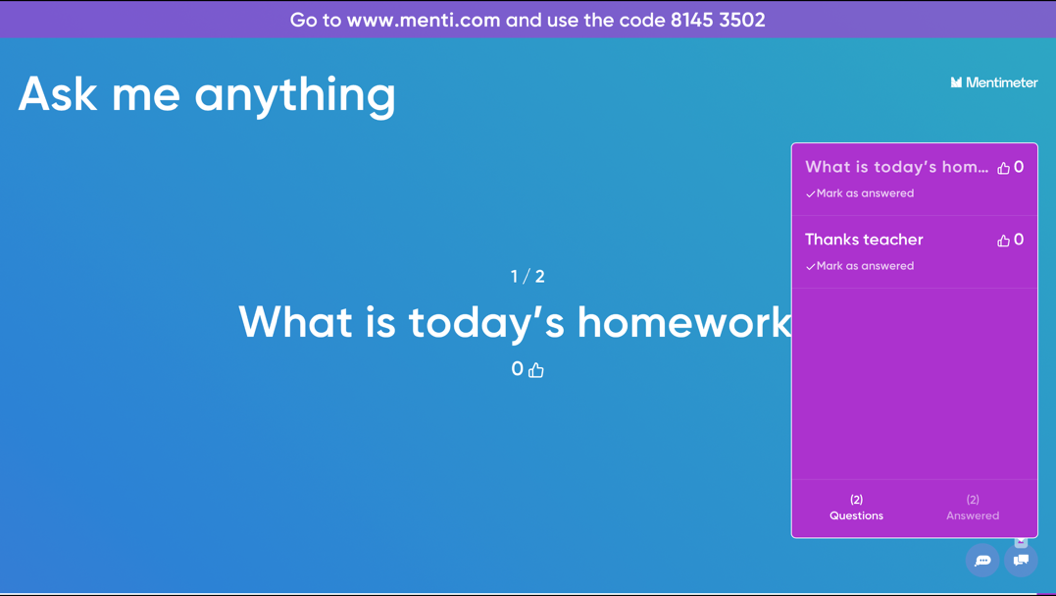
Figure 6. An example of Q&A board at the end of the lesson
Using Mentimeter allows for an easy path forward for teachers to design and host informative quiz competitions to increase the energy within their classrooms. Teachers simply need to enter questions and mark the correct answer. For example, Figure 7 shows a multiple-choice quiz about Bloom’s Taxonomy, guiding students to design their MOOC for language teaching. After several questions, the results and the winner will be automatically shown upon the leader board (Figure 8). Apart from designing a unique quiz from scratch, there are assorted quiz templates available on the Mentimeter official website.
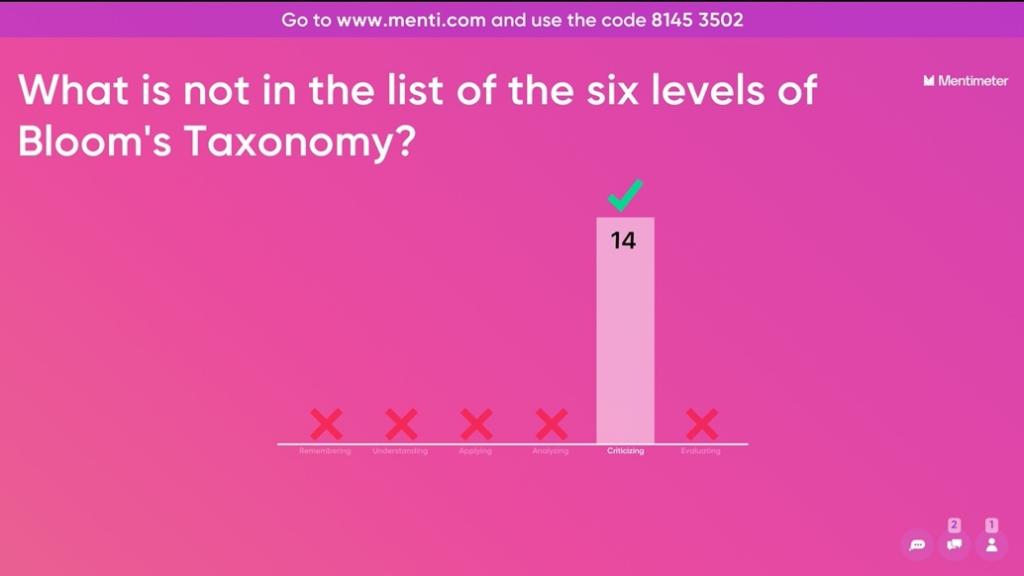
Figure 7. An example of a multiple-choice quiz
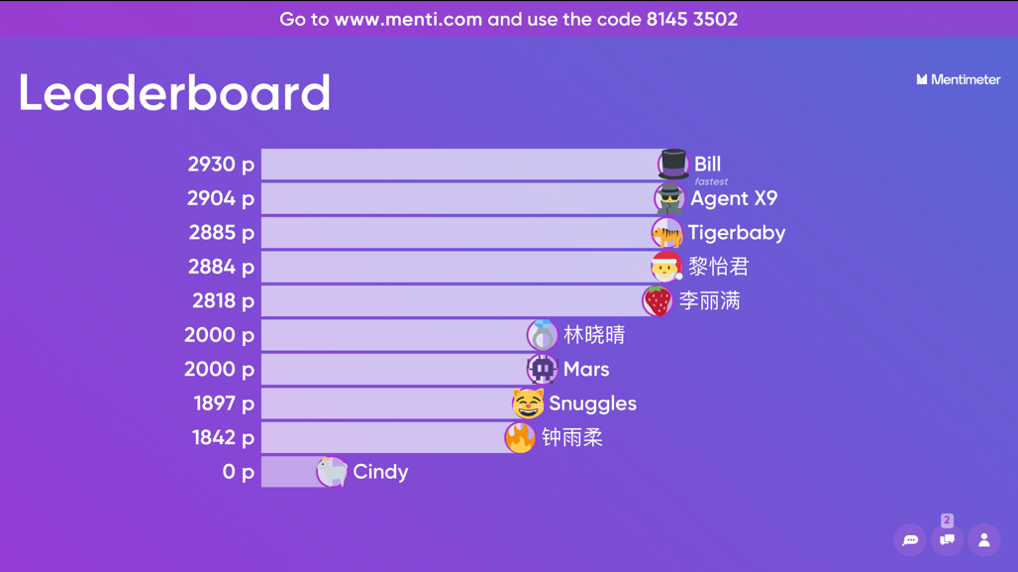
Figure 8. An example of a leader board after a quiz competition
After preparation, educators can invite their learners to connect to the presentation using their smartphones or other available mobile devices. The presentation can be shared by link, invitation number, or QR code. Once the lesson is over, the class data can be shared and exported for further analysis. This data can be compared over time to measure the progress of learners as well.
Thanks to the plugin, teachers are able to bring creativity, interactivity, and ultimately, fun to the traditional PowerPoint presentation. As it has been developed with numerous interactive elements, educators can instantly connect with their learners by bringing their PowerPoint slides to life. The plugin is for Windows PowerPoint 2016, and an Office 365 account is required. In addition, Mentimeter can also be applied in Microsoft Team meetings. Polling, Quizzes, Word Clouds, Q&A, along with other educational applications can be used to engage with the learners accompanied by real-time input straight from the Teams window. Mentimeter can also be integrated into Zoom, which makes meetings increasingly interactive and engaging. Participants are able to vote, ask questions, and contribute to the conversation, and educators can gather honest responses together with valuable insights.
Advantages of using Mentimeter
Mentimeter is an instrument for making fun lectures along with getting students engaged within a dynamic classroom environment. Primarily, Mentimeter provides an opportunity for teachers to create interactive presentations where students ask and vote upon questions and take polls, allowing teachers to engage their audiences in ways that a traditional presentation cannot. In addition, educators can get their students’ attention and motivate them so as to involve the students within the presentation itself. Secondly, Mentimeter can be used as a learning and assessment tool, assisting teachers to gain valuable insight into the classroom session and into the language knowledge their students retain by various types of assessments. According to students’ responses, particularly their misunderstandings, educators can alter the content of lectures and offer additional support for students before making better-informed decisions. Finally, the flexibility of various questions enables students to answer questions, make real-time comments, and allows for connections between educators and students during a lesson. Answers could be anonymized as well, which could make students feel a higher level of comfort and safety.
Limitations of using Mentimeter
Nevertheless, there are also a number of limitations and possible challenges concerning Mentimeter. The first of which is in terms of designing and editing. Once students have submitted their answers, they cannot retrieve nor edit their responses. This may cause some level of frustration and leave a number of students feeling disappointed. In addition, the customization of the content slides needs improvement, calling for a larger amount of room for the users to change the font and size along with the style of the text, not to mention the layout of the slides themselves. For multimedia input, videos are suggested to be uploaded, rather than only being compatible with YouTube links. Next, from a technological perspective, students can only contribute to Mentimeter if they have a WiFi-connected device. At times the internet connection in numerous regions is relatively slow, especially when loading the mobile Mentimeter App. Teachers may need to consider whether all their students have access to a device that allows them to join in the Mentimeter presentation. This might not be the case in a significant number of classrooms around the world. In contexts with low digital literacy and access to technology, it can be challenging to follow the on-screen instructions so as to submit a response. Finally, the free version of Mentimeter is constricted to two questions and five quiz slides. Users have to purchase the Basic or Pro versions for unlimited questions. In this case, governments and institutions are suggested to give more financial support to purchase Mentimeter paid plans. Teachers may consider also applying traditional presentation tools (e.g., PowerPoint) and other LRS (e.g., Plickers, Kahoot!, Quizlet) to reduce the limitations of Mentimeter. All the relevant stakeholders, including governments, institutions and teachers, are responsible for working together to help students in rural areas enhance their digital literacy.
Concluding Remarks
Generally, Mentimeter is a powerful, flexible, and engaging application that offers a solution to improve upon language teaching and learning in a large classroom environment. It enables language educators and learners to share knowledge and give real-time feedback on mobile devices while accompanied by presentations, polls, and quizzes in classes. It is a useful tool to encourage engagement, group participation together with collaboration, and motivates learners to answer questions in an interactive, dynamic, and engaging way. However, there may be a number of barriers in designing the presentation and implementing Mentimeter in today’s language classroom. In the future, governments, schools, teachers, and students are advised to cooperate so as to integrate Mentimeter along with other online tools into language education effectively. Further empirical studies are needed to advance the evaluation of the effectiveness of Mentimeter in various language teaching and learning contexts (e.g., formal and informal contexts), regions (e.g., western countries vs. eastern countries and urban areas vs. rural areas) and students (e.g., pupils and university students) to offer additional insights into technology-enhanced language education.
To cite this article
Zhang, D. (2022), Engaging, Impressing and Captivating Language Learners by Interactive Presentations – A Review of Mentimeter. Teaching English as a Second Language Electronic Journal (TESL-EJ), 26(1). https://doi.org/10.55593/ej.25101m1
References
Abrahamson, L. (2006). A brief history of networked classrooms: Effects, cases, pedagogy, and implications. In B. David (Ed.), Audience response systems in higher education: Applications and cases (pp.1-25). IGI Global.
Allen, D. & Tanner, K. (2005). Infusing active learning into the large-enrollment biology class: seven strategies, from the simple to complex. Cell Biology Education, 4(4), pp. 262-268.
Cardoso, W. (2011). Learning a foreign language with a learner response system: The students’ perspective. Computer Assisted Language Learning, 24(5), 1-25.
Cline, K.S. (2006). Sharing teaching ideas: Classroom voting in Mathematics. Mathematics Teacher, 100(2), pp. 100-104.
Draper, S. W. & Brown, M. I. (2004). Increasing interactivity in lectures using an electronic voting system. Journal of Computer Assisted Learning, 20(2), pp. 81-94.
El-Rady, J. (2006). To click or not to click: That’s the question. Innovate: Journal of Online Education, 2(4), pp.1-5.
Elliott, C. (2003). Using a personal response system in economics teaching. International Review of Economics Education, 1(1), pp. 80-86.
Kent, D. (2019). Technique efficacy when using a student response system in the reading classroom. Language Learning and Technology, 23(1), pp. 26-35.
Judson, E., & Sawada, A.D. (2002). Learning from Past and Present: Electronic Response Systems in College Lecture Halls. The Journal of Computers in Mathematics and Science Teaching, 21, 167-181.
Lamb, M. (2017). The motivational dimension of language teaching. Language Teaching, 50(3), 301-346.
Liu, C., Sands-Meyer, S., & Audran, J. (2018). The effectiveness of the student response system (SRS) in English grammar learning in a flipped English as a foreign language (EFL) class. Interactive Learning Environments, 27(8), 1178-1191.
Mentimeter. (2021). Retrieved 8 November 2021, from https://www.mentimeter.com.
Pérez-Segura, J., Sánchez Ruiz, R., González-Calero, J., & Cózar-Gutiérrez, R. (2020). The effect of personalized feedback on listening and reading skills in the learning of EFL. Computer Assisted Language Learning, 1-23.
Simpson, V. & Oliver, M. (2007). Electronic voting systems for lectures then and now: A comparison of research and practice. Australasian Journal of Educational Technology, 23(2), pp. 187-208.
Stowell, J.R. (2015). Use of clickers vs. mobile devices for classroom polling. Computer Education, 82(C), 329–334.
About the Reviewer
Danyang Zhang is an Assistant Professor at School of Foreign Languages, Shenzhen University. Her research interests include second language acquisition, technology-enhanced language learning, and teacher development. Danyang has published her work in many SSCI journals, including Applied Linguistics, Computer Assisted Language Learning, Language Teaching Research. She currently serves as a journal reviewer of several SCI and SSCI journals. Danyang have presented her projects in many international conferences including BERA 2018, CALL 2019 and EUROCALL 2018, 2019. She is the winner of the 2018 BJET Best EdTech Paper Award, the doctoral scholarship recipient of GLoCALL 2019 Conference and mLearn 2019 Conference, and the awardee of mLearn 2019 Conference Best Paper.
<danyangzhangszu.edu.cn> ORCID ID: 0000-0003-2514-9488
| © Copyright rests with authors. Please cite TESL-EJ appropriately. Editor’s Note: The HTML version contains no page numbers. Please use the PDF version of this article for citations. |