

Flash MX: Not Just Another Flash in the Pan
Jim Duber
duber dot com
<jim@duber.com>
At approximately fifteen minutes past midnight on March 15, 2002 (Pacific Standard Time), Macromedia released a revised version of Flash, a programming tool designed especially for use in authoring interactive multimedia content for distribution on the Web. Dubbed Flash MX (to identify it with a line of future products from Macromedia to carry the same "MX" moniker), the authoring tool was released along with a new version of the browser plug-in, this one named Flash Player 6.Within moments of its release, the servers at Macromedia were inundated with requests for downloads of the new program, trial versions and the new plug-in. All for good reason too, as there are quite a few awe-inspiring features in this new version which will revolutionize the teaching and learning of ESL/EFL on the Internet.
THE FLASH PANORAMA
Originally called "FutureSplash Animator," the history of Flash begins with version one near the end of 1996. At that time, Flash was a drawing and animation package. I first became interested in the interactive aspects of Flash upon the release of version 3 of the software (see my review of Macromedia’s "Design in Motion Suite" from this column in September, 1998), with its ability to add audio to interactive presentations. Like other multimedia authoring tools, Flash allows a designer/programmer to import audio and graphic files and synchronize them with text, for example. You can easily add interactive buttons and menus to create a learning presentation followed by an interactive quiz, for example. With careful planning, sophisticated ESL/EFL learning applications can be created with Flash and designed to load very quickly, even over a slow modem connection.
I still maintain that version 4 is the easiest to learn and use (and recommend it to anyone interested trying out their first multimedia authoring program). Version 5, first released in July, 2000, was another significant upgrade.With the addition of "ActionScript," a powerful object-oriented programming language similar in many ways to JavaScript, the possibilities became endless. But, in fact, Flash MX opens a whole new realm of possibilities in terms of interactive learning in the online environment.
SO, WHAT’S NEW?
If pressed to pick the single most important new feature in Flash MX, I wouldn’t hesitate to mention its video support.Completely new and unexpected, the support for high-quality, fast-loading video is amazing–especially given the small size of the Flash Player. Furthermore, it’s an easy process to import video for use in a presentation. Flash MX enables the import of all the common video formats supported by QuickTime and Windows Media players (e.g., .mov, .dv, .avi, .mpeg, etc.). After choosing "Import" and navigating to the movie file that you want to embed, the menu choices below appear.
Figure 1. Thumbnail of "Import Video Settings"
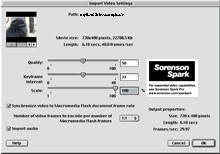
(click the image to see a full size version)
The settings in the dialogue box shown here allow you to make adjustments that will affect the overall quality and resolution of the imported video–and ultimately control the file size of your creation. The best choices to make will depend upon the target audience and delivery method. It’s also possible make one version for high-bandwidth and another for low-bandwidth use. In my limited testing, I’ve found the compression quality to be excellent. The usual caveats for using video on the web apply–short, well-lit scenes with limited action result in the smallest files. Even so, I’m impressed with Flash MX’s ability to handle even poorly lit scenes shot without a tripod. Here’s a short clip from of a video I’m working on for my friends’ band (Steve Lucky and Carmen Getit’s Hammond Cheese Combo). I shot handheld video in a dark nightclub with lots of red stagelights in place and pretty much no other light. The clip samples are exactly 60 seconds long. The original QuickTime source is 275 MBs after having scaled it to 240 x 160, or about 1/4 screen size. I imported and embedded that source in Flash MX at 75% quality and 80% scale (for low bandwidth users) and 95% quality (for high bandwidth users). In both cases, the frame rate in Flash MX was set to 15 frames per second. See the results for yourself (of course these samples will require that you’ve already downloaded and installed the Flash 6 Player).
- Low Resolution Sample Clip (664K, which equals slightly over 0.24% of the original source file’s size)
- High Resolution Sample Clip (2100K–or 2.1 MBs, roughly equal to 0.76% of the original source file’s size)
Video can be made highly interactive within Flash MX. In addition to being scriptable (that is, the video can be programmed to respond to user events, such as the click of a button, or time-based events such as the passage of a two-minute interval), the video object can be masked to give it a custom shape, or to obscure certain features. Furthermore, the mask can be animated and scripted. For additional visual effect, the video object can be skewed or scaled and even duplicated within the presentation, all without additional costs in terms of file size.
But video is not the only important feature added to spice things up. Other significant additions include:
- an improved user interface (a new property inspector, for example, changes the designer options it presents depending upon what the author has selected–in prior versions, all the options were distributed among a variety of separate panels. The work environment quickly became cluttered and space was at a premium. This shortcoming has largely been solved in the new version);
- the ability to load external images dynamically (in jpeg format) and/or audio files (so a presentation can be updated without having to return to Flash MX to reauthor it);
- a new voice codec (a compression/decompression module for streaming spoken audio now complements MP3 audio–which has been supported in Flash for several versions now);
- multilingual support allows designers to work with Unicode and develop applications in English, as well as Chinese, Japanese, Korean, and others;
- accessibility features assist designers in producing "universally accessible" content that can be made available to all users
- improved handling of XML data (although it was possible to work with text formatted in "Extensible Markup Language" in version 5 of Flash, the player’s ability to work with XML data was hampered by the fact that it took so long for the player to parse the text. No longer–reports are that the version 6 player now parses XML blazingly fast.
For even more, see Macromedia’s listing of top 10 new features.
AND, WHAT DOES ALL THIS MEAN FOR US?
For experienced developers, a whole new world opens up in terms of streaming interactive video over the web. Of course, there are other options for streaming video on the web. The three most popular options–RealMedia, QuickTime and WindowsMedia–all provide good quality streaming video. The breakthrough provided by Flash MX is that: (1) you don’t need to pay the high costs of a streaming server to deliver your video content (as is the case with RealMedia and WindowsMedia), (2) you can easily integrate the video content inside a web-page with a customized look of your design and with lower memory requirements.
Recent reports indicate that 98% of web browsers have some version of the Flash Player installed, far exceeding the installed base of the other popular multimedia browser add-ons. In discussing the ubiquity of the Flash Player and adoption rates for the new versions that come along, John Dowdell, a senior member of the Technical Support team at Macromedia said, "Each version of the Macromedia Flash Player has had faster and faster adoption rates–Media Matrix [an independent research group] found that half of all consumers tested had the Flash 5 Player within its first six months and we’re aiming to increase that trend in this release."
ESL/EFL instructors and students can look forward to a steady stream (no pun intended) of richer web-based language learning applications which integrate full motion video with text and audio and sophisticated interactivity (for example, multiple-choice quizzes, essay responses, object identification, drag-and-drop activities, etc. can accompany the video and other multimedia elements). In addition, teachers can soon expect to find lots of Flash-based video content which they can link to and use as source material for their own classroom or lab activities. Things really couldn’t get any better.
BUT, THINGS COULD CERTAINLY GET BETTER!
Macromedia’s release of Flash MX was accompanied by a flurry of cryptic announcements concerning undocumented features of the program, but which will be fully functional and documented in the near future. What seems clear is that, among other advancements, there will soon be support for audio and video conferencing within the Flash 6 Player. Macromedia has published a document entitled "Macromedia Flash MX–A next-generation rich client" which states, "[We are] introducing new server solutions
that will work with Macromedia Flash Player for adding two-way
communications, including voice, video and shared data between multiple
users" (p. 10).
Furthermore, you can see the settings panel for these future capabilities already in action. If you have a supported camera and/or microphone attached to your computer, PC users access the settings panel by right-clicking on a Flash movie; Mac users by control-clicking. There, you find options to control (1) privacy–you can, for example, allow or deny a specific website access to your microphone and/or camera (and in fact, you must grant a website permission before they can be accessed at all); (2) local storage (where it should be possible to save user data, such as quiz results, and perhaps even voice recordings); (3) a microphone; and, (4) a video camera. You can even preview your microphone and camera now.
Figure 2. Screenshot of Macromedia Flash Player Settings (version 6)
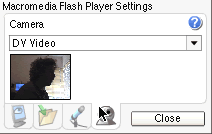
(the author’s silhouette is visible in the preview window above)
This seems to offer the promise that, very soon, EFL/ESL instructors and students will be able to video-conference and share homework assignments in real-time all from the ease of a Flash-based web interface.
WHERE CAN I LEARN MORE ABOUT FLASH MX?
I’ve found the following resources from Macromedia’s website helpful:
- Product Home Page
http://www.macromedia.com/software/flash/
Press Report on New Video Technology
http://www.macromedia.com/macromedia/proom/pr/2002/flash_mx_video.html- Evaluation Resource Center
http://www.macromedia.com/software/flash/resources/evaluation/ - Flash MX Application Development Center
http://www.macromedia.com/desdev/mx/flash/ - Using Macromedia Flash MX Learning Interactions (pre-built learningcomponents supplied with the authoring tool)
http://www.macromedia.com/support/flash/applications/learning_interactions/ - Flash MX Sample Files
http://www.macromedia.com/desdev/mx/flash/sample_files/
If you haven’t yet gotten started in developing ESL/EFL activities in Flash, but are interested in doing so, the following resources might be useful:
- Product Tutorials (Flash and others, with free samples)
http://www.lynda.com/products/videos/index.html - Free Online Tutorials (Introduction to Flash, and others)
As mentioned previously, if this is your first experience with a multimedia authoring tool, my suggestion is to start off with version 4 of Flash. Although not nearly as feature-rich as later versions, it’s much easier to learn and use.
If you’re ready to get started, Macromedia offers a 30-day free trial version of the authoring software. The separate Flash player is, as always, free to install in your browser.
| © Copyright rests with authors. Please cite TESL-EJ appropriately.
Editor’s Note: Dashed numbers in square brackets indicate the end of each page for purposes of citation. |