December 2006 — Volume 10, Number 3
| Title: | VTrain 5.0 |  |
| Level: | Pre-Intermediate | |
| Author: |
Paul Raedle http://www.vtrain.net/faq-dbase.htm |
|
| Product Type: |
Downloadable vocabulary training program |
|
| Platform: | Windows 2000 / XP | |
| Minimum System Requirements: | 386 processor or faster, 5 MB of RAM, 10 MB available on hard drive, SVGA card, sound card, microphone and speakers | |
| Price | $19.00 USD or €19.00 | |
Description of the product
VTrain is an authoring program which allows the user to create electronic flashcards using text, sound, and pictures. It supports special characters in 100 languages. While it is intended for vocabulary learning, it can just as easily be used for other subject matter. Prospective users can download a trial version from the VTrain website which allows the user 30 hours of examination time. Users may then purchase a version which allows users to use the program, with free updates, for two years.
VTrain keeps track of correct and incorrect answers and allows for spaced repetition of items. The program sorts out the items that are most difficult for users and reminds them when a card needs to be reviewed. The easier the card, the less frequently the user needs to review it.
Figure 1 shows the main window. It features main menus across the top, a row of icons to assist in editing, a column of card file icons on the left, and an open space in which the cards and feedback appear.
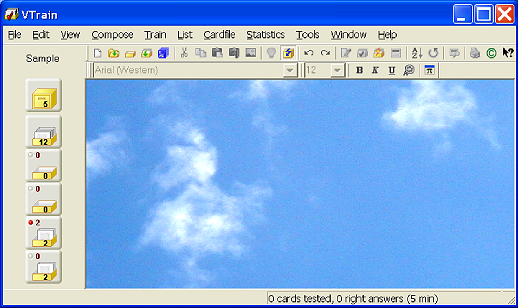
Figure 1. Main VTrain window
Tutorials are available under the Help file. One tutorial assists with making adjustments to Windows. The other tutorial guides users though the creation and use of cards.
There are two types of cards.
- Decks of flashcards: You can create and edit your own decks of flashcards or download them from VTrain’s website. The VTrain website has a database containing decks of flashcards for 112 languages ranging from Afrikaans to Zulu, as well as cards for 22 academic subjects ranging from agriculture to technology.
- Training cardfiles: A cardfile consists of boxes which are displayed on the left of the main window. The top box is the “Pool” containing all of the cards for a particular training session. The remaining boxes are for other training sessions.
Training sessions begin with Box 1. If a question is answered correctly, the card goes into Box 2. If the answer is wrong, the card stays in Box 1. In this way, the words that are most difficult for the user stay in Box 1 so that they can be reviewed sooner. The cards in Box 2 do not require immediate review. For example, Box 1 could be reviewed after just one day, while Box 2 could be reviewed after one week. According to the instructions in the tutorial, by the time a cards gets into Box 4, the user can wait as long as two years to review it.
VTrain offers both automatic and manual scheduling. In manual mode, users can decide for themselves how frequently to do their reviews. In automatic mode, the program keeps track of which cards are due for repetition.
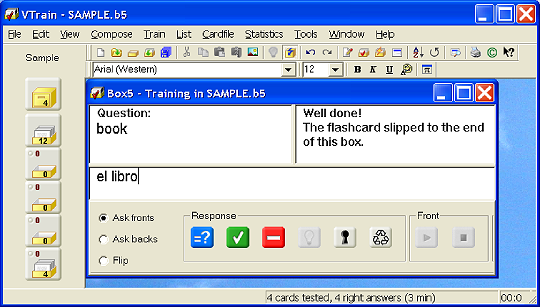
Each card has two sides and either side can be the question. For example, the user could have an English word or lexical item on the front and the corresponding Spanish expression on the back. By choosing to look at the front, the English word becomes the question and the Spanish word is the answer. However, users can also choose to look at the back first, in which case the Spanish word becomes the question and the English word is the answer. Users choose how they would like to study by clicking one of the following choices visible in the lower left of Figure 2.
Ask fronts: look at the front of the flash card Ask backs: look at the back of the flash card Flip: the back becomes the front and vise versa
Figure 2. Sample VTrain flashcard
In Figure 2, the question is in the upper left. The feedback from the previous answer remains in the upper right. This feedback goes away when you click on one of the three choices:
Before submitting an answer, users can ask for a spelling by having it compared with the solution, in which case the program underlines in red any portion of your response that does not match the correct answer. You have typed in your answer and you want to know if you are right or wrong. You do not know the answer and you give up. The program will tell you the correct answer.
VTrain provides file synchronization which allows several users to share their decks of flashcards. For example, a teacher can create and update decks of cards and distribute them to students over a local area network.
Evaluation
Because this is an authoring program, the pedagogical success of the vocabulary cards depends on how they are created. Because few of the downloadable pre-made cards in VTrain’s database provide information about lexical items beyond basic meaning, it is probably best that teachers create their own decks based on sound pedagogical theory. We know that learning a lexical item entails more than just learning its meaning. One should also learn the word’s spelling, derivations, grammatical and lexical associations, register constraints, pronunciation in a variety of contexts, and so on. VTrain seems to allow for all of these, but it is up to the user to create effective cards.
Learning how to use the program is not entirely intuitive. Therefore, the user needs to try out the tutorial before beginning this program. At first, there is a steep learning curve. However, patience pays off. Once you get the general idea, you can start creating and using decks of cards.
In the old days, before computers, students used paper and pencil to create decks of vocabulary cards. It was quick and easy, and had the advantage that you could tuck a deck of cards into your pocket or purse and take them with you wherever you went and study them whenever it was convenient. The student could separate the cards into those that had been mastered and those that needed review. A drawback to using this type of electronic program, besides the fact that it takes so much time to create a deck of cards, is, of course, that you have to go to the computer every time you want to do a practice session. However, as laptops become lighter and smaller, that should not be as much of a problem. Furthermore, Vtrain is developing a version of their software for Palm and Windows CE handheld computers, which are obviously much more portable than a standard PC.
Another shortcoming is that while the program allows students to listen to target words, it lacks a speech recognition feature that would allow the learner to say words as a way of responding to questions.
According to VTrain’s web site, version 5.5 will have some interesting and useful new options. One option will be to allow multiple correct answers. Another option will be the ability to put hyperlinks in the flashcards to create cross-references, mind maps, and tables of contents in your documents. You will also be able to link to files on your computer, such as grammar lessons, or web sites, such as electronic dictionaries.
Overall, VTrain is a richly endowed program offering a great range of flexibility and options for users willing to put in the time necessary to create pedagogically sound training cards.
About the Reviewer
Bill Walker holds an MA in TESL from San Francisco State University. He is a core instructor at the American English Institute at the University of Oregon. He has taught ESL/EFL for nearly 20 years both in the US and in the Middle East. His main research interest is vocabulary acquisition.
© Copyright rests with authors. Please cite TESL-EJ appropriately.
Editor’s Note: The HTML version contains no page numbers. Please use the PDF version of this article for citations.