

March 2008 — Volume 11, Number 4
On the Internet
Engrade: An Open-Source Online Gradebook
by Nina Liakos
Maryland English Institute
University of Maryland, College Park
<nina.liakos gmail.com>
Many schools now use online course management systems such as Edline [http://edline.com], School Fusion (K-12) [http://schoolfusion.com], or Blackboard Academic Suite (versions available for all levels [http://www.blackboard.com/products/Academic_Suite/] ) for a variety of purposes, from blended learning to basic course management. School systems and universities subscribe to these web-based course management tools, and their faculty have the choice, or are required, to use them. For teachers in smaller institutions or in systems which do not contract with one of the for-fee products, there are open-source products available on the web. Engrade [http://engrade.com] is one such product. Free to both school systems and individual teachers, Engrade has the capability to maintain records of grades, attendance, and assignments, and the program can be made accessible to students and their parents or sponsors. (See Figure 1.)
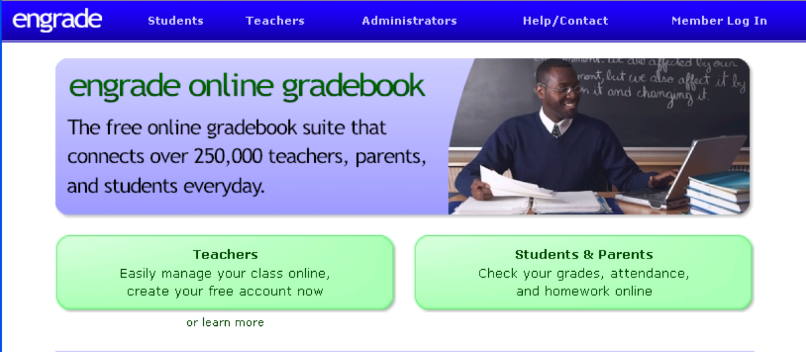
Figure 1. Engrade home page
Creating a free Engrade account is simple. The teacher enters his or her name as students will see it (for example, Ms. Liakos), chooses a user name (for example, nliakos) and password, and provides a valid email address. Once registered, teachers can create one class or several. The class list can be entered as soon as it is available. Then the instructor selects a grading scale (see Figure 2). There are several preset options, including classic letter grades and simple percentages, and the grades can be customized (useful if one teaches in a country where grades are not assumed to be A, B, C, etc.) or decline to have Engrade perform the grade calculations at all. Varying weights–up to eight different assignment categories, including 0% for assignments which do not count toward the final grade–can be assigned. There are options to calculate the letter grade or percentage score or not, and to retain the lowest score in the calculations or not.
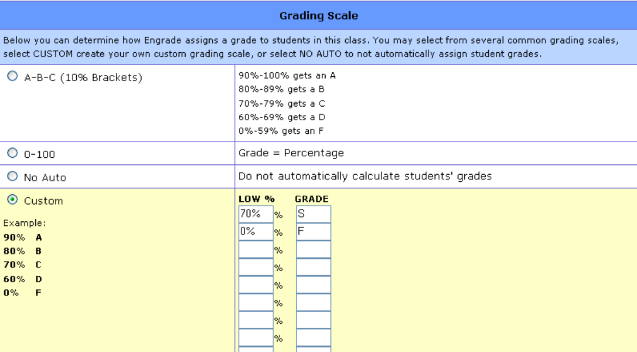
Figure 2. Grading Scale Options in Engrade
Each student is assigned an ID number, and from this Engrade creates an individual student ID in the format engrade-nliakos-ID#. Students, parents, and sponsors can access the gradebook by signing up for an account with this ID. Teachers who wish to keep the gradebook for their private use need not share these IDs with students.
The gradebook is probably the most important function of Engrade for students and teachers alike. Adding an assignment to the gradebook is simple. The teacher gives the assignment a name (for example, Listening Test 1). If grades are weighted, the instructor selects the appropriate category (for example, Listening or Tests), sets the date (the default is the date when she entered the data) and assigns the number of points possible. (note: Engrade does not automatically calculate percentages, so if the first test has 48 points and the second test has 53, the instructor must set a standard number of possible points, such as 100, and then enter the percentages that have been calculated “the old-fashioned way.”) The instructor then records the students’ grades and saves the file. He or she can choose to excuse individual students from assignments by entering E where the score should be. An M instead of a score indicates that the assignment was not turned in. (See Figure 3.)
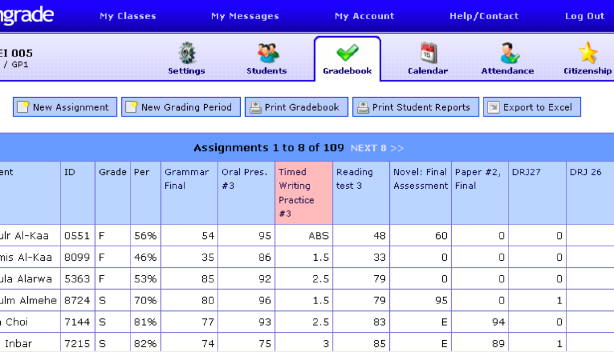
Figure 3. Gradebook in Engrade
Something I have found to be very useful is the fact that students quickly catch any errors that I may have made, such as forgetting to record or change a grade or recording the wrong grade. After they show me the original graded paper, I can make the change quickly and easily.
Teachers or students can print out individual student grades at any time, and teachers can export the entire gradebook to a spreadsheet, which is advisable, since in the event of a crash, you may find to your dismay that Engrade has not backed up your data for you.
Attendance is marked as Present, Absent, or Tardy on a seven-day chart by month (see Figure 4). I have also found that it accepts other entries, such as .5 or Exc. Attendance records can be exported to a spreadsheet, such as Microsoft Excel. A new feature allows teachers to view the totals for each attendance category used.
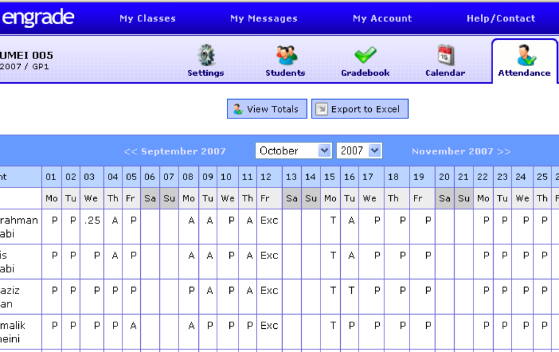
Figure 4. Attendance Sheet in Engrade
The Calendar feature allows teachers to record assignments either by assignment date or by due date. Students with internet access can never again claim that they did not know what the homework was. (See Figure 5.)
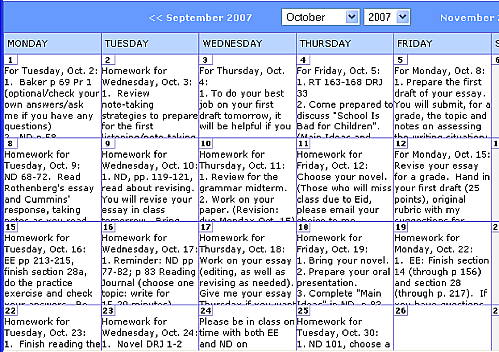
Figure 5. Calendar in Engrade. Students click on a date to see the whole entry.
There is also a category called “Citizenship,” where teachers may record comments pertaining to student behavior. A new feature in 2008 is an internal messaging system which allows teachers and students to post messages to one another within Engrade.
I polled the fifteen students in my Spring 2007 semi-intensive English class at the University of Maryland, College Park. Fourteen of the fifteen reported consulting Engrade for information concerning their grades; most checked every day, or at least several times per week. Eleven students consulted Engrade for information about their attendance. Eleven students reported that they used the Calendar feature to check their homework assignments. Four students reported that they had found a discrepancy between their actual grade and their recorded grade. Only two students had experienced problems using Engrade. One student commented, “It’s a fun and helpful program to check your progress in the class,” while another reported suggesting to the professor of her academic course that she switch to Engrade from WebCT [1].
There can be disadvantages to using an online gradebook when the records are shared with a student’s parents or sponsor. The Washington Post reported that some parents may inadvertently discourage communication with their older child by micro-managing the child’s work through an online gradebook. They jump on the child for failing to make up a quiz or turn in an assignment before the child has had an opportunity to negotiate the situation with his or her teacher (Weeks, 2007).
Another thing some teachers may not like with Engrade is the fact that everything must be quantified. In the United States at least, the No Child Left Behind Act stipulates that everything be measurable, and Engrade, like other electronic grading systems, forces the teacher to assign a number to just about everything.
In general, however, I have found that using an online system has more benefits than drawbacks, and Engrade has many advantages. It is an easy-to-use and convenient tool for maintaining records of grades, attendance, and homework assignments for teachers who do not have access to a system-wide course management tool such as Edline or Blackboard. It encourages adult and university students to track their own grades and attendance, which in my experience has helped them to be more responsible about attending class and turning in their work. It allows parents of K-12 students and sponsors with whom students share their Engrade Student ID to track attendance and grades as well. This can be a way to enhance communication among teachers, students, parents, and sponsors. Finally, the fact that Engrade is, and plans to remain, free to users makes it an excellent choice for teachers whose schools do not subscribe to a paid service but who wish to reap the benefits of an online gradebook.
A Webcast recording of the presentation of this paper at the WiAOC is available from [http://www.webheadsinaction.org/node/179/ ].
Editor’s note
[1] WebCT is a learning management system, purchased in 2005 by Blackboard [http://blackboard.com].
References
Blackboard Academic Suite. (1997-2008). Washington, DC: Blackboard, Inc. Available from: http://www.blackboard.com/products/Academic_Suite/.
Edline. (n.d.). Chicago, IL: Edline. http://www.edline.com.
Engrade. (2003-2008). San Diego, CA: Engrade. http://engrade.com.
School Fusion. (2008). Denver, CO: Centrifuge Solutions, LLC. http://schoolfusion.com.
Weeks, L. (2007, April 30). How’d you do in school today? With Edline Online, The report card goes 24/7 and every test is an open book. Washington Post, p C01. Retrieved February 29, 2007, from http://www.washingtonpost.com/wp-dyn/content/article/2007/04/29/AR2007042901391.html
|
© Copyright rests with authors. Please cite TESL-EJ appropriately. Editor’s Note: The HTML version contains no page numbers. Please use the PDF version of this article for citations. |