

December 2008 – Volume 12, Number 3
WiZiQAnyone Can Teach & Learn Live, Online
| Title | WiZiQ |  |
| Publisher | authorGEN Technologies | |
| Contact information | http://www.wiziq.com/Support/Contact_Us.aspx
9220 Fairbanks Dr, Ste 205, |
|
| Type of product | Online teaching and learning platform | |
| Platform | Any operating system | |
| Minimum hardware requirements | Sound card, speakers, microphone, webcam and at least 256 kbps Internet connection at both ends (teachers and students) for effective audio conferencing and 512 kbps for video conferencing. Supplementary software: Adobe Flash Player (freely available) |
|
| Supplementary software | Java needs to be up-to-date. Usually used within a Content Management System (see above). | |
| Price | Free membership; Premium membership costs $49.95 for one year. (Incl. advanced features. See Figure 12 below.) |
|
Introduction
WiZiQ, created by authorGEN Technologies, is a free online teaching and learning platform which provides an alternative to other conferencing tools such as Adobe Connect Professional. The platform aims to enable the educational community to create user friendly online teaching and learning spaces. It is an easy-to-use tool which works on any operating system and requires no installation or changes in the user’s system. Nonetheless, its features are astonishing, such as audio and video streaming and recording sessions. “Anyone can Teach & Learn Live, Online” is the slogan of WiZiQ and without a doubt it does what it aims to do. Figure 1 shows the default front page of the website.
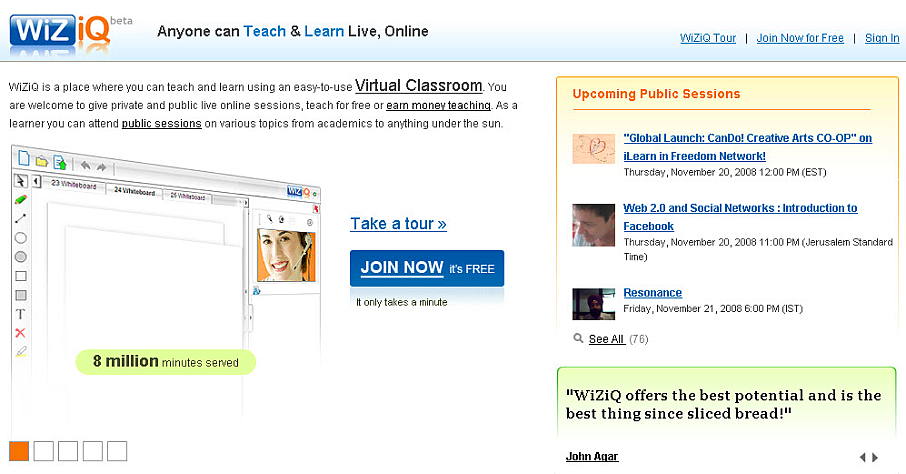
Figure 1. The FrontPage of WiZiQ
Using WiZiQ
1. Creating an account and signing in
In order to start using WiZiQ, it is necessary to create an account. As can be seen in Figure 2, there is a “JOIN NOW” link on the WiZiQ home page.
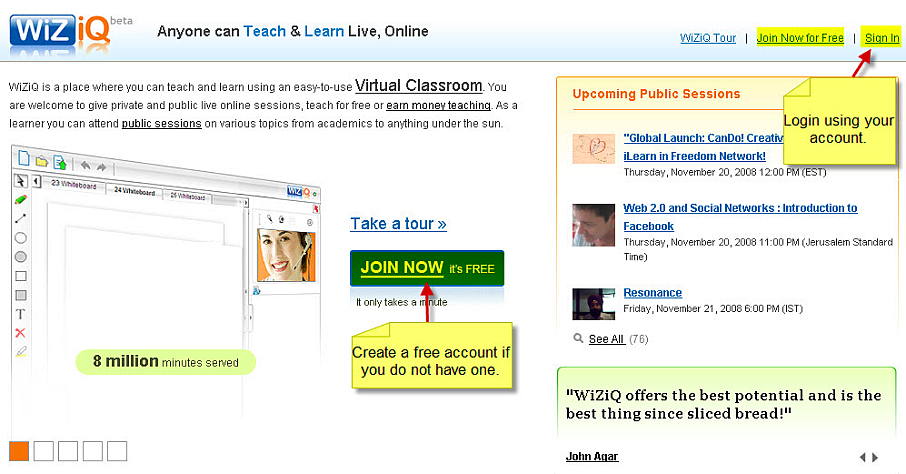
Figure 2. How to join and sign in
After clicking the “JOIN NOW” button, the next step is to fill in the required information for the account (Figure 3).
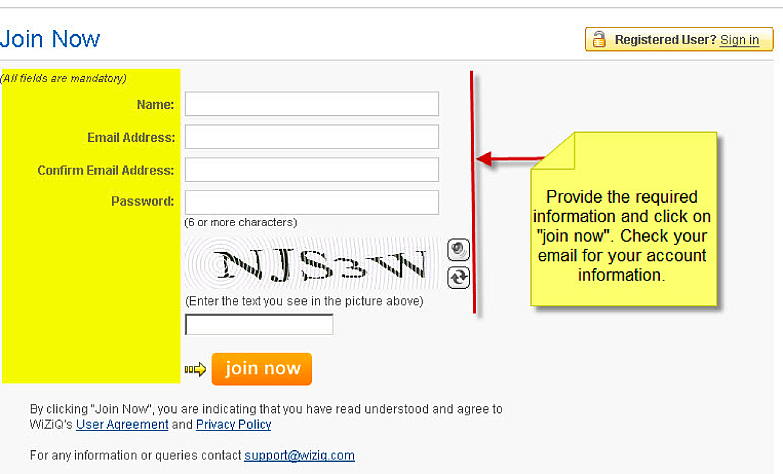
Figure 3. Joining WiZiQ
Once the required fields have been filled in, the e-mail address and password will be sent to the email specified and will be used to sign in.
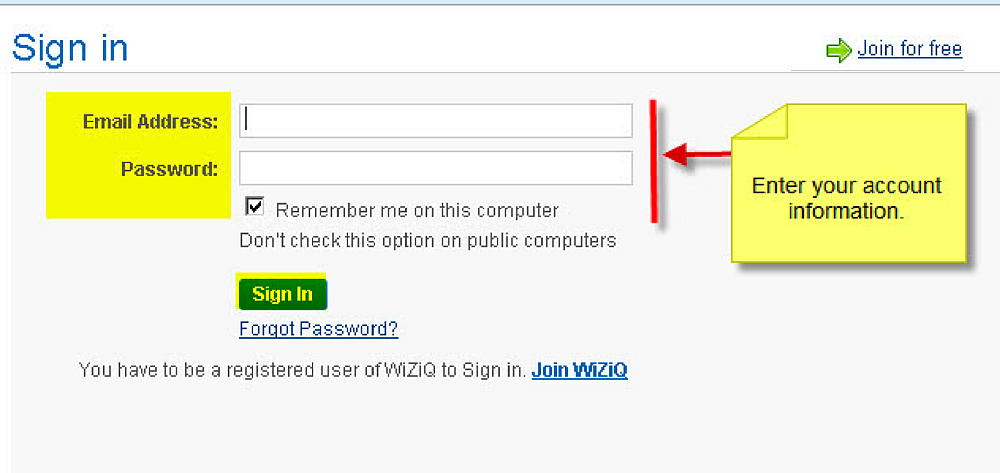
Figure 4. Signing in
The next screen is the account page which shows the user’s tests, content, sessions, and profile. Information (such as name, location etc.) can be changed in the “profile” and “account and settings” sections (Figure 5).
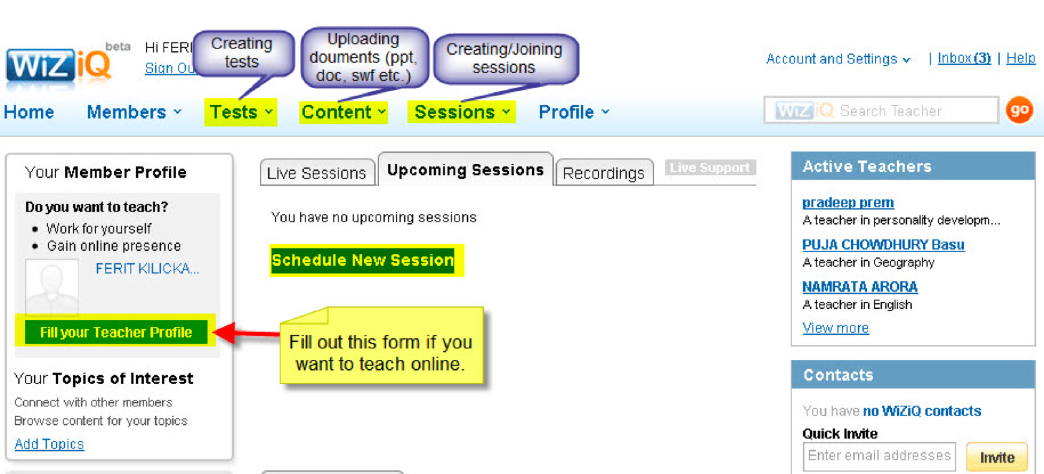
Figure 5. WiZiQ account
The most commonly used features, which can be seen in Figure 5, include the following:
- Tests: To create/view/search multiple-choice tests
- Content: To upload documents (ppt, doc, swf, pdf etc.)
- Sessions: To schedule/search sessions
2. Scheduling a session
In order to create a new session or a new virtual classroom, users click on “Sessions” and then “Schedule a Session” which causes a new page to appear. Users then enter information about the new session, such as time, date, title, and a description of the session (Figure 6).
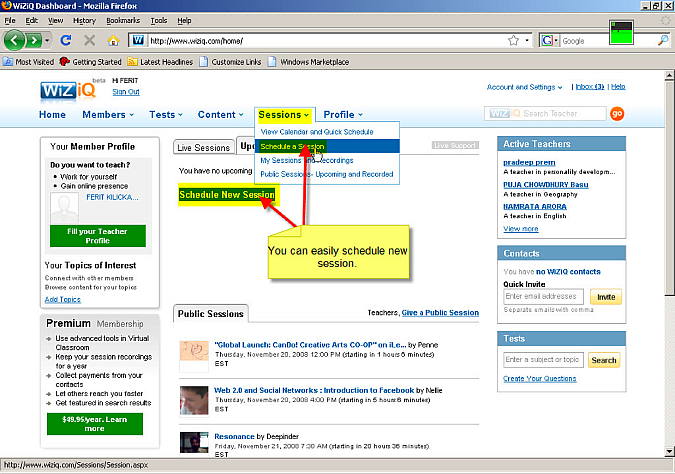
Figure 6. Scheduling a new session
The next step is to provide information on the new session, such as the title and a description (Note: It is optional, but strongly recommended that users provide detailed information such as date, time, and duration).
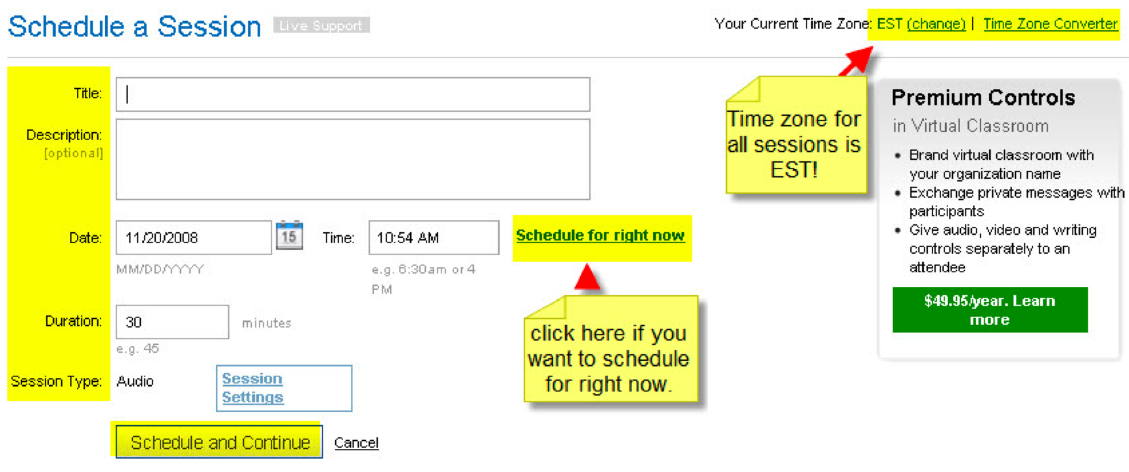
Figure 7. Providing information on the new session
After this information has been entered, a new page appears, notifying the user that “Your session has been successfully scheduled.” On this page, some settings are provided. Users can invite contacts from WiZiQ and/or web email accounts to the sessions, change session settings, or launch the session. Users can also post a “Session Link” to a blog or wiki (Figure 8).
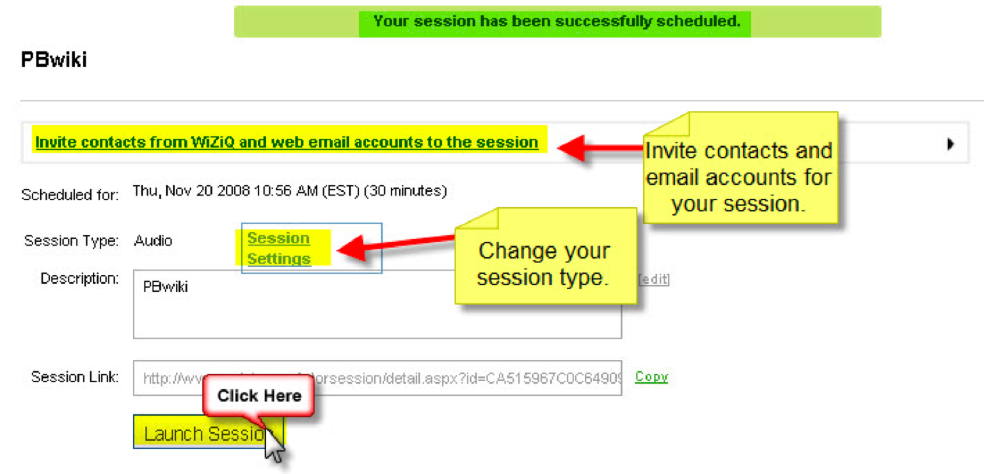
Figure 8. Confirmation of the session scheduled
3. Inviting contacts and email accounts to the session
In Figure 9, the screen shows how to add email accounts and/or contacts from WiZiQ.
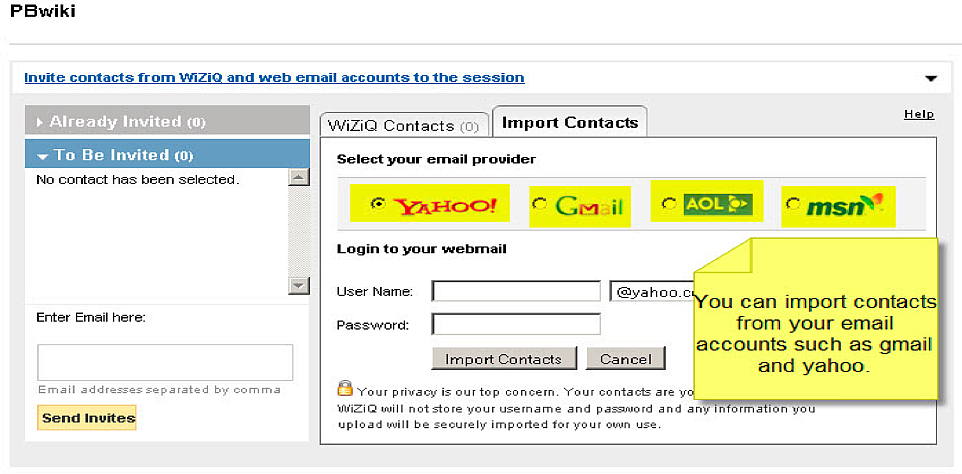
Figure 9. Inviting contacts and email accounts
4. Searching/Launching Sessions
Choosing the “Sessions” menu allows users to search for a session or launch an upcoming or recorded public sessions. Figure 10 shows the screen after “Public Sessions–Upcoming and recorded” has been clicked. Here, users can “Search Public Sessions,” view recordings, or give a public session.
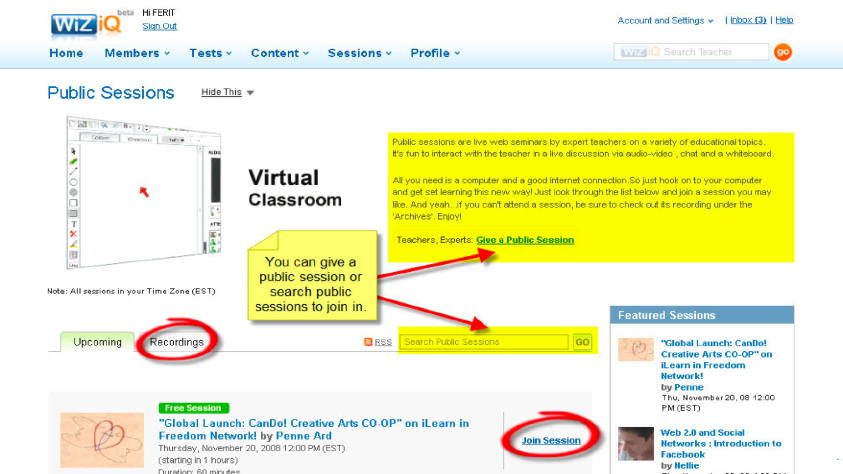
Figure 10. Public sessions–upcoming and recorded
When a session is joined/launched, the following Adobe Flash-based screen loads. Users should keep in mind that they can only join or launch a session during the date and time it is scheduled. If you cannot join a session, you can view a recording of it if it has been made public.
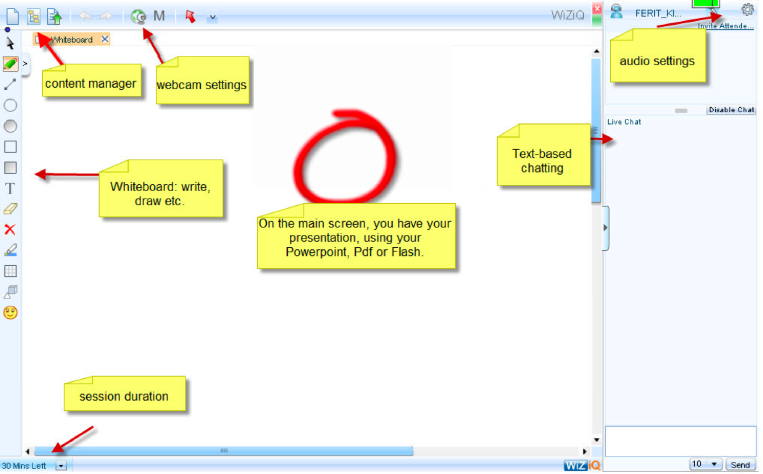
Figure 11. Session launched
Figure 11 shows the screen on which presentations are given using formats such as Microsoft PowerPoint and PDF. Files can be uploaded prior to the session or during the session using the content manager (uploading documents/audio/video streaming is very fast and without delay). The presenter (the teacher) can control the presentation and discuss the necessary points via a red pointer. Attendees (students) can contribute through live chat (text-based) or raising their virtual hand. The presenter can also transfer control to attendees (audio, or audio and video; whiteboard control by the attendees is available for premium members). There is also a whiteboard which the teacher can write on using the mouse; however, typing on this area is not possible (although a tablet PC and tablet pen can be used with WiZiQ).
Limitations of Free Accounts
Figure 12 shows detailed information about the limitations of free WiZiQ accounts.
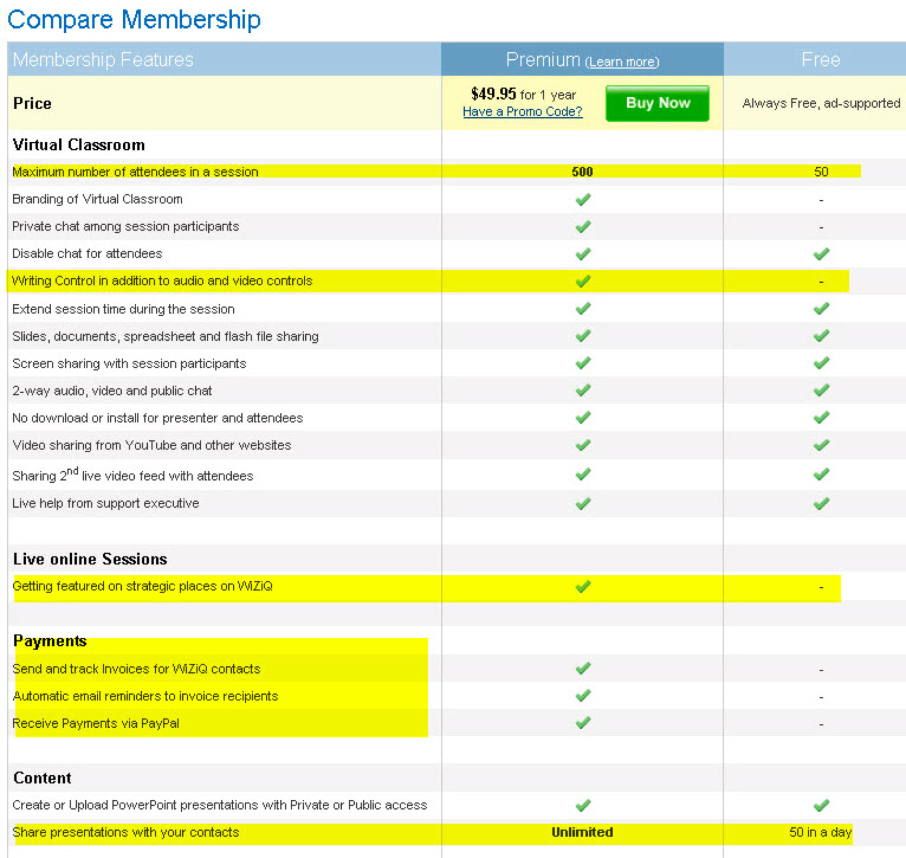
Figure 12. Premium vs. free membership
Evaluation
It cannot be denied that online education is no longer a dream of the future. WiZiQ enables anyone to teach or learn about anything that they want without geographic boundaries. All that is needed is a computer and a good Internet connection. You just sign up, schedule, or join a session. No technical expertise is needed and with little or no training, anyone can learn how to benefit from WiZiQ in minutes. Even with a free account, audio/video streaming, file uploading, and session recording features are available. In addition to all these features, WiZiQ Live Class Module for Moodle makes it a very good alternative to expensive online classroom platforms. It has many uses especially for distance language classes such as speaking, archiving training/lecture sessions, and interviews.
Everything has two sides, and there are some limitations to WiZiQ, such as the type of test questions available (only multiple-choice). This could be improved by adding additional assessment formats such as matching or fill in the blanks. Moreover, presenters could be allowed to visit other websites while presenting on the Whiteboard in order to do live demonstrations. I am sure future versions/updates will make this feature available to users.
Most importantly, while WiZiQ provides users with the necessary tools for online learning and teaching, it cannot work magic; simply using online tools like WiZiQ will not automatically make users better teachers or students. Good quality content is necessary (Lamy & Hampel, 2007) to put to good use the astonishing free features provided by WiZiQ.
A Flash version of the figures provided on this review is available.
Reference
Lamy, M. N. & Hampel, R. (2007). Online communication in language learning and teaching. New York: Palgrave Macmillan.
Other resources
Adobe Connect Professional. (http://www.adobe.com/products/acrobatconnectpro/)
AuthorSTREAM. A similar platform. (http://www.authorstream.com)
authorPOINTTM Lite for Free PowerPoint Sharing and Conversion. (http://www.authorgen.com/authorpoint-lite-free/powerpoint-to-flash-converter.aspx)
Official Blog of WiZiQ. (http://wiziq.typepad.com)
WiZiQ. (http://www.wiziq.com)
WiZiQ Forum. (http://www.wiziq.com/forum/)
WiZiQ Help. (http://www.wiziq.com/help.aspx/wiziq/)
WiZiQ Live Class Module for Moodle. For version 1.6; For version 1.7 & Higher
About the Reviewer
Ferit Kılıçkaya is a research assistant and a doctoral candidate in the Department of Foreign Language Education at the Middle East Technical University, Ankara, Turkey. He holds a master’s degree in English Language Teaching. His main interests include computer-assisted language learning and testing and educational technology. He has published several articles and reviews in journals such as CALL-EJ Online, Educational Technology & Society, Teaching English with Technology, and TESL-EJ. Email: <kilickay metu.edu.tr>;
<ferit.kilickayagmail.com>
Home Page: http://www.metu.edu.tr/~kilickay
|
© Copyright rests with authors. Please cite TESL-EJ appropriately.
Editor’s Note: The HTML version contains no page numbers. Please use the PDF version of this article for citations. |