

September 2010 – Volume 14, Number 2
lyricstraining.com
| Title |  |
| Homepage | http://www.lyricstraining.com/ |
| Type of product | Website utilizing music videos to enhance foreign language skills |
| Minimum system requirement |
Macromedia Flash Player 7.0+ plug-in; Windows 2000 or higher with latest updates installed or Mac OS X 10.3 or higher; Firefox 1.1+, Internet Explorer 5.0+, or Safari 1.0+; Broadband connection with 500+ kbps |
| Price | Free |
The reality of music is in that vibrations remain in the ear after the singer finishes his song and the player no longer plucks the strings.
-Kahlil Gibran
Introduction
In recent years, YouTube has emerged as one of the most recognizable and widely used resources on the web. Music videos are popular on the site as are videos made by users that provide lyric transcripts along with music from popular artists (evidenced by the high number of views that these videos receive). Lyrics Training (htt://www.lyricstraining.com) seems to be the first dedicated language learning website to realize the popularity of these materials and use them in an educational context.
General Description
Lyrics Training is a website utilizing imbedded YouTube music videos of popular songs to provide language learners with a fun way to practice language skills. Users can choose from 6 languages (English, Spanish, German, French, Italian and Dutch) and videos are categorized into three levels of difficulty (easy, medium and hard).
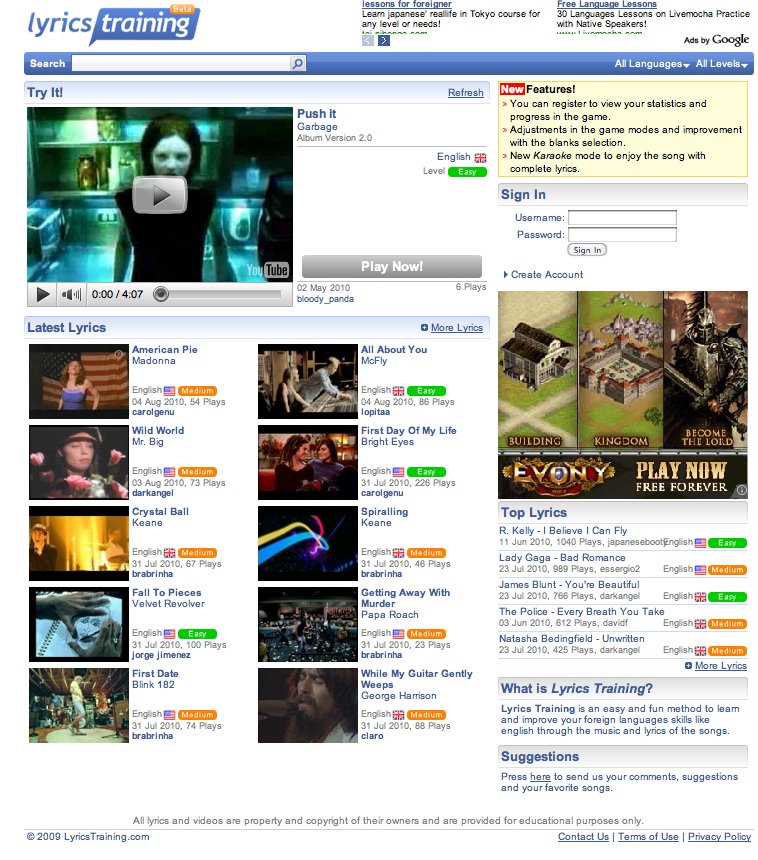 Figure 1. Home page
The home page displays a featured music video, labeled “Try It”, which changes each time the screen is refreshed; recently added videos are displayed under the heading “Latest Lyrics”. In addition, the most popular videos are presented in the bottom-right of the screen and labeled “Top Lyrics”. Users can look up videos by artist name or song title using the search function or get a listing of videos that meet language and level criteria by using the drop-down menus in the website’s toolbar – when the page opens these menus are set at “all languages” and “all levels” as a default.
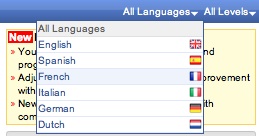
Figures 2. Drop-down menu for language
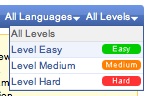
Figure 3. Drop-down menu for level
Even though six languages are given in the language menu, it is important to note that the vast majority of videos available are in English. In fact, the final choice on the menu, Dutch, only contains three videos at this time. Perceived difficulty levels seem to be determined by speed of the song, vocabulary level and how clearly the lyrics can be heard.
Once a music video has been selected, users begin a game by pressing the “Play Now” button next to the video. The user will then be presented with the screen below.
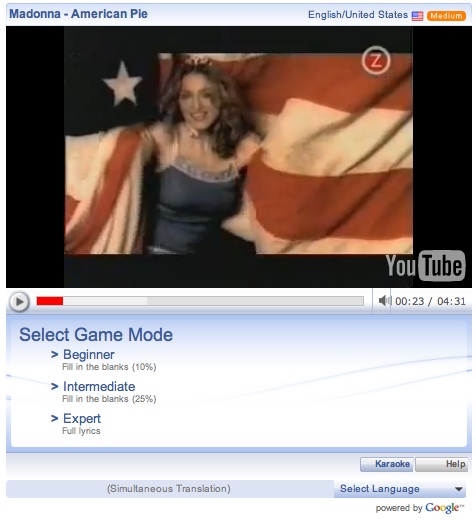 Figure 4. Game opening page
At this stage the learner is confronted with a variety of selections. By simply pressing the play button, the music video will play without any lyrics. By selecting the “Karaoke” button in the bottom-right, the music video will play with the full-lyrics. Both of these modes allow for users to preview the song before taking part in the game mode. When ready, the language learner can select a game mode. Beginner level has students complete a gap-fill activity with 10% of the text blank, Intermediate with 25% blank text and Expert mode with 100% blank text.
The following screenshot shows an intermediate level game for the song American Pie by Madonna.
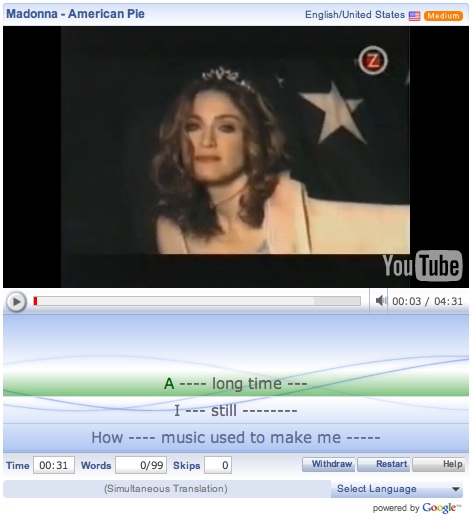 Figure 5. Game in progress
As the video plays, users are expected to complete a gap fill exercise using the transcript of the lyrics below the video. The video will not continue until the missing word is filled in. On the bottom left a timer is displayed as well as a count of the number of missing words remaining and the number of gaps skipped by the user. At anytime, the user can select to “withdraw” which will stop the game and play the karaoke version of the song, giving the student further review before trying again. Additionally, a user might opt to restart the game from the beginning. Learners looking for further support may select for the game to display a simultaneous translation at the bottom of the screen in a number of languages. Finally, the help button may be used to display game controls.
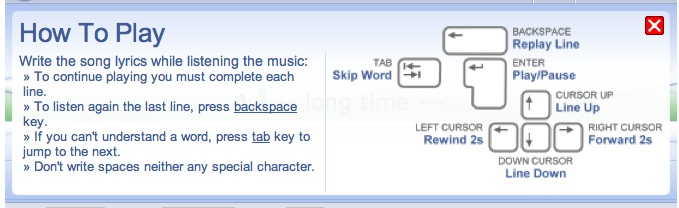 Figure 6. Game controls
When the game is completed, Lyrics Training automatically tallies a score for the user based on the time it took for her to complete the song and how many of the missing words were filled in. Playing higher level modes of the game will result in higher scores since a greater number of words are missing. Below is a sample of the score based on an intermediate game played using Miley Cyrus’ song “The Climb”.
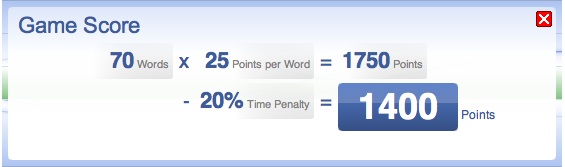 Figure 7. Game score
Players who wish to keep track of their progress may create a free account with Lyrics Training. Members can then access a statistics page, shown below, which lists videos completed with scoring information.
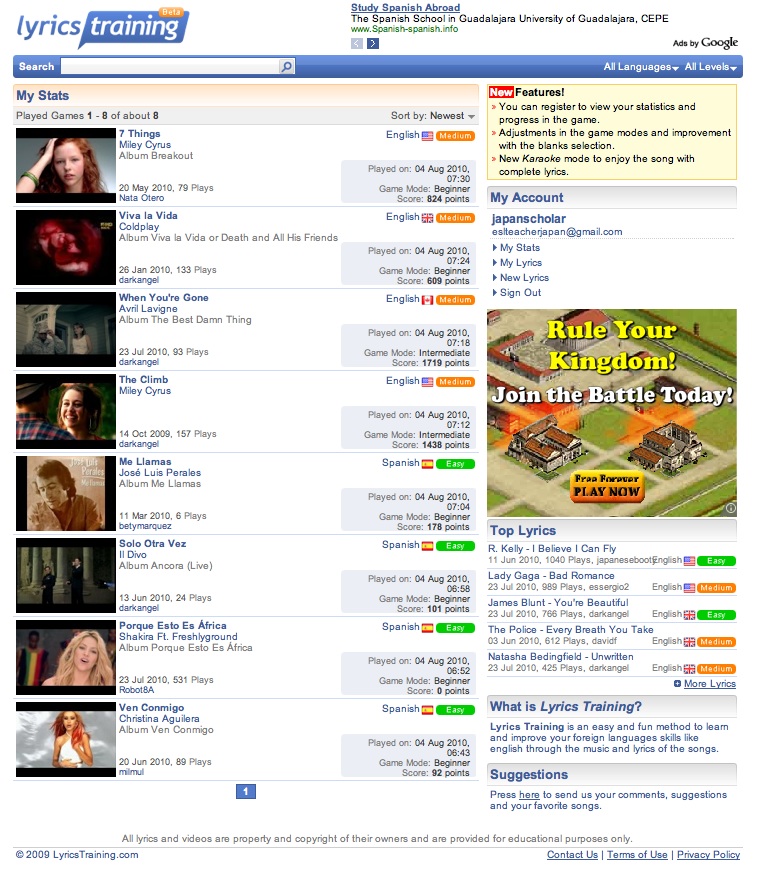 Figure 8. Member statistics
Furthermore, membership entitles users to add additional videos to the website. To do this, users simply need to click the “New Lyrics” button under the heading “My Account”. This will open up a separate window that is shown below.
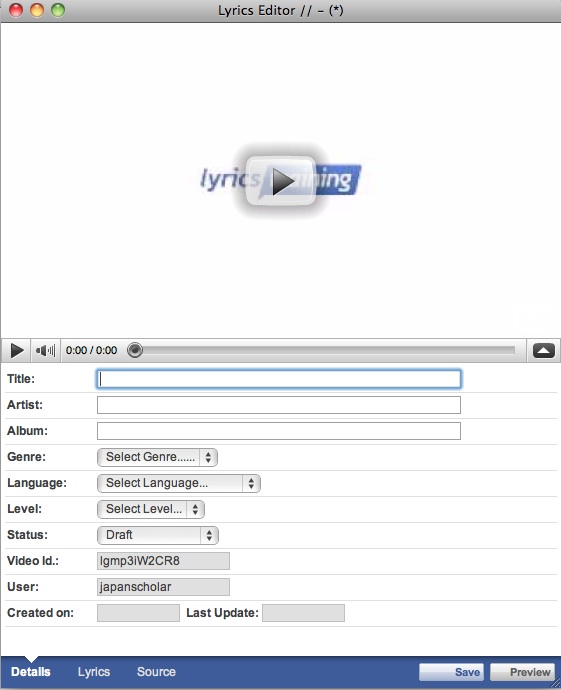 Figure 9. New lyrics
The process of creating “New Lyrics” is an easy one and can provide further practice to students who wish to transcribe videos in the target language or who want to contribute to the site community by providing learners of their native language with additional resources.
Evaluation
Advantages
Lyrics Training is a unique website which provides learners with material which is authentic, current and interesting. Tomlinson has stated that effective materials should achieve impact (1998). He proposes that impact can be achieved through a variety of factors such as novelty, attractive presentation and appealing content (1998). Due to the wide variety of songs, artists, and genres available on Lyrics Training (especially for English language learners) and the entertainment quality of music videos, it seems as if Lyrics Training may meet this aim for many students.
In addition, Lyrics Training makes it easy for learners to adjust content to their ability level. This is due to the categorization of music videos into three difficulty levels as well as providing three additional modes of game play. Instructional scaffolding may be provided by using the karaoke version of the song to preview before playing a game and utilizing other features such as simultaneous translation. Furthermore, video has also been shown to give additional support to learners in CALL environments by providing them with paralinguistic and extralinguistic information (Mendelsohn 1994; Ur, 1984 as cited in Chapelle and Jamieson, 2008). Furthermore, research has shown that video can increase motivation and interest levels in listeners as well as increase their comprehension of the listening task (Lynch, 1998).
Finally, feedback is provided to users immediately since they must correctly fill in the missing word for the game to progress. Additionally, feedback is provided at the end of the session with an easy to understand scoring system. This information is stored for account holders and may provide additional motivation as students see how they progress in a quantifiable way.
Disadvantages
Despite these advantages, there are some areas where Lyrics Training might be able to improve. First, many evaluations of effective materials development (Tomlinson, 1998; Chapelle and Jamieson, 2008) state that materials should draw a student’s attention to particular language forms. This might be particularly important when we consider song lyrics, where reduced forms (i.e. wanna and gonna) as well as unusual syntax is common. This could be particularly confusing to low level students without adequate explanation. It may be helpful if the site provided students with a reference section or glossary that highlighted these forms.
Secondly, Lyrics Training has provided language learners with a superb resource (music videos with lyric transcripts) but has only used these materials for a single purpose (gap-fill exercises). It might be beneficial if students could be given additional ways to use the materials on the site. For example, a forum or comments section could be created for students to discuss a song’s meaning or simply to chat about their favorite artist. Teacher’s resources might also be compiled to demonstrate ways to use music in the classroom.
Conclusion
In summary, Lyrics Training can be a fun way for students of different abilities and target languages to practice listening skills. Video and text support make it simple for students to vary the difficulty of the listening tasks. The beta format also allows for constant updates, keeping the content current. Additional support, reference materials and activities to supplement gap-fills could benefit the site. However, these features should/will become available as Lyrics Training becomes increasingly popular with both teachers and students of foreign/second languages.
References
Chapelle, C.A. & Jamieson, J. (2008). Tips for teaching with CALL: Practical approaches to computer-assisted language learning. New York: Pearson-Longman.
Lynch, T. (1998). Theoretical perspectives on listening. ARAL, 18, 3-19.
Richard-Amato, P.A. (2003). Making it happen: From interactive to participatory language teaching. New York: Pearson-Longman.
Tomlinson, B. (1998). Materials development in language teaching. Cambridge, UK: Cambridge University Press.
About the Reviewer
Daniel J. Mills holds an M.S. Ed. TESOL and works as a business language instructor and curriculum designer with several corporations in Shiga, Japan.
<eslteacherjapan gmail.com>
| © Copyright rests with authors. Please cite TESL-EJ appropriately. |