

June 2011 – Volume 15, Number 1
Connected Speech
| Title | Connected Speech |
| Publisher | Protea Textware |
| Contact Information | http://www.proteatextware.com.au/shopexd.asp?id=103&bc=yes?id=103 |
| Type of product | Pronunciation practice software |
| Platform | Windows NT, 2000, Me, XP, Vista, 7 |
| Minimum hardware requirement | Recommended RAM for the appropriate version of Windows, 640 MB of free hard disk space; microphones and speakers or headphones |
| Price | Twenty User: USD $864 |
Introduction
Recently, various software programs have been developed with the goal of improving pronunciation. Connected Speech is a well-known and established language learning program which is currently among the top competitors in the area of pronunciation. In 2010, it received eLearning’s Award for Excellence, and has been awarded “Best in Class” in International Training.
General Description of the Program
Connected Speech uses video and audio clips from nine different speakers to address seven areas of pronunciation: language, pause groups, stress, pitch change, linking, sounds, and syllables. The program focuses on suprasegmentals, as is reflected in four of the six pronunciation areas (pause groups, stress, pitch change, and linking). Segmentals are addressed in the sounds area, which emphasizes vowels without entirely neglecting consonants. Students can work in any area they wish, and can change areas or speakers at any time. Language is listed as the first area, however, suggesting to learners that it is a good place to start. The primary purpose of the language section is to ensure that the meaning of the aural text is understood before work on form commences.
Each aspect of pronunciation includes three activities to help students recognize and produce the prosodic or segmental features which are the focus of the lesson. After completing listening activities for recognition, students can record their own pronunciation. The program provides feedback about the featured aspect of pronunciation.
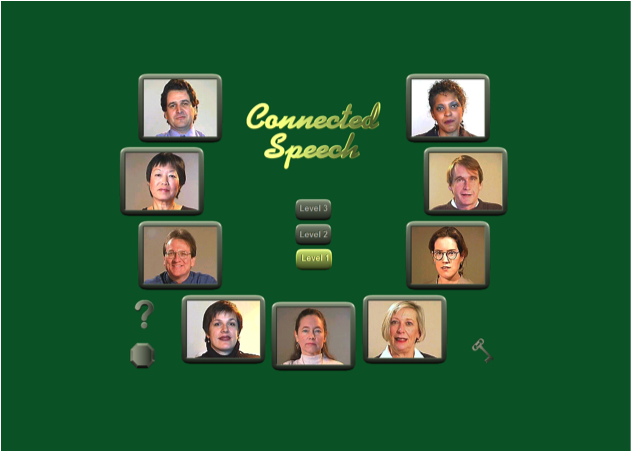
Figure 1. Connected Speech opening screen
Connected Speech opens with a screen showing the three available levels as well as the nine speakers (see Figure 1). Clicking a stop sign-shaped button allows students to exit from the program. A key button allows students to change printer passwords. A question mark button leads to a help screen which instructs students to select a level and the speaker they would like to work with. It also informs students that they may right-click any button to receive help understanding the function of that button. As students move the mouse over the speakers, the speakers will greet the student by introducing themselves, saying, for example, “Hi, my name is Mary Michaels.”
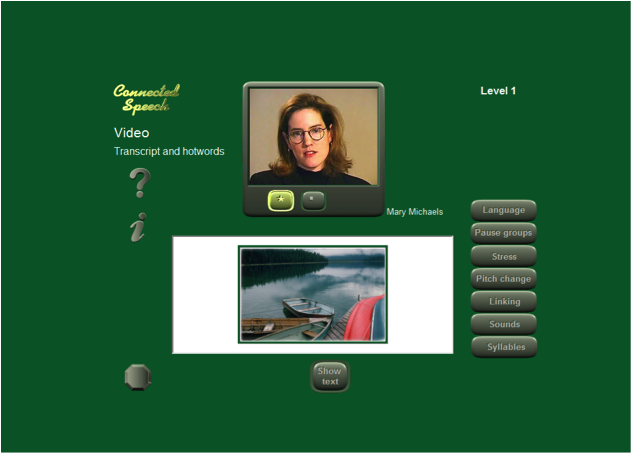
Figure 2. Topic selection
Once a student selects a level and clicks on a speaker, that speaker’s screen will open (see Figure 2). After it opens, a voice will direct students to “play the video and read the text, then choose a module to work on.” In the center of the page, there will be a picture of the speaker with a button with a five-pointed star beneath it. Clicking the star will begin the video. Once the video begins, a button with an eight-pointed star will appear. Clicking this button will stop the video. The question mark button, once again, provides help, while the stop sign button returns the student to the opening page. An i button gives students tips on identifying stressed words from speaker cues. Beneath a subject-related picture is a button allowing students to show or hide a transcription. On the right hand side of the screen are the buttons which students use to select pronunciation features for practice.
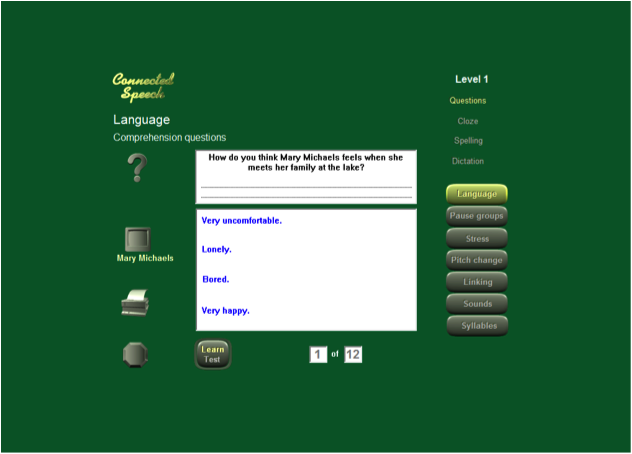
Figure 3. Language
Selecting a pronunciation feature will bring up three to four activities above the pronunciation feature buttons. The available activities vary with each aspect of pronunciation. The language section activities include multiple-choice questions, cloze, spelling, and dictation exercises (see Figure 3). Cloze exercises can be completed from aural texts, as students listen and type what they hear. Spelling activities ask students to type correctly a spoken word. If a wrong letter is typed, the learner will be instructed to try again. On the third try, the voice will tell students the letter. The dictation feedback is similar, but requires the students to write entire paragraphs.
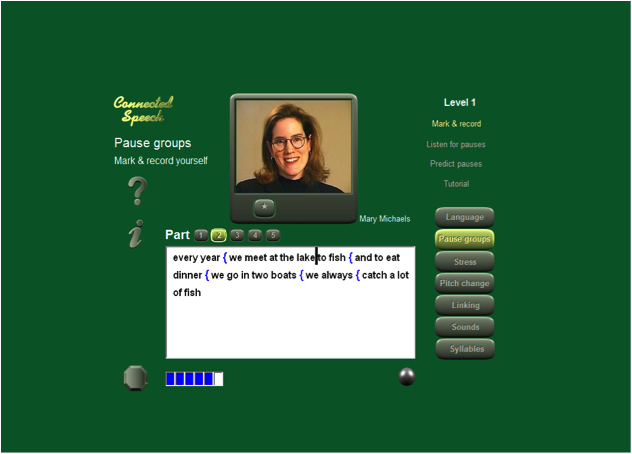
Figure 4. Pause groups
The pause groups section offers students a tutorial and three activities: mark and record, listen for pauses, and predict pauses (see Figure 4). In the first two activities, students listen to and read a short, unpunctuated text. Students click between words to mark a pause. In the example above, there are six pauses, as shown by the series of rectangles below the text box. As students click each pause, a box will be filled in. Once pauses are marked, the circular gray button will check the work. Correct answers are marked in green, incorrect in red. Students can retry by clicking incorrect answers. The third activity, predict pauses, allows students to guess the placement of pauses in an unknown text.
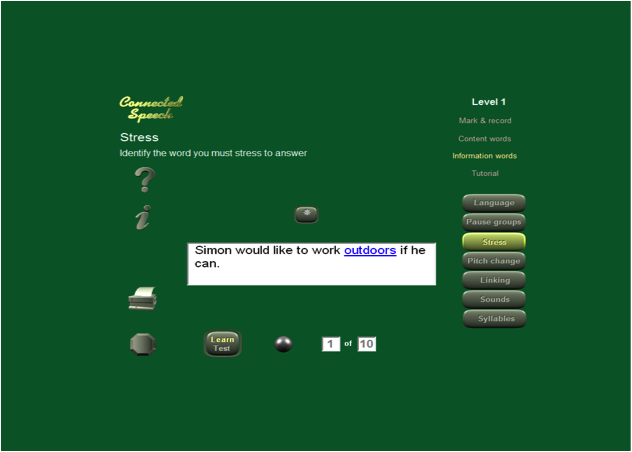
Figure 5. Stress
In the stress section, students can do the following exercises: mark and record, content words, and information words (see Figure 5). In mark and record, students will listen to the video and click the words on which they hear stress. They must select the number of words that are stressed (as the rectangles are filled in) and check with the circle button. Incorrect answers appear in red and can be clicked on to change the answer. In content words, students will read a sentence and mark the content words. Information words is an activity that makes students think about how words are stressed in context. Before choosing a word to stress, they must click on the eight-pointed star button and listen to a question. In response to this question, they will click the word in the answer which gives the most important information. This kind of exercise raises students’ awareness of the importance of showing their listeners what information is important when they speak.
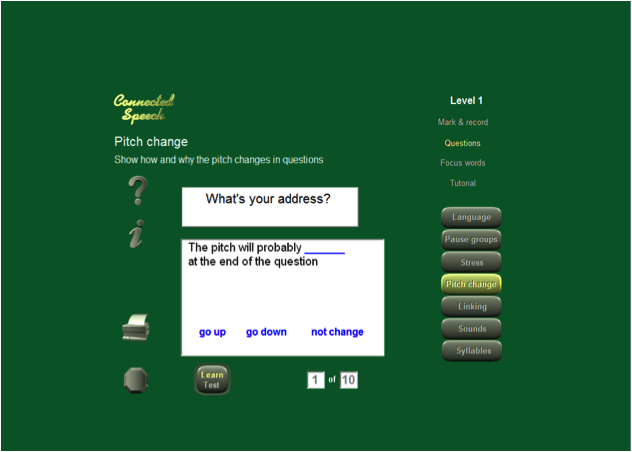
Figure 6. Pitch change
Pitch change activities include mark and record, questions, focus words, and a tutorial. In mark and record, students listen while looking at a transcription of the aural text. They mark all words during which the pitch changes. The checking and correcting take place as in other exercises. The second part of the exercise asks students to select the words in which pitch changes and mark the direction of pitch change. At the end, students can record themselves using pitch change in the phrases from the video. The questions section has students read a written question and mark whether the pitch would go up or down or not change at the end of the question (see Figure 6). After they choose the correct answer, they will also be asked to choose why they think so. The Focus Words section has students listen to a short sentence such as “He’s a doctor,” and find which word involves pitch change. Once they find the word, they will be asked to decide on which syllable the pitch changes.
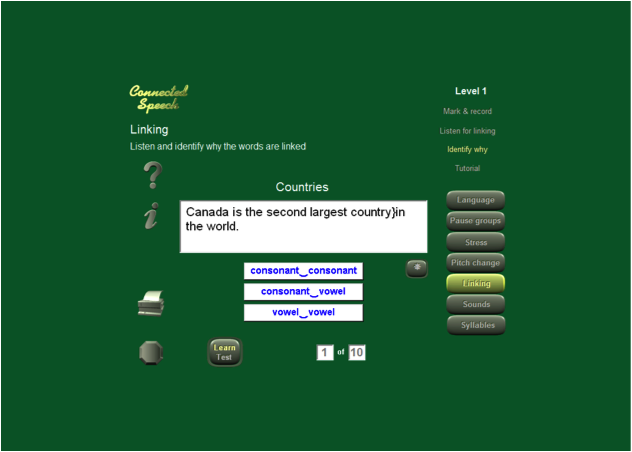
Figure 7. Linking
Linking activities include mark and record, listen for linking, identify why, and the tutorial. In mark and record and listen for linking, students are again given a transcription to mark while they listen to the speaker. They must mark between words which are linked. Mark and record is taken from the video, while listen for linking gives students new content. Finally, identify why allows students to discover why, phonemically, words are linked (see Figure 7).
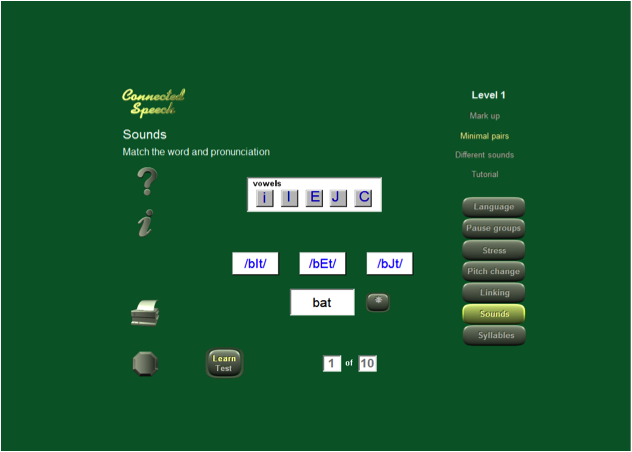
Figure 8. Sounds – minimal pairs
Sounds activities allow students to practice their segmentals (vowels and consonants, especially vowels). The sounds page has a tutorial as well as mark up, minimal pairs, and different sounds. Mark up will give students a transcription and a vowel or consonant. Students must listen and mark every word containing that vowel or consonant. Minimal pairs gives students a word (in black, “bat”) and several phonetic transcriptions. They must listen by clicking the star button and then select the correct phonetic transcription. The different sounds activity gives students four words, three of which contain the same vowel or consonant. They must find the one word which does not contain the sound.
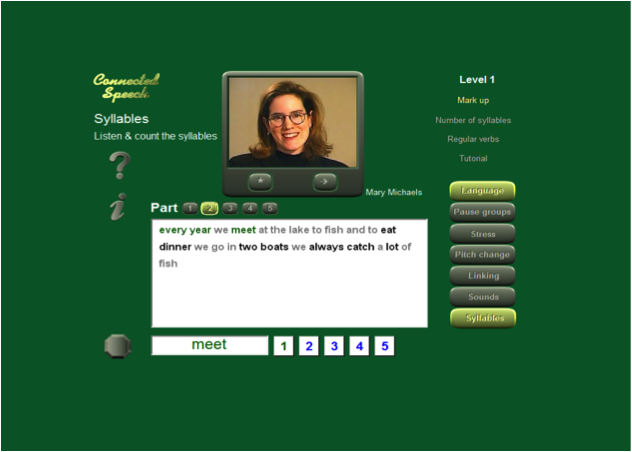
Figure 9. Syllables
The syllables page has mark up, number of syllables, and regular verbs activities, as well as a tutorial. Mark up gives students a transcription with highlighted words. They must click on a black word and select the number of syllables it contains, then press the gray circle button to check. Again, students can correct their answers if they answer incorrectly by clicking it and then clicking the correct answer. Number of syllables gives students discreet words, not from the text, and has them select the number of syllables. Regular verbs has students give the number of syllables in the root form and a different tense of a regular verb.
Evaluation of the Product
Pronunciation is a vital element of communicative ability, as demonstrated by Derwing and Munro (2005) and Derwing (2003), affecting both intelligibility and the attitudes of listeners.
Connected Speech has the advantage of focusing on suprasegmentals over segmentals, a choice supported by research. Derwing and Munro (2005) recount multiple studies in which suprasegmentals are shown to be of greater importance for intelligibility than segmentals. It is important to note, however, that an increasing emphasis on suprasegmentals should not result in complete failure to address segmentals. Connected Speech offers practice on both segmental and suprasegmentals, placing the greatest stress, however, on suprasegmentals.
Connected Speech provides exercises to promote awareness of input pronunciation as well as pronunciation output. It is just as important to be able to understand the other speaker in a conversation as to speak clearly oneself.
It is also pedagogically sound to begin, as Connected Speech does, with comprehension questions, attempting to give students an understanding of the content before they analyze the sounds. This may help to prevent students from losing sight of the communicative purpose of language in the midst of a program with an intensive focus on accuracy. Pictures also serve to connect the form of the words with their meaning. It must also be said that, though Connected Speech has comprehension questions, it is, for the most part, a form-focused program, aimed towards increasing pronunciation accuracy. This still has the potential to mislead students into dissociating their learning from actual communication and failing to use what they are taught. For instance, if students could speak the phrases being used in practice as responses to a question or statement (as occurs in real communication), rather than simply repeating, they might be more likely to implement aspects of pronunciation in their actual speech.
Though a learner may possibly lose sight of the purpose of language, s/he is not likely to become lost in navigating the program. Connected Speech has an essentially straightforward interface navigated by clicking buttons with identifiable shapes or pictures, facilitating use for non-native speakers. There is also a help button to give assistance to students in every activity and area of pronunciation.
Connected Speech makes use of the speech technology discussed by Godwin-Jones (2009), including visualization of speech and speech recognition. Here, it exceeds its competitor Clear Speech Works, which has no speech recognition component (Al-Surmi, 2010).
Summary
Connected Speech is a useful resource for learners who would like to improve the intelligibility or native-likeness of their pronunciation. It capitalizes on modern speech technologies to provide help in both recognition and production of various pronunciation features. A contextualized focus on suprasegmentals raises student awareness and skills in the prosodic aspects of spoken language as well as segmental aspects of pronunciation while placing language features in meaningful contexts. An interactive and navigable program, it is an excellent choice for any learner who wishes to engage in intensive pronunciation work.
References
Al-Surmi, M. (2010). Clear Speech Works. TESL-EJ 14, 1, 8 pp. Available: http://www.tesl-ej.org/wordpress/issues/volume14/ej53/ej53m2/.
Derwing, T. M. (2003). What do ESL students say about their accents? Canadian Modern Language Review, 59(4), 547-66.
Derwing, T. M., & Munro, M. J. (2005). Second language accent and pronunciation teaching: A research-based approach. TESOL Quarterly, 39(3), 379-397.
Godwin-Jones, R. (2009). Emerging technologies: Speech tools and technologies. Language Learning & Technology 13, 3, 4-11. Available: http://llt.msu.edu/vol13num3/emerging.pdf .
About the Reviewer
Hope Hawthorne is a graduate student and graduate teaching assistant in the MA-TESL program at Northern Arizona University. She has been an English instructor in Thailand, South Korea, and the United States. She has taught classes in Computer-Assisted Language Learning (CALL).
hope.hawthorne nau.edu
| © Copyright rests with authors. Please cite TESL-EJ appropriately. |