
May 2019 – Volume 23, Number 1
| Website | www.storybird.com |
| Title | Storybird |
| Authors | Mark Ury (CEO), Kaye Puhlmann (Operations), and Adam Endicott (Engineering) |
| Contact Information | info storybird.com storybird.comMailing address: Storybird Corp. 3044 Bloor St. West #944, Toronto ON M8X 2Y8 |
| Type of Product | Digital book creator |
| Hardware Requirement | An internet-accessible device |
| Software Requirements | Chrome, Safari 5+, Firefox 5+, IE 11+, Opera 12.11+ |
| Registration | Required |
| Price | Free to make, share, and read stories on Storybird. Printing and downloading stories have various fees (download – $2.99 and up; download bundle – $3.99 and up; softcover – $9.99 and up; hardcover – $32.99 and up). |
Introduction
Traditionally, stories have been told for passing knowledge from one generation to another. Recently, digital storytelling has become “a modern incarnation” (Smeda, Dakich, & Sharda, 2014, p. 2) of the traditional art of storytelling that allows almost anyone to create a story with images, sounds, and music using Web 2.0-based applications. In educational contexts, digital storytelling has become increasingly used for literacy development in first language (L1) classrooms. It is also gaining popularity in English as a Second Language (ESL) and English as a Foreign Language (EFL) classrooms as it promotes student engagement and is highly adaptable to content (Grigsby, Theard-Griggs, & Lilly, 2015). Among many sophisticated digital storytelling tools, Storybird is one widely-used platform.
The premise of Storybird is “art-inspired storytelling” (Storybird, 2019); that is, when users choose artwork in Storybird and then create a written narrative story inspired by those images. This innovative approach to writing is believed to ignite students’ imagination, evoke emotions, and inspire students to write. This may consequently help students avoid the “blank-page syndrome” (Storybird, 2019), which is difficulty with getting beyond the blank page due to a lack of ideas. Teachers can use Storybird to create an online class that allows them to enroll students, create writing assignments, grade students’ work, and provide feedback. Once enrolled, students can write visual stories and poems. Students can also read stories written in English that were moderated and approved by Storybird and even participate in different writing challenges created by the Storybird team.
General Description
To join Storybird, users can sign up for free with Google or create an account with any email address. Users can register as a “Regular user” or “Educator/Teacher.” While the two account types are similar in the way the tool can be used, the “Educator/Teacher” account has the option of creating an online class.
To create a class, teachers need to provide a class name, choose a class grade level from the list (e.g., pre-K-12, college, occupational, or other), and then select the end date for the class. Figure 1 below shows this interface.
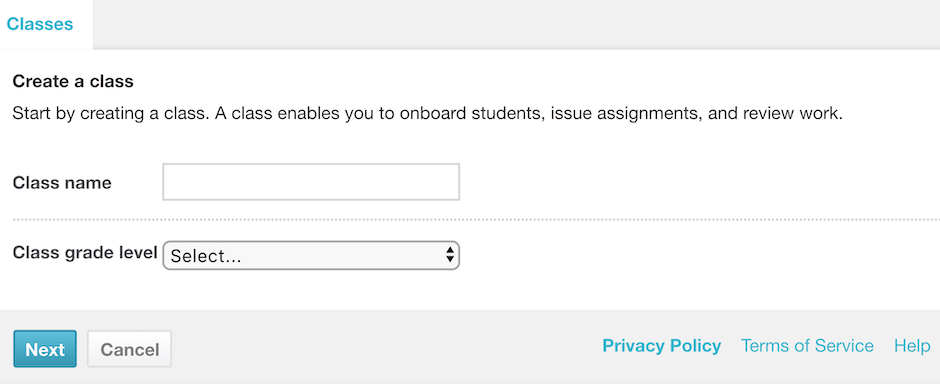
Figure 1. “Create a class” interface
After creating a class, teachers can add students in two ways: by creating student accounts or by giving students the automatically generated class passcode to set up their own accounts. Once all students are enrolled, teachers can then set a writing assignment.
Creating a writing assignment begins with choosing artwork from the Storybird illustration library. Teachers can either assign specific artwork to their students to illustrate a story or let students choose their desired artwork. If students have a specific topic in mind, they can search for it in the top right corner of the illustration library page. The art medium includes watercolor, oil, ink, and digital art. The artwork is largely narrative to give writers an opportunity to “establish a protagonist, feature a location, and reference items as they build their world” (Storybird, 2019). Figure 2 below shows the illustration library and a few examples of the artwork available.
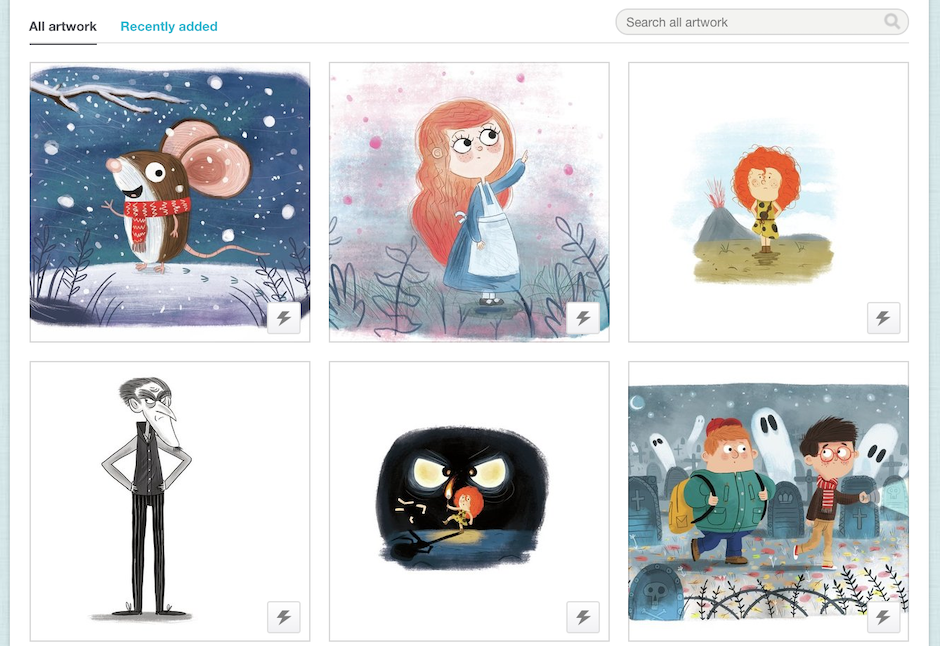
Figure 2. The illustration library interface
After artwork selection, teachers can then choose one of the following assignment formats: Longform Book, Picture Book, or Poem. Each of these formats is explained in detail below.
The Longform Book format enables students to create a multiple-chapter story. Once students are in the Longform Book editor page, they are provided with images from artwork they have been assigned or have chosen on their own (see Figure 3 below). First, students select an image for the cover of their book and then drag and drop it onto the cover area. Next, students add a title for both the book and the first chapter. They then can write their first chapter and even insert images into the body of their text. When the first chapter of a Longform Book has been written and published, students can return to the Longform Book editor page to begin their next chapter. The number of chapters is unlimited, and they can be as long as students desire.
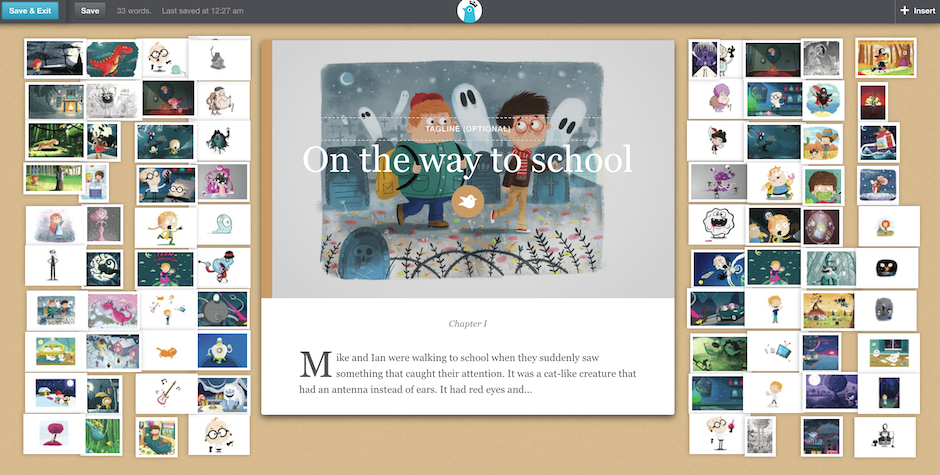
Figure 3. The Longform Book editor interface
The Picture Book format allows students to write a short visual story similar to a children’s book. To create a visual story, students simply need to drag and drop images and write a short text. Once students are in the Picture Book editor page, they begin by creating a cover page that requires an image, a title of the story, and author’s name. Then they create pages to write their story. Each page also requires a short text and an image. Students can add an unlimited number of pages by simply clicking on the “plus” button located at the bottom-right corner of the editor. By clicking the “minus” button, they can delete the created pages. Figure 4 shows the Picture Book editor interface.
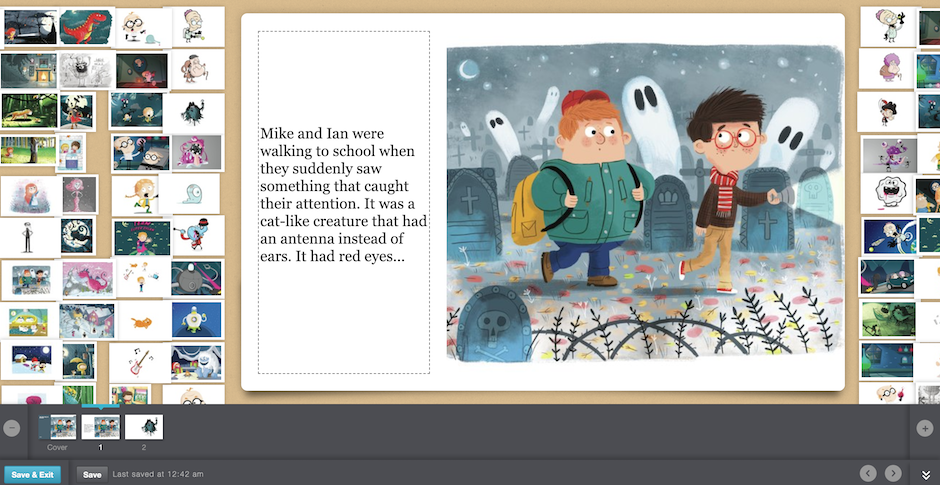
Figure 4. The Picture Book editor interface
The Poem format enables students to create poetry using a single image and preloaded words provided by Storybird or by their teacher. The words provided by Storybird are often related to the possible subject of the image. Verbs, nouns, adjectives, adverbs, and punctuation marks are included so that students are able to create meaningful phrases and sentences. Teachers can also develop a custom wordlist for their students when preparing an assignment. To write a poem, students drag words onto the image in the editor page. If students do not like the preloaded words or an image, they can change either of them by choosing an available option after clicking the “refresh” button on the bottom-right corner of the editor. Students can change the words and image as many times as they wish. Figure 5 shows the Poem editor interface.
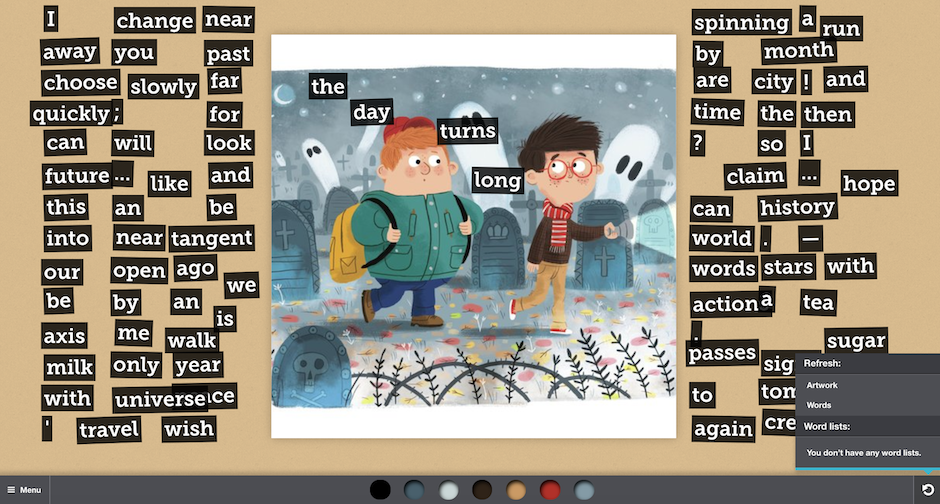
Figure 5. The Poem editor interface
Apart from the three writing assignments, teachers can also assign challenges, created by Storybird, to their students. Challenges are various writing tasks that range from general (e.g., Publish a Picture Book) to more specific (e.g., Haiku Poetry, Instant Poetry). Each challenge includes age, level, format, genre, challenge summary, and instructions that students must follow. An example of a challenge (called SandSonnetWich) is shown below in Figure 6. After participating in a challenge, the student receives a printable certificate of completion.
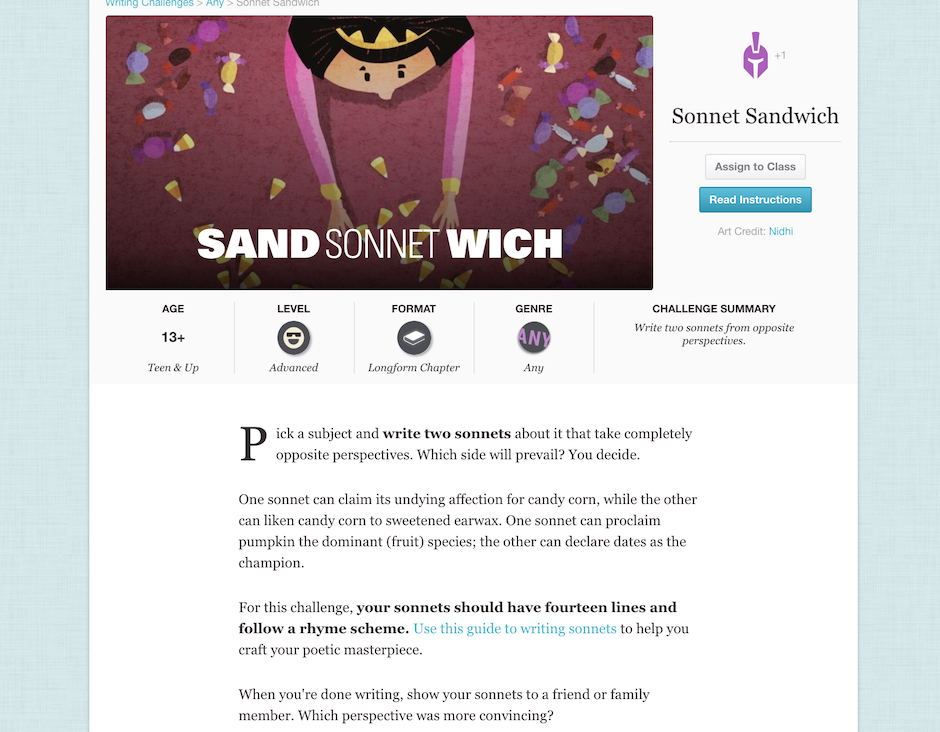
Figure 6. The Storybird Challenge interface
Lastly, teachers can assign students to do readings. Storybird has about 5 million published stories and poems in its public library that are written by regular users as well as amateur and professional writers (Storybird, 2019). Any user can choose to publish their poems and stories publicly for inclusion into the Storybird public library. To be accepted, their work needs to be reviewed and approved by Storybird moderation team. Moderators do not judge the quality of writing and grammar, but instead, they review stories to make sure they do not contain provocative content, inappropriate language, personally identifiable information, and/or advertisements (Storybird, 2019). All the published stories and poems are in English as Storybird does not yet moderate work written in other languages. Stories and poems can be searched by their genre, format, intended age range, or topic (see Figure 7 for the Storybird public library interface). After reading stories and poems, students can leave comments and share their favorite stories on social networking sites such as Facebook, Twitter, and Tumblr.
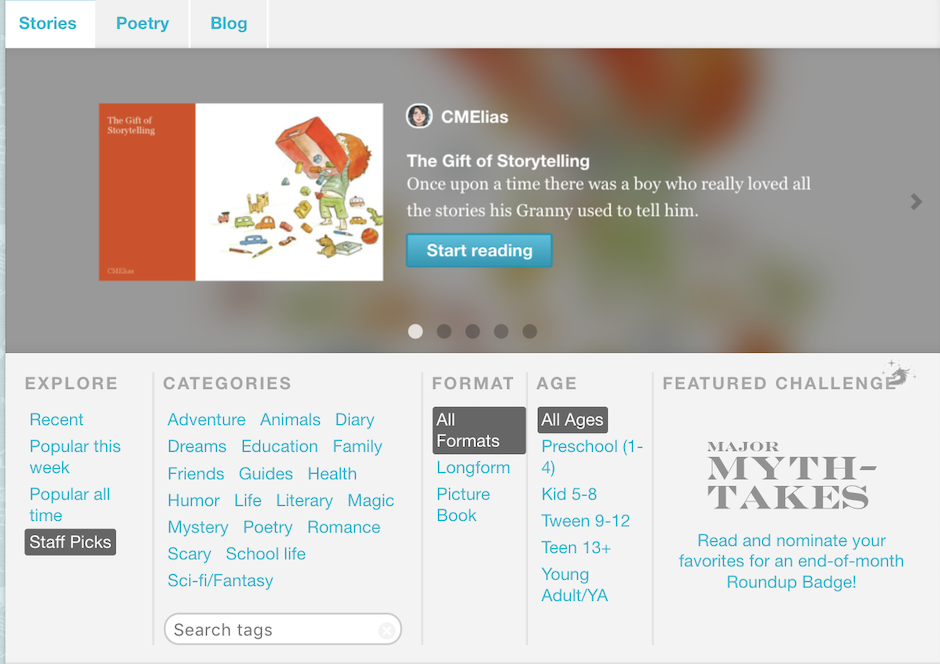
Figure 7. The Storybird public library interface
Evaluation
This section reviews Storybird by considering technological features such as its usability, and its potential for ESL and EFL teaching and learning.
Technological Features
Any user, from young learners to adults, can find it easy to operate Storybird. All users need are basic computer skills such as the ability to type as well as drag and drop words and pictures. However, since Storybird often undergoes changes in an attempt to improve the website, users may find themselves constantly reorienting. This may make getting used to working with Storybird a little difficult and time-consuming. For example, Storybird recently launched its new version which is no longer free. At the time of publication (May 2019), the new version is still under construction, and many more changes are anticipated, such as students being able to choose their own words in a new Poetry app and teachers being able to import a class from Google Classroom (Storybird, 2019).
Language Teaching and Learning
Although Storybird has been mainly used in L1 contexts to develop students’ literacy skills, it also has great potential in ESL and EFL classrooms. Firstly, Storybird’s images could help language learners, especially the learners with low proficiency, convey their messages and ideas more easily (Kim & Lee, 2018). For example, if a learner is unable to clearly communicate their idea to the reader, the accompanying images could support the written text. As they say, “a picture tells a thousand words.”
Secondly, digital storytelling tools are known for their effectiveness in facilitating writing, boosting creativity, and enhancing critical thinking skills (Kim & Lee, 2018; Tsigani & Nikolakopoulou, 2018) which are very important for language learning. Storybird is no exception. Its images are intended to help ESL and EFL learners in narrative writing by providing them with ideas for plot, character development, and setting. This stimulates learners’ thoughts and encourages them to express themselves creatively in their target language. Besides, the process of creating a picture-based story stimulates learners to think critically about their ideas, audience, and effective ways of communicating their ideas with the help of images so that they could achieve a desired effect.
Thirdly, Storybird has the potential to increase the degree of learners’ engagement with writing their stories in the target language (Smeda, Dakich, & Sharda, 2014). Specifically, the final product of learners’ creative work can be turned into a printed book including their image-based stories. Having such a book may give learners a sense of achievement because this allows them to share their stories not only with their teacher and classmates, but also with their family and friends. Sharing their stories with people outside of their class could consequently increase the learners’ interest in writing and engage them with the storytelling process. Additionally, the possibility of sharing their stories with wider audience can motivate learners to try harder and produce better quality texts (Tsigani & Nikolakopoulou, 2018).
However, teachers need to take into account that writing image-based stories may not be suitable for all language learners. For example, Wertz (2014) noted that some of her students came with their own initial ideas when they were first introduced to Storybird, but then had to adapt their stories to the images in the picture sets. This suggests that learners who have a specific vision of what they want to write about might be inadvertently limited by Storybird’s images that do not match their initial intentions. Unfortunately, Storybird does not allow its users to upload their own images, which might be regarded as its drawback for learners who have images they would like to use.
Despite this potential limitation, another benefit of Storybird is that it may help ESL and EFL learners expand vocabulary and improve their reading skills in the process of reading stories and poems written by other users of English. The presence of images in stories may also facilitate comprehension of the stories as images and words usually complete each other (Al Khaiyali, 2014).
Summary
As this review has suggested, Storybird is easy to use, and it has great potential in the language classroom. Namely, it may facilitate writing through the use of images and support ESL and EFL learners’ creativity and critical thinking skills. It may also help learners engage with the writing process while enlarging their vocabulary and enhancing their reading skills. Thus, it is possible to conclude that Storybird can be used for teaching ESL and EFL in different contexts, regardless of learners’ language proficiency and computer skills.
References
Al Khaiyali, A. T. S (2014). ESL elementary teachers’ use of children’s picture books to initiate explicit instruction of reading comprehension strategies. English Language Teaching, 7(2), 90-102.
Grigsby, Y., Theard-Griggs, C., & Lilly, C. (2015). (Re)claiming voices: Digital storytelling and second language learners. Acta Technologica Dubnicae, 2(1), 60-67.
Kim, H., & Lee, J. H. (2018). The value of digital storytelling as an L2 narrative practice. Asia-Pacific Edu Res, 27(1), 1-9.
Smeda, N., Dakish, E., & Sharda, N. (2014). The effectiveness of digital storytelling in the classrooms: A comprehensive study. Smart Learning Environments, 1(6), https://doi.org/10.1186/s40561-014-0006-3
Storybird. (2019). Retrieved March 23, 2018 from https://storybird.com/
Tsigani, C., & Nikolakopoulou, A. (2018). Digital storytelling: a creative writing study in the foreign language classroom. Educational Journal of the University of Patras UNESCO Chair, 5(2), 67-80.
Wertz, J. A. (2014). Bitstrips and Storybird: Writing development in a blended literacy camp. Voices from the Middle, 21(4), 24-32.
About the Reviewer
Svetlana Koltovskaia is a third-year Ph.D. student in the doctoral program in TESL/Applied Linguistics at Oklahoma State University in the USA. Her main research areas are technology in education, intercultural pragmatics, and genre analysis.
<skoltovokstate.edu>
| © Copyright rests with authors. Please cite TESL-EJ appropriately.Editor’s Note: The HTML version contains no page numbers. Please use the PDF version of this article for citations. |