

September 2003 — Volume 7, Number 2
Longman Dictionary of Contemporary English, New Edition
| Title: | Longman Dictionary of Contemporary English, New Edition |
| Contact information: | http://www.longman.com/ldoce |
| Type of product: | Dictionary with CD-ROM |
| Platform: | Windows 95/98/NT/ME/2000/XP |
| Minimum hardware requirements: | Minimum: 300 MHz, 64 MB RAM |
| Recommended: 500 MHz, 128 MB RAM | |
| Price: | £17.80 |
| ISBN: | 0-582-77646-5 |
Introduction
When students ask me which dictionary they should buy, they are wondering which of the numerous dictionaries published by the leading publishing houses will benefit them the most. Naturally then, the following review was written primarily with an eye towards what would be most beneficial for the student-user. The review begins by taking a look at the printed, paperback volume of the Longman Dictionary of Contemporary English, New Edition, and then continues to discuss features of the CD-ROM dictionary that comes with the printed dictionary.
The Paper Dictionary
If you were to simply spread open the Longman Dictionary of Contemporary English, New Edition (LDOCE) to find a word, the blue and red colored fonts, shaded boxes, bolded words, and highlighted entries would probably hint that there is more to using this volume than a knowledge of alphabetical order. The LDOCE is simply packed with features which aid the eye in locating information and which efficiently explain the entries. Dictionaries, like word processors, are supposed to be helpful tools for our students. Of course, it only works out that way when the person using the tool has a good idea of how to use it. Fortunately, the LDOCE includes a very easy to follow graphical description of its features (see pages xii-xvii).
Definitions are composed using words from the Longman Defining Vocabulary list of around 2,000 words, which is included in the back of the volume. The inclusion of the list can be a great benefit to materials developers who want to ensure that their own texts adhere to a similar, simplified style. [-1-]
Aside from the vocabulary list, a few maps (United Kingdom, North America, and Australia and New Zealand), a table of weights and measures, an irregular verb list, and a single page with juxtaposed images of a curriculum vitae and a résumé (but with no explanation of these items) are among the additional resources in this volume. In fact, the above list covers most of the additional resources, which seem to have been thrown in just as “standard features.” Located, for whatever reason, in the middle of the volume, however, is a “Language Notes” section which has great promise for self-study of modals, pragmatics (apologizing, inviting someone, etc.), idioms, and several other topics. Even if its placement is odd, at least Longman have marked the section with blue page edges so students can open to it immediately.
It is the dictionary portion of the book that will most likely attract and please student-users. The formatting, especially the aforementioned use of colors, takes the eyestrain out of using the dictionary. And, once a student understands the shorthand and format codes, browsing definitions or scanning a list of related words is also efficient.
Entries include the part of speech, British and American pronunciation (when distinct), usage notes in some cases, and a note when the word is one of the 1,000, 2,000, or 3,000 most frequent words in spoken or written English. Example sentences and phrases abound, which is one of the most important features in a learner’s dictionary.
On top of all that, the LDOCE includes several “Word Choice” boxes that compare the usage of related terms—a feature which the CD-ROM’s Activator is sorely missing (see below). “Word Focus” boxes, touted as a new feature in this edition, also provide insight into how groups of words are related. Though some entries might seem little more (or less) than an entry in a thesaurus, other entries explain words in degrees of nuance (such as the Word Focus box for “wet,” which lists soaked and drenched as synonymous with “very wet,” soggy as “wet and soft,” and so on).
Finally, one feature that we can only hope will continue to be developed is a box which presents bar graphs to compare the amount of spoken and written usage of a particular word. For example, the entry for “Commence” includes a very telling comparison with the words “start” and “begin,” revealing that “start” is the clear choice for most spoken uses, and that “begin” is used slightly more than “start” in writing, with “commence” trailing incredibly far behind in both cases. Coupled with notes that indicate “commence” is a formal word, students can deduce when to use this word. I would add that the example sentences (there are four for “commence”) could aid in the deductive process, but the samples are vague enough that it would not seem odd to replace “commence” with “start” in any of them. Since all sentences in this dictionary appear in written form, illustrating the distinction between written and spoken frequencies can be slightly problematic. The bar graphs comparing spoken and written usage of particular words are a great aid in this regard, and it is to be hoped that in the future this feature will be developed and expanded.
Among the negative points I have pointed out, I consider them mainly as areas for future improvement, and not necessarily drawbacks to the current edition. There is plenty of improvement that can be made, but to pretend that this is not a worthwhile and practical volume for students would be ridiculous. I would recommend that my students consider making this volume their learner’s dictionary for its convenient format, plentitude of example sentences, and Language Notes features. [-2-]
The Electronic Dictionary
Overview
My first three attempts to install the CD-ROM on Windows XP all failed (actually, it installed, but the program would not start when the icon was clicked). This left me to install the software on Windows 98, which I was able to do without further difficulties. Other than that, the installation process was so easy that even an English professor could do it. The user interface is also relatively intuitive and uncluttered. Users can choose the full sized display, or “Pop-Up Mode” (see Figure 1 below). There are three main functions in the CD-ROM, each opening in the main window but with a slightly different look. These three functions are the Dictionary, Activator, and Exercises.
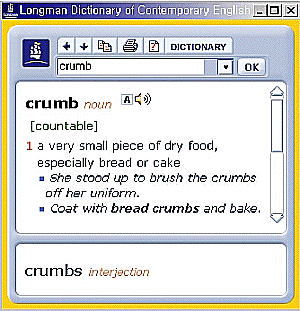
Figure 1: Pop-up Mode Screenshot
Dictionary
The dictionary interface (see Figure 2 below) includes a search bar, an area for viewing entries, and windows for the Phrase Bank, Examples Bank, and the Activate Your Language tool.
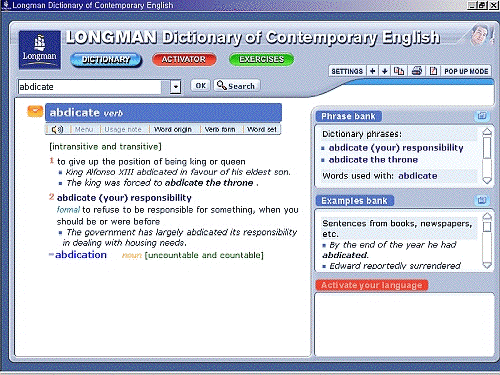
Figure 2: Dictionary Interface Screenshot
[-3-]
In the entry display (left side of screen), the word is presented along with links to pronunciation, usage notes, word origin, verb form, and word set, but not all links are active for all entries. Other entries that include the search word are listed beneath the original entry. When a user clicks on one of these entries, the entry expands and the previously opened entry collapses to list form. All entries remain in their original order, making it simple to jump from entry to entry without losing track of any important definitions in the process. One of the convenient features of the CD-ROM dictionary is that you can double click any word anywhere in the display Р even words which do not have an explicit link Р and the word will be searched for with the results displayed in the pop-up window.
The Phrase Bank includes phrases that use the search word, as well as words that are commonly used with the search word. For example, when a search for the word “junk” is performed, the following hyperlinked entries appear in the Phrase Bank window.

Figure 3: Phrase Bank (not a screenshot)
The Examples Bank presents samples of the word’s usage from “Extra dictionary examples” and “Sentences from books, newspapers, etc.” Clearly, the example sentences are a boon to serious (or confused) students.
The Activate Your Language section, which does not have entries for all words, allows you to continue your search in the Activator.
Activator
Perhaps the most useful portion of the CD-ROM is the Activator (see Figure 4 below). This cross-referenced combination of thesaurus and dictionary, enhanced by samples of usage, is a true time-saver for students who continually search through bound volumes for alternative expressions. Searches result in links to related words and related expressions, organized under a general concept word. For example, a search for “query” returns the concept of “ask.” “Query” is included in the concept “something that you ask someone,” the seventh item listed under the main category “to ask questions.” The entry for the seventh item automatically appears on the right side of the screen, with the entry of the word “query” expanded. [-4-]

Figure 4: The Activator Screenshot
One possible drawback to the Activator is that it assumes students will be able to draw conclusions about the nuances of words implicitly. Given that so much work has gone into preparing lists of conceptually related words, it might be a logical next step for the publisher to include some way to compare the nuances of words in relation to the other words listed under the same concept.
Exercises
There are five types of exercises: grammar, vocabulary, culture, dictation, and exam practice. Each of these has a menu of subtopics, normally with one exercise per topic and ten questions per exercise (see Figure 5 below). Among the notable inclusions are phrasal verb activities, which have been grouped according to the verb used (come, do, get, put, etc.), and idiom activities. These types of activities are always in high demand. However, some of the topics, including articles (two activities, for a total of 20 questions) and modals (one activity, ten questions) seem to receive inadequate attention. Also, the single exercise for punctuation is not a test of using the punctuation, but of whether the student knows the name of the punctuation. For example, one of the ten questions reads: “A short written or printed line that joins words or syllables.” After this, the student is presented with box in which to type the answer. It seems somewhat ironic that no punctuation (except a few series commas) appears in the list at all—not even end punctuation. More troubling is the format of this particular quiz, which has the boxes and words jumbled together with no apparent line breaks or sense of space. [-5-]
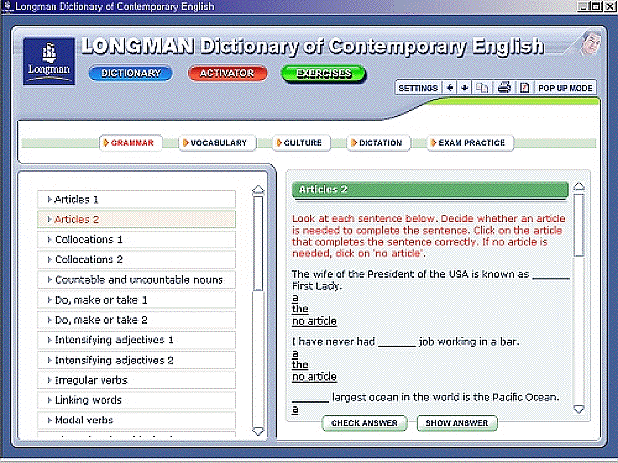
Figure 5: Exercises Screenshot
Overall, although there is some value in these exercises, they are by no means state of the art, and free alternatives can be found on various websites, many of which are more advanced than this commercial product.
Conclusion
Though I have criticized the LDOCE for certain shortcomings, I must admit that these observations are based on an ideal dictionary, not a comparison to currently available competing tomes. The format of the print version of the LDOCE is fabulous, as are the clarifying features, such as the “Word Choice” feature. However, the CD-ROM portion of this package is not especially impressive. There are no cutting edge aspects to its interface or its content, and overall it is reminiscent of a low-tech website. This CD-ROM seems to have been put together to sell the dictionary, but not to supplement it substantially: It is sparse on content and as static as one can imagine an “interactive” tool being.
Eric Prochaska
International Graduate School of English
<eric@igse.ac.kr>
|
© Copyright rests with authors. Please cite TESL-EJ appropriately. Editor’s Note: Dashed numbers in square brackets indicate the end of each page for purposes of citation.. |
[-6-]